OSD TIMEOUT

Determines the On Screen Display timeout. When the On Screen Display appears it will remain displayed for the time set in this parameter starting from the time the last key was pressed. The

adjustment is made using the ◀ (decrease) and ▶(increase) keys within a 5-60 second timeframe.

OSD POSITION

Serves to position the On Screen Display within the screen area. The OSD can be positioned using the arrow keys for fine adjust- ments or keys 1...9 on the remote control to select one of 9 preset positions.

MEMORIES

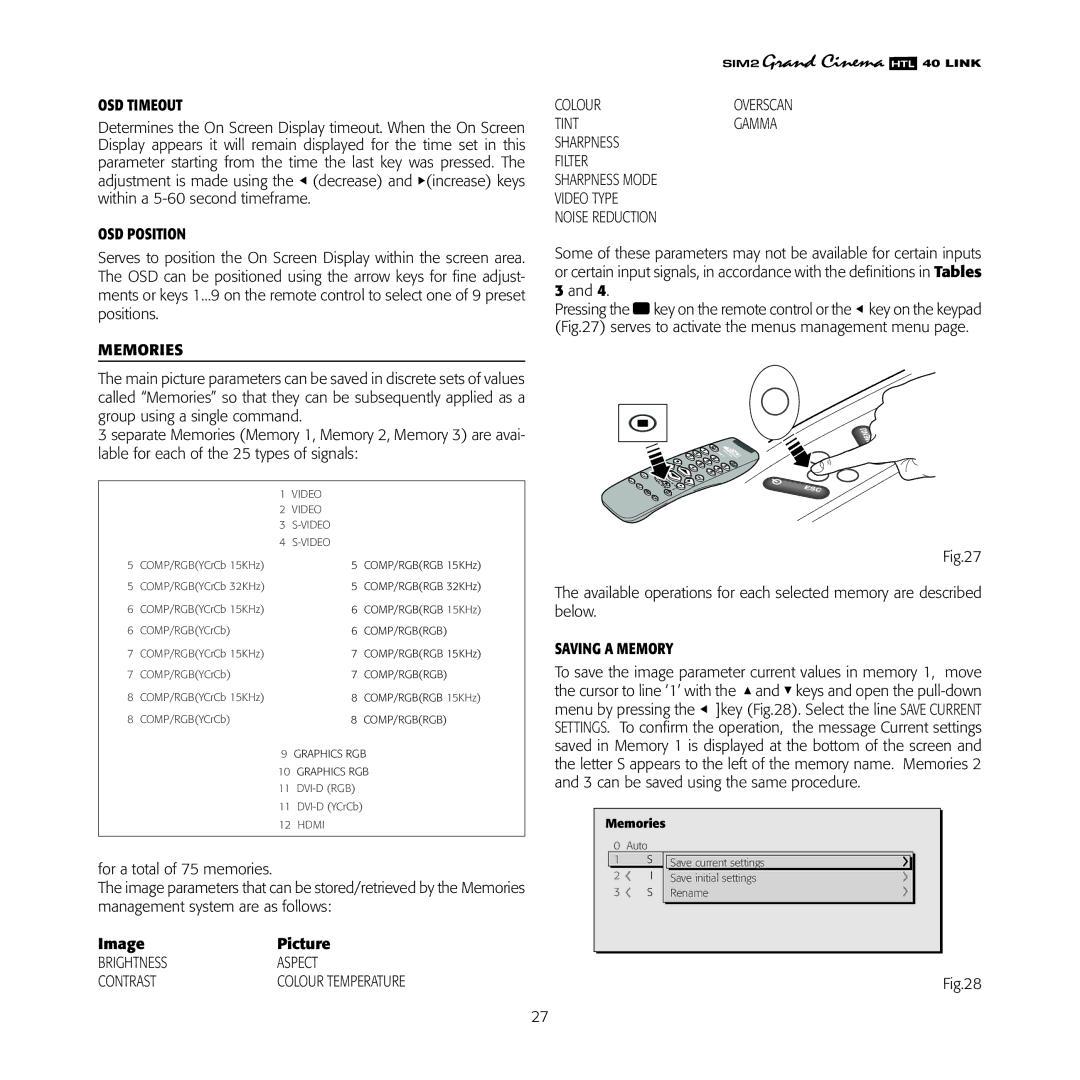
The main picture parameters can be saved in discrete sets of values called “Memories” so that they can be subsequently applied as a group using a single command.

3 separate Memories (Memory 1, Memory 2, Memory 3) are avai- lable for each of the 25 types of signals:

����������

����������

������������ ��

������������

������������������������������������������������

������������������������������������������������

������������������������������������������������

������������������������������������

������������������������������������������������

�����������������������������������

������������������������������������������������

������������������������������������

����������������

�����������������

�������������������

������������������ � ���

��������

for a total of 75 memories.

The image parameters that can be stored/retrieved by the Memories management system are as follows:

Image

Picture

BRIGHTNESS

ASPECT

CONTRAST

COLOUR TEMPERATURE

�������

COLOUR

OVERSCAN

TINT

GAMMA

SHARPNESS


FILTER


SHARPNESS MODE


VIDEO TYPE


NOISE REDUCTION


Some of these parameters may not be available for certain inputs or certain input signals, in accordance with the definitions in Tables 3 and 4.

Pressing the key on the remote control or the ◀ key on the keypad (Fig.27) serves to activate the menus management menu page.

LIG RCI

AUTO

HT 2005


??

?

Fig.27

The available operations for each selected memory are described below.

SAVING A MEMORY

To save the image parameter current values in memory 1, move the cursor to line ‘1’ with the ▲ and ▼ keys and open the pull-down menu by pressing the ◀ ]key (Fig.28). Select the line SAVE CURRENT SETTINGS. To confirm the operation, the message Current settings saved in Memory 1 is displayed at the bottom of the screen and the letter S appears to the left of the memory name. Memories 2 and 3 can be saved using the same procedure.

��������

���������

������������ ����������������������

������������� ����������������������

��������������������

Fig.28

27

Page 27
Image 27
Sim2 Multimedia HTL40 installation manual OSD Timeout, OSD Position, Memories, Image Picture, Saving a Memory

HTL40 specifications

The Sim2 Multimedia HTL40 is a remarkable projective display system that stands out in the realm of high-definition projection technology. As a part of Sim2's esteemed range of home theater projectors, the HTL40 is designed for cinema enthusiasts seeking a powerful and immersive viewing experience.

One of the primary features of the HTL40 is its advanced imaging technology, which employs a high-performance DLP (Digital Light Processing) engine. This engine leverages the capabilities of micro-mirrors to create stunning images with exceptional clarity, contrast, and vibrant colors. The projector boasts a native resolution of 1920x1080, delivering full HD viewing that ensures every detail is captured beautifully.

The HTL40 also incorporates Sim2's patented CHR (Color Harmony Resolution) technology. This innovation facilitates a wider color gamut and improved color accuracy, allowing users to experience images that are remarkably lifelike. The projector excels in reproducing subtle shades and vivid hues, ensuring that films and videos look their best in any lighting condition.

Another significant characteristic of the HTL40 is its impressive brightness level, reaching up to 2000 ANSI lumens. This level of brightness makes the projector suitable for various environments, including rooms with ambient light, where traditional projectors might struggle. Coupled with a high contrast ratio, the HTL40 enhances dark scenes without sacrificing detail, creating an immersive cinematic experience.

For connectivity, the HTL40 is equipped with multiple input options, including HDMI, ensuring compatibility with a range of devices, from Blu-ray players to streaming gadgets. With built-in support for 3D content, the projector is an excellent choice for those who enjoy cutting-edge entertainment technologies.

Additionally, the HTL40 is designed with user convenience in mind. It features an intuitive interface with easy-to-navigate settings, allowing users to quickly adjust picture and audio parameters. The compact and stylish design of the projector ensures it blends seamlessly into any home theater setup, while its reliable performance enhances overall viewing enjoyment.

In conclusion, the Sim2 Multimedia HTL40 combines advanced projection technologies with user-friendly design, making it a top choice for home theater aficionados. Its high-definition capabilities, superior color accuracy, and robust connectivity options position it as a leading projector in today’s competitive market, promising an unforgettable entertainment experience.