Configuration of SIP video endpoints on Communication Manager 6.0
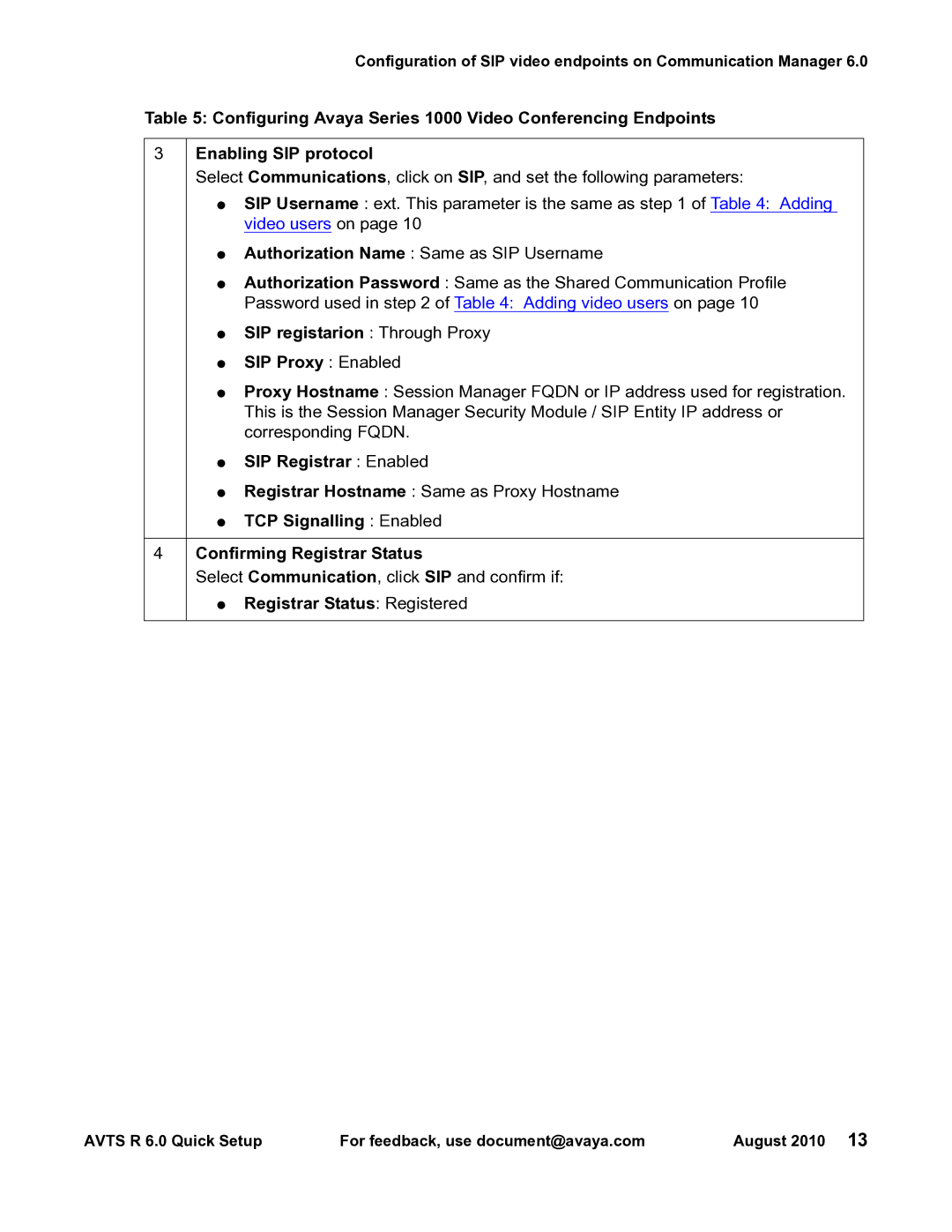
Table 5: Configuring Avaya Series 1000 Video Conferencing Endpoints
3Enabling SIP protocol
Select Communications, click on SIP, and set the following parameters:
●SIP Username : ext. This parameter is the same as step 1 of Table 4: Adding video users on page 10
●Authorization Name : Same as SIP Username
●Authorization Password : Same as the Shared Communication Profile
Password used in step 2 of Table 4: Adding video users on page 10
●SIP registarion : Through Proxy
●SIP Proxy : Enabled
●Proxy Hostname : Session Manager FQDN or IP address used for registration. This is the Session Manager Security Module / SIP Entity IP address or corresponding FQDN.
●SIP Registrar : Enabled
●Registrar Hostname : Same as Proxy Hostname
●TCP Signalling : Enabled
4Confirming Registrar Status
Select Communication, click SIP and confirm if:
●Registrar Status: Registered
AVTS R 6.0 Quick Setup | For feedback, use document@avaya.com | August 2010 13 |