Camera User Guide
Checking the Package Contents
Warranty Limitations
Camera Body Temperature
Read This First
Test Shots
What Do You Want to Do? 4Shoot
Take good people shots
Shoot various other scenes
1View
EShoot/View Movies
2Print
3Other
Table of Contents
105
Conventions Used in this Guide
Conventions Used in this Guide
Safety Precautions
Battery and Battery Charger
Use only recommended power sources
Camera
Use only the specified battery charger to charge the battery
Other Warnings
Safety Precautions
Do not place the battery near pets
Do not sit down with the camera in your pocket
Page
Getting Started
Using the Touch Panel
Touch
Double Tap
Drag
Charging the Battery
Remove the cover Insert the battery
Charge the battery
Remove the battery
Battery Charge Indicator
Using the battery and charger effectively
Approximate Number of Shots That Can Be Taken
Inserting the Battery and Memory Card
Compatible Memory Cards Sold Separately
Check the card’s write-protect tab
About Eye-Fi Cards
Open the cover
Insert the memory card
Close the cover
What if Memory card locked appears on the screen?
Removing the Battery and Memory Card
Remove the memory card
Approximate Number of Shots per Memory Card
Can you check the number of shots that can be taken?
Setting the Date and Time
Complete the setting
Turn on the camera
Set the date and time
Setting the Display Language
Enter Playback mode
Display the settings screen
Set the display language
Formatting Memory Cards
Display the menu
Choose Format
Format the memory card
Pressing the Shutter Button
Press halfway lightly to focus
Press fully all the way to shoot
Does the length of the shutter sound change?
Choose a mode
Taking Pictures Smart Auto
Compose the shot
Choose a subject to focus on
Focus
Shoot
Scene Icons
What if the h icon blinks when you try to shoot?
What if
What if a flashing appears?
Viewing Images
Choose an image
You can view the images you have taken on the screen
Press the 1 button Last image you took will appear
Switching to Shooting mode
Tilt the camera to switch images
Active Display
Viewing Images
Erasing Images
Choose an image to erase
Erase the image
Drag horizontally across the screen to Choose an image
Enter E mode
Set the mode switch to E
Shooting Movies
Twice
Stop shooting
Magnifying the subject while shooting
Estimated Shooting Times
Viewing Movies
Choose a movie
Play the movie
What if you cant play back movies on a computer?
Transferring Images to a Computer for Viewing
System Requirements
Windows
Macintosh
Install the Software
Begin installation
Preparations
Windows Place the CD in the computer’s CD-ROM drive
Connect the camera to the computer
Open CameraWindow
Press the 1 button to turn on the camera
Transfer and View Images
Accessories
Supplied with Camera
Canon-Brand PictBridge Compliant Printers
Separately Sold Accessories
Power Supplies
Using Accessories Abroad
Other Accessories
Separately Sold Accessories
Use of genuine Canon accessories is recommended
Printers
Learning More
Mode Switch
Use the mode switch to change the Shooting mode
Components Guide
Switching the Display
Screen Display
Shooting
Playback
Indicator
Screen Display in Dark Shooting Conditions
Overexposure Warning during Playback
Histogram during Playback
FUNC. Menu Basic Operations
Display the FUNC. menu
Choose a menu
Choose an option to set
Menu Basic Operations
Choose a tab
Touch a menu item to choose it
Choose an option
Touch Ú Normal screen will reappear
Menu Basic Operations
Changing the Sound Settings
Adjusting the Volume
Muting Sounds
Changing the Screen Brightness
Choose LCD Brightness
Change the brightness
You can change the screen brightness
Returning the Camera to Default Settings
Choose Reset All
Reset the settings
Are there functions that cannot be reset?
Low Level Memory Card Formatting
Display the Format screen
Perform the low level format
About low level formatting
Power Saving Function Auto Power Down
Power Saving during Shooting
Power Saving during Playback
Shooting in Special Conditions and Commonly Used Functions
Set the mode switch to 4 p Choose the desired shooting mode
Produces a soft effect when photographing people
Shooting in Various Conditions
Shoot ITake portraits Portrait
FTake snapshots at night Night Snapshot
VTake shots of kids and pets Kids&Pets
’Take indoor shots Indoor
Take shots in low light conditions Low Light
OTake shots of foliage Foliage
PTake shots of people in snow Snow
TTake shots of fireworks Fireworks
Modes for other scenes
Adding Effects and Shooting
Shoot with the effects of a fish-eye lens Fish-eye Effect
Choose
Choose an effect
Set the frame position and size
To change the frame position, touch the screen
Adding Effects and Shooting
Special Effects for Night Backgrounds Creative Light Effect
Choose a shape and size
Shooting tips
Detecting a Smile and Shooting
What if a smile is not detected?
Changing the number of shots
Touch to resume smile detection
Using the Wink Self-Timer
Compose the shot and press the shutter button halfway
Press the shutter button fully
Face the camera and wink
Using the Face Self-Timer
Lamp will blink and the self-timer sound will play
Using the Face Self-Timer
Join the subjects and look at the camera
Turning the Flash Off
Touch Choose
What if a flashing appears?
You can shoot with the flash turned off
Zooming in Closely on Subjects Digital Zoom
Move the zoom lever toward
Move it toward i again
What if the zoom factor appears in blue?
Accept the setting
Digital Tele-Converter
Choose Digital Zoom
Touch qr to choose a zoom factor
To restore to the original setting, choose Off in Step
Inserting the Date and Time
Choose Date Stamp
Using the Self-Timer
To restore the original setting, choose in Step
Touch Choose Ò
Choosing Settings Yourself
Set the mode switch to 4 p Choose G
Adjust the settings according to your purposes pp Shoot
Shooting in Program AE
Choose G in on p
Enter Exposure Compensation mode
Adjust the brightness
Turning the Flash On
Choose h
Changing the Focus Range Macro/Infinity
Choose a Focus Range
Shooting Range Description
Changing the Recording Pixel Setting Image Size
Choose the recording pixel setting
Choose the compression ratio setting
Changing the Compression Ratio Image Quality
Approximate Values for Paper Size
Changing the Compression Ratio Image Quality
Recording Pixels
Number of Recordable Images
Changing the ISO Speed
Choose the ISO speed
Changing the ISO speed
Adjusting the White Balance
Choose the white balance function
Adjusting the White Balance
Custom White Balance
Choose a Drive mode
Continuous Shooting
Changing the Tone of an Image My Colors
Choose My Colors
Shooting Using the Two Second Self- Timer
Touch Ú to make the setting
Shooting Using the Two Second Self-Timer
Custom Color
Customizing the Self-Timer
Choose the settings
Touch and $, then immediately touch Settings
Choose $
Changing the Composition with the Focus Lock
Recompose
Getting More Out of Your Camera
Changing the AF Frame Mode
Face AiAF
Choose AF Frame
Magnifying the Focal Point
Fixed frame
Choose AF-Point Zoom
Check the focus
To cancel, touch Ú
Choosing the Subject to Focus On Touch AF
Choose the subject, face or location to focus on
Choosing the Subject to Focus On Touch AF
Border appeared around the screen when it was touched
Shooting with the AF Lock
Lock the focus
Compose the scene and shoot
Shooting with Servo AF
Choose Servo AF
Changing the Metering Mode
Choose the Metering mode
Shooting with the AE Lock
Shooting with the FE Lock
Lock the exposure
Choose h p Lock the flash exposure
Correcting the Brightness and Shooting i-Contrast
Choose i-Contrast
Choose Flash Settings
Adjust the setting
Red-Eye Correction
Checking for Shut Eyes
Shooting with Slow Synchro
Choose …
Touch , then touch …
Shooting Long Exposures
Choose ≈
Choose the shutter speed
Confirm the exposure
Changing the Color and Shooting
Color Accent
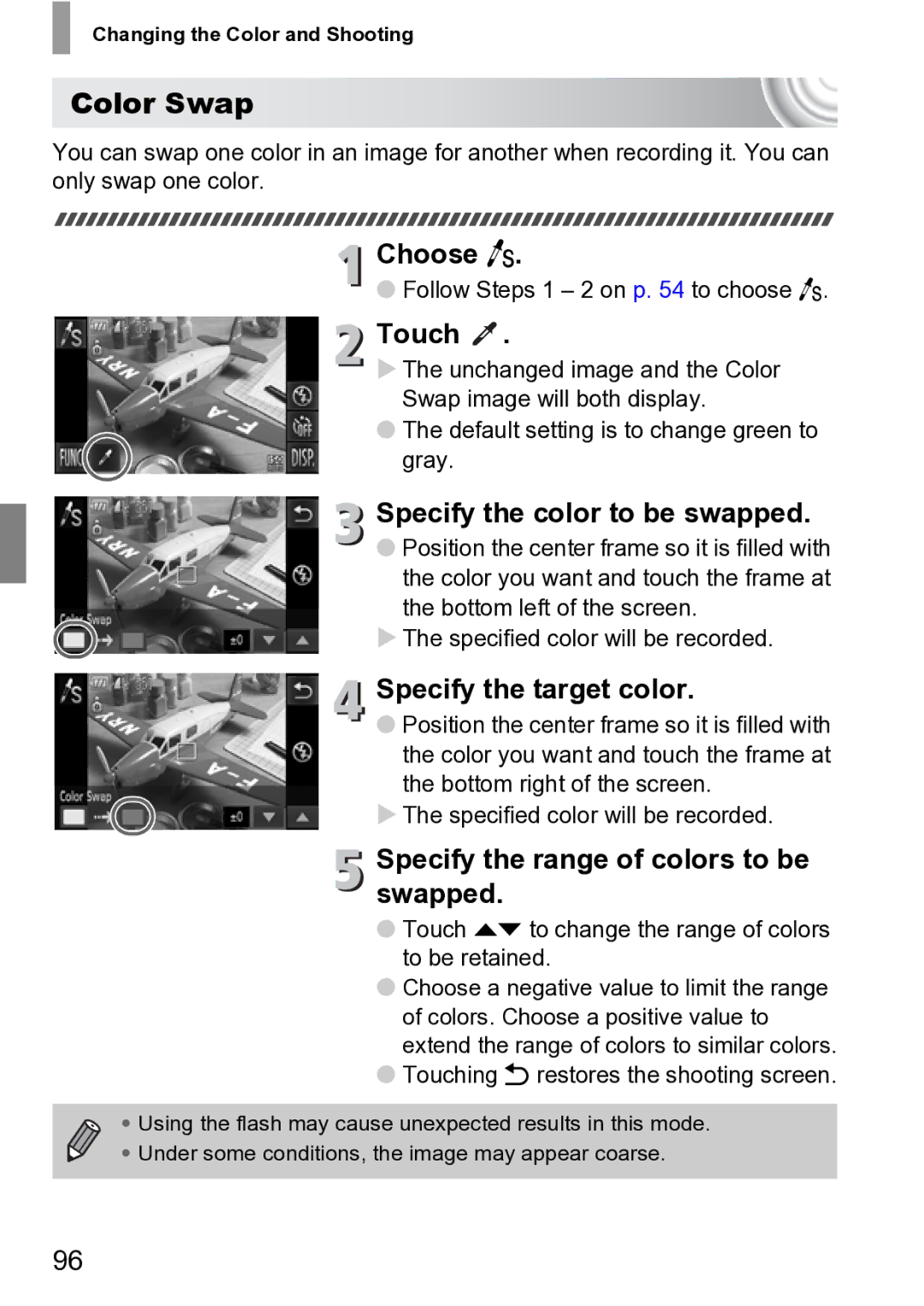
Color Swap
Choose Y
Specify the color to be swapped
Specify the target color
Using Various Functions for Shooting Movies
Changing the Movie Mode
Set the mode switch to E Choose a Movie mode
Choose the image quality setting
Changing the Image Quality
Image Quality Recording Pixels/Frame Rate Content
Image Quality Table
Estimated Shooting Time
Changing the Image Quality
AE Lock/Exposure Shift
Change the exposure
100
Other Shooting Functions
101
Zooming in Closely on Subjects Digital Zoom p
Playback Functions
102
Summary of Movie Control Panel in Viewing Movies p
Editing
Set the editing range
Touch or
Choose a portion to delete
To reset the editing range, touch Ú
Save the edited movie
104
Touch New File
Using Various Playback Editing Functions
105
Searching Images Using Index Display
Switch the displayed images
Quickly Searching Images
Display images in an index
Searching Images by Scrolling
107
Quickly Searching Images
Viewing Images in Filtered Playback
Choose ‚
Choose a filter
View the filtered images
Viewing Slideshows
Start the slideshow
109
Filtered Playback
Changing Settings
Make the setting
Choose Slideshow
110
Touch l to switch the focus check display p
Switch frames
Checking the Focus
Change the magnification level or location
Magnifying Images
Changing Image Transitions
Magnify an image
Choose Transition
Easy Operations with Touch Actions
Use a Function Registered to
Changing Touch Actions Registered Functions
Choose Set Touch Actions
Viewing Images on a TV
Turn off the camera and TV. Connect the camera to the TV
114
Functions that Can be Registered
115
What if the images don’t properly display on the TV?
Viewing Images on a High-Definition TV
Turn off the camera and TV Connect the camera to the TV
116
Displaying Various Images Smart Shuffle
117
Camera will choose four images based on the displayed image
Touch Ú to return to single image view
Using the Menu
Protecting Images
Choose Protect
Choose a selection method
Choosing Images Individually
Choose All Images
Erasing All Images
Choose Erase
Erase
120
121
Follow on p , touch All Images
Erasing All Images
Organizing Images by Category My Category
122
Tagging Images as Favorites
Tag an image as a favorite
123
Easily display images tagged as favorites
Using the FUNC. Menu
Choose Favorites
124
Image will be tagged as Favorite,
Rotating Images
Choose \
Rotate the image
125
Resizing Images
Choose Resize
Choose an image size
Save the new image
Adjust the trimming area
Trimming
Choose Trimming
Save as a new image and display
Adding Effects with the My Colors Function
Choose a menu option
128
Touch ø, then n to choose the 1 tab, and touch My Colors
Correcting the Brightness i-Contrast
Choose a menu item
129
Touch ø, then n to choose the 1 tab, and touch i-Contrast
Correcting the Red-Eye Effect
Choose Red-Eye Correction
Choose and Correct the image
130
Printing
131
Printing Images
Turn on the printer Turn on the camera
Choose an image to print
Print images
Printing from the Print List Dpof
Easily Add Images to the Print List
Choose c videos will be excluded
Print list
Print Settings
Choosing Images for Printing Dpof
Print Added Images
Choosing the Number of Copies
Choose Select Images & Qty
135
Set All Images to Print Once
Clearing All Selections
Customizing Camera Settings
137
Changing Camera Settings
Changing Sounds
Turning off Hints & Tips
138
Changing Camera Settings
Changing the Start-up Screen
Registering Recorded Images as the Start-up Screen
139
Changing the Screen Color
Changing the File Number Assignment
140
Choose Color Option, then touch qr to choose an option
Turning off the Power Saving Function
Creating Folders by Shooting Date
Changing the Lens Retract Time
141
Setting the Screen Shut-Off Time
Using the World Clock
Set the home time zone
142
Changing the Date and Time
Set the world time zone
Choose the world time zone
143
Calibrating the Touch Panel
144
Changing Shooting Function Settings
Turning off the AF Assist Beam
Turning Off the Red-Eye Reduction Function
145
Changing Shooting Function Settings
Changing the Image Display Right After Shooting
Changing the Way the Image Displays Right After Shooting
146
Changing the IS-Mode Settings
Displaying the Overlay
147
Choose is Mode, then touch qr to choose an option
Preset Layouts
Changing Icon Order Icon Layout
Change the order
Exit
Changing Playback Function Settings
Turning Off Active Display
Choosing the Image that First Displays in Playback
149
150
Useful Information
151
Using Household Power
Connect the power cord
Turn off the camera
Insert the coupler
Using an Eye-Fi Card
153
Choose Eye-Fi trans., then Disable
Checking Connection Information
Disabling Eye-Fi Transfer
Choose Connection info
Troubleshooting
Power
TV output
Shooting
156
Shooting movies
157
Playback
Screen
Computer
Eye-Fi Card
List of Messages That Appear on the Screen
159
160
Handling Precautions
161
Information Displayed on the Screen
Shooting Information Display
162
Playback Detailed Information Display
163
Information Displayed on the Screen
Functions Available in Each Shooting Mode
164
Functions Available in Each Shooting Mode
165
Menus
Shooting Menu
166
167
Menus
Set up Menu
168
Options/Summary Ref.
Playback Menu
Print Menu
169
Specifications
170
Specifications
171
Specifications Battery Pack NB-6L
Battery Charger CB-2LY/CB-2LYE
172
Index
173
174
Index
175
107
Disclaimer

 .
.