Back to Contents Page
Keyboard
Dell™ Vostro™ 1510
Service Manual
Removing the Keyboard
Replacing the Keyboard
Removing the Keyboard
CAUTION: Before you begin any of the procedures in this section, follow the safety instructions that shipped with your computer.
1.Follow the procedures in Before Working on Your Computer.
2.Remove the hinge cover (see Removing the Hinge Cover).
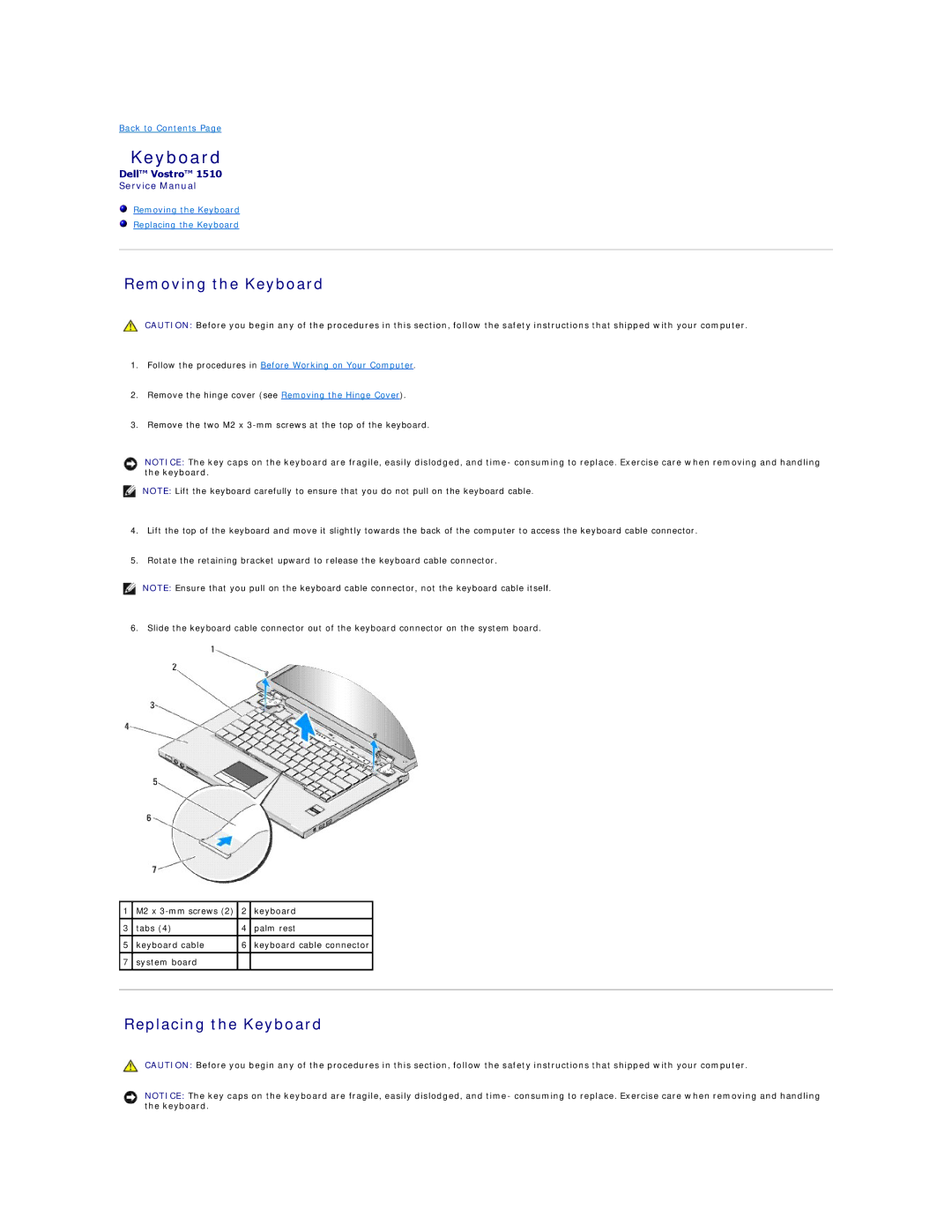
3.Remove the two M2 x
NOTICE: The key caps on the keyboard are fragile, easily dislodged, and time- consuming to replace. Exercise care when removing and handling the keyboard.
NOTE: Lift the keyboard carefully to ensure that you do not pull on the keyboard cable.
4.Lift the top of the keyboard and move it slightly towards the back of the computer to access the keyboard cable connector.
5.Rotate the retaining bracket upward to release the keyboard cable connector.
NOTE: Ensure that you pull on the keyboard cable connector, not the keyboard cable itself.
6. Slide the keyboard cable connector out of the keyboard connector on the system board.
1 | M2 x | 2 | keyboard |
|
|
|
|
|
|
3 | tabs (4) | 4 | palm rest |
|
|
|
|
|
|
5 | keyboard cable | 6 | keyboard cable connector |
|
|
|
|
|
|
7 | system board |
|
|
|
|
|
|
|
|
|
|
|
|
|
Replacing the Keyboard
CAUTION: Before you begin any of the procedures in this section, follow the safety instructions that shipped with your computer.
NOTICE: The key caps on the keyboard are fragile, easily dislodged, and time- consuming to replace. Exercise care when removing and handling the keyboard.