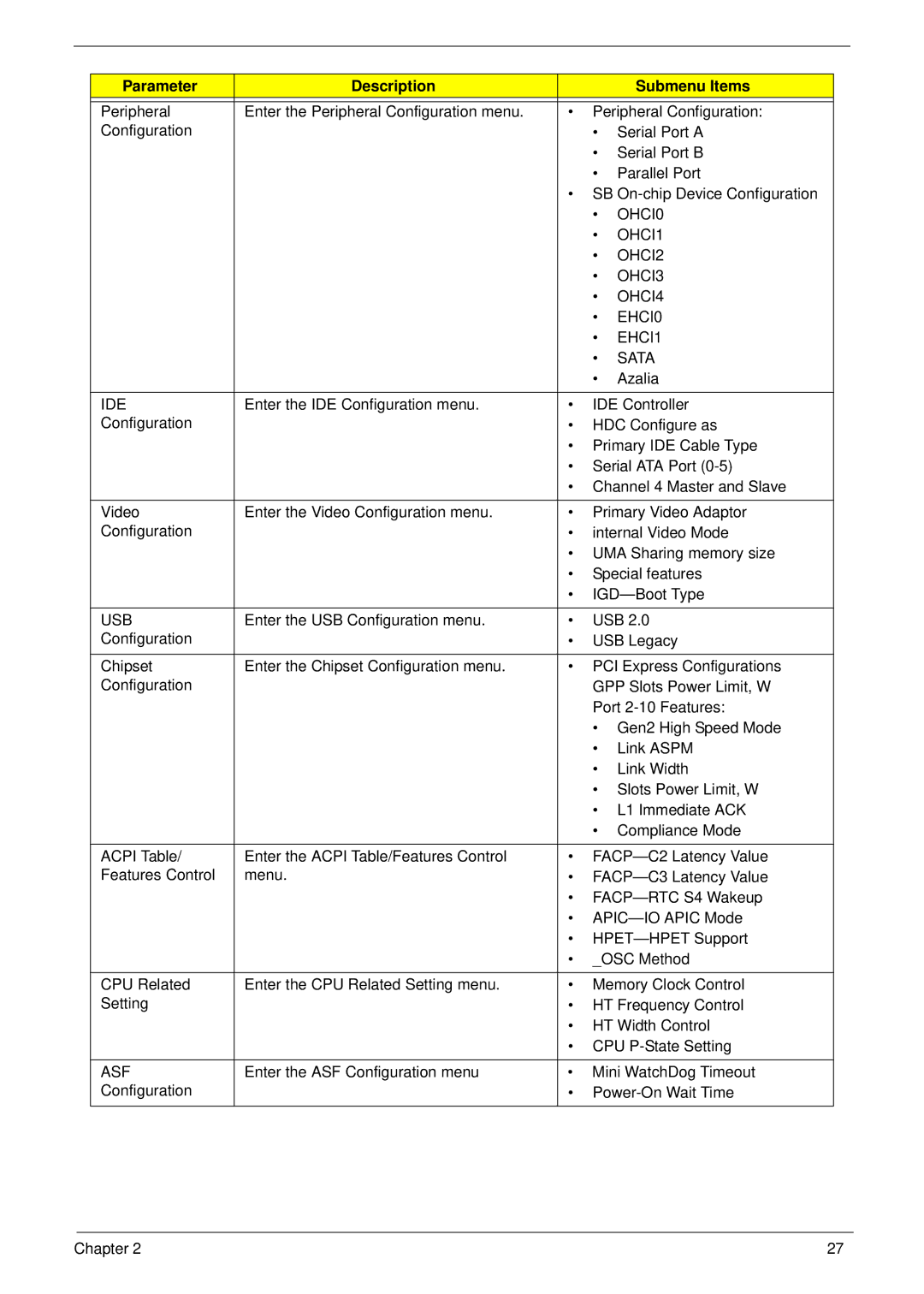
Parameter | Description |
|
| Submenu Items |
|
|
|
| |
Peripheral | Enter the Peripheral Configuration menu. | • | Peripheral Configuration: | |
Configuration |
|
| • | Serial Port A |
|
|
| • | Serial Port B |
|
|
| • | Parallel Port |
|
| • SB | ||
|
|
| • | OHCI0 |
|
|
| • | OHCI1 |
|
|
| • | OHCI2 |
|
|
| • | OHCI3 |
|
|
| • | OHCI4 |
|
|
| • | EHCI0 |
|
|
| • | EHCI1 |
|
|
| • | SATA |
|
|
| • | Azalia |
|
|
|
| |
IDE | Enter the IDE Configuration menu. | • | IDE Controller | |
Configuration |
| • | HDC Configure as | |
|
| • Primary IDE Cable Type | ||
|
| • Serial ATA Port | ||
|
| • Channel 4 Master and Slave | ||
|
|
|
| |
Video | Enter the Video Configuration menu. | • | Primary Video Adaptor | |
Configuration |
| • | internal Video Mode | |
|
| • UMA Sharing memory size | ||
|
| • | Special features | |
|
| • | ||
|
|
|
| |
USB | Enter the USB Configuration menu. | • | USB 2.0 | |
Configuration |
| • | USB Legacy | |
|
|
|
| |
Chipset | Enter the Chipset Configuration menu. | • | PCI Express Configurations | |
Configuration |
|
| GPP Slots Power Limit, W | |
|
|
| Port | |
|
|
| • Gen2 High Speed Mode | |
|
|
| • | Link ASPM |
|
|
| • | Link Width |
|
|
| • Slots Power Limit, W | |
|
|
| • | L1 Immediate ACK |
|
|
| • | Compliance Mode |
|
|
|
| |
ACPI Table/ | Enter the ACPI Table/Features Control | • | ||
Features Control | menu. | • | ||
|
| • | ||
|
| • | ||
|
| • | ||
|
| • | _OSC Method | |
|
|
|
| |
CPU Related | Enter the CPU Related Setting menu. | • | Memory Clock Control | |
Setting |
| • | HT Frequency Control | |
|
| • | HT Width Control | |
|
| • CPU | ||
|
|
|
| |
ASF | Enter the ASF Configuration menu | • | Mini WatchDog Timeout | |
Configuration |
| • | ||
|
|
|
|
|
Chapter 2 | 27 |