5.3.2 Using chaining

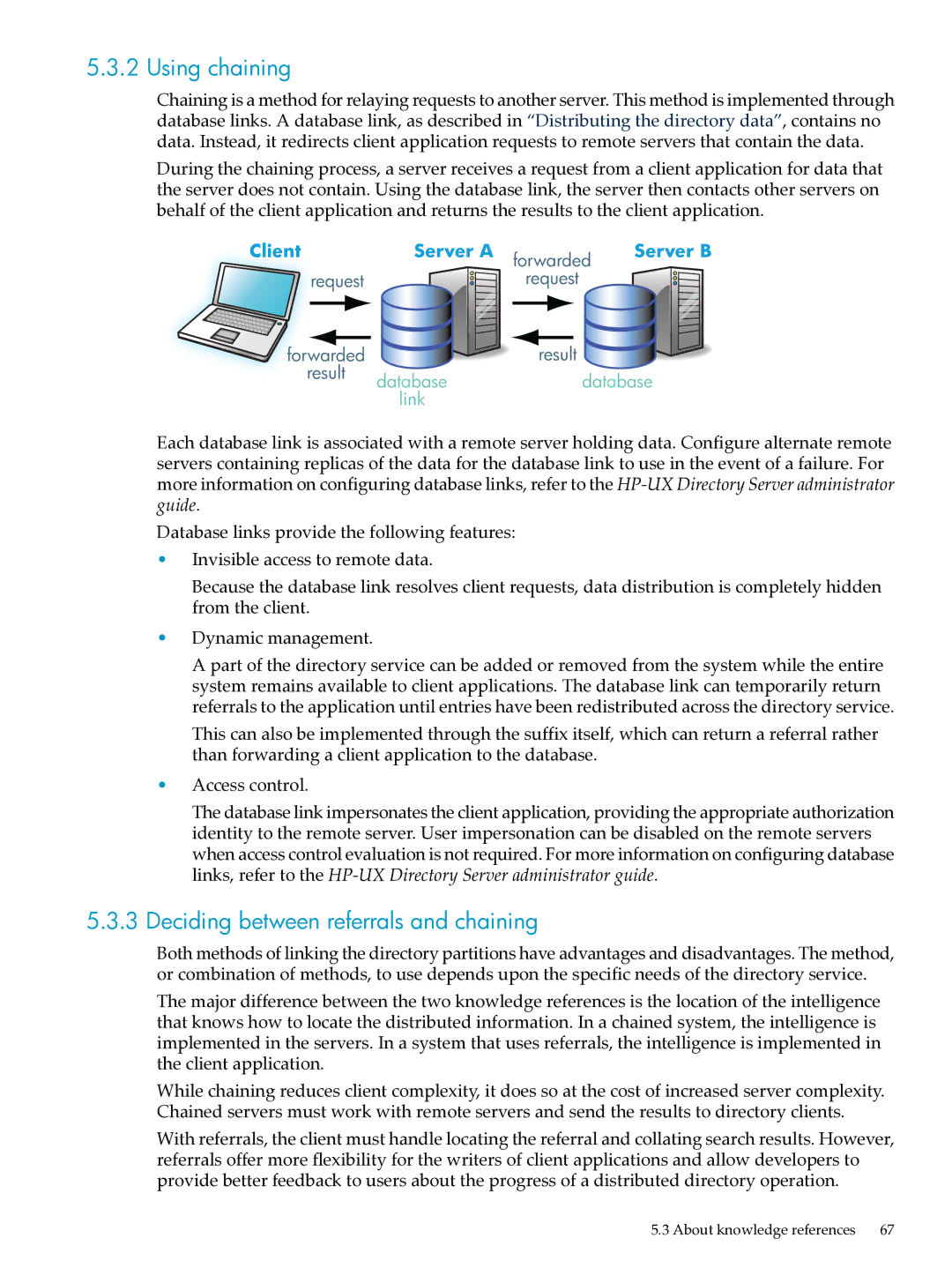
Chaining is a method for relaying requests to another server. This method is implemented through database links. A database link, as described in “Distributing the directory data”, contains no data. Instead, it redirects client application requests to remote servers that contain the data.

During the chaining process, a server receives a request from a client application for data that the server does not contain. Using the database link, the server then contacts other servers on behalf of the client application and returns the results to the client application.

Each database link is associated with a remote server holding data. Configure alternate remote servers containing replicas of the data for the database link to use in the event of a failure. For more information on configuring database links, refer to the HP-UX Directory Server administrator guide.

Database links provide the following features:

•Invisible access to remote data.

Because the database link resolves client requests, data distribution is completely hidden from the client.

•Dynamic management.

A part of the directory service can be added or removed from the system while the entire system remains available to client applications. The database link can temporarily return referrals to the application until entries have been redistributed across the directory service.

This can also be implemented through the suffix itself, which can return a referral rather than forwarding a client application to the database.

•Access control.

The database link impersonates the client application, providing the appropriate authorization identity to the remote server. User impersonation can be disabled on the remote servers when access control evaluation is not required. For more information on configuring database links, refer to the HP-UX Directory Server administrator guide.

5.3.3Deciding between referrals and chaining

Both methods of linking the directory partitions have advantages and disadvantages. The method, or combination of methods, to use depends upon the specific needs of the directory service.

The major difference between the two knowledge references is the location of the intelligence that knows how to locate the distributed information. In a chained system, the intelligence is implemented in the servers. In a system that uses referrals, the intelligence is implemented in the client application.

While chaining reduces client complexity, it does so at the cost of increased server complexity. Chained servers must work with remote servers and send the results to directory clients.

With referrals, the client must handle locating the referral and collating search results. However, referrals offer more flexibility for the writers of client applications and allow developers to provide better feedback to users about the progress of a distributed directory operation.

5.3 About knowledge references 67

Page 67
Image 67
HP UX Direry Server manual Using chaining, Deciding between referrals and chaining

UX Direry Server specifications

HP UX Directory Server is a robust and scalable solution designed for managing directory information within enterprise networks. Developed by Hewlett-Packard (HP), this server offers an extensive set of features tailored to meet the needs of organizations that require an efficient way to store, manage, and retrieve identity and access data.

One of the key features of HP UX Directory Server is its ability to handle large directories with significant volumes of data. Built on a highly optimized architecture, it provides excellent performance and can support millions of entries without sacrificing speed or reliability. This capability makes it an ideal choice for large-scale deployments in enterprises that require high availability and responsiveness.

In addition to its scalability, HP UX Directory Server supports a wide range of protocols, including LDAP (Lightweight Directory Access Protocol), which ensures seamless integration with diverse applications and systems across various platforms. The server maintains standards compliance, which facilitates interoperability and simplifies administration tasks.

Security is a top priority for HP UX Directory Server, offering an array of features to protect sensitive information. It supports secure data transmission via TLS/SSL protocols, ensuring encrypted communication between clients and servers. Advanced access controls allow administrators to define fine-grained permissions, helping to safeguard directory data against unauthorized access.

Another salient feature of HP UX Directory Server is its replication capabilities. The server can replicate directory data across multiple instances, ensuring data consistency and availability in distributed environments. This feature is essential for businesses operating across different geographical locations or requiring failover solutions for disaster recovery.

HP UX Directory Server also comes equipped with tools for data management, including an intuitive administration console for configuring and monitoring the server. Additionally, it offers customizable schema capabilities, enabling organizations to tailor the directory structure to fit their specific needs.

Integration with existing identity management solutions is streamlined through connectors and APIs, allowing organizations to extend their directory services and enhance user experience.

In summary, HP UX Directory Server is a powerful directory management solution that combines scalability, security, and integration flexibility. Its support for industry standards, advanced replication, and comprehensive administrative tools makes it an essential asset for organizations seeking to manage identity and access efficiently. By leveraging this technology, businesses can improve their operational efficiency and ensure a secure and organized approach to directory management.