Intel Express 510T Switch
Forth edition August 681886-004
Contents
Advanced Configuration
Technical Specifications
Page
Switch and operate the switch using Intel Device View
This switch
Printed guide that describes these basic steps
Intel Express 510T Switch
This User Guide gives you instructions on how to use
Electrostatic Sensitive Device
Intel Device View
Dynamic Host Configuration Protocol
Address Resolution Protocol
Random Access Memory
ToS Type of Service
Page
This chapter covers the following topics
Introduction to the product
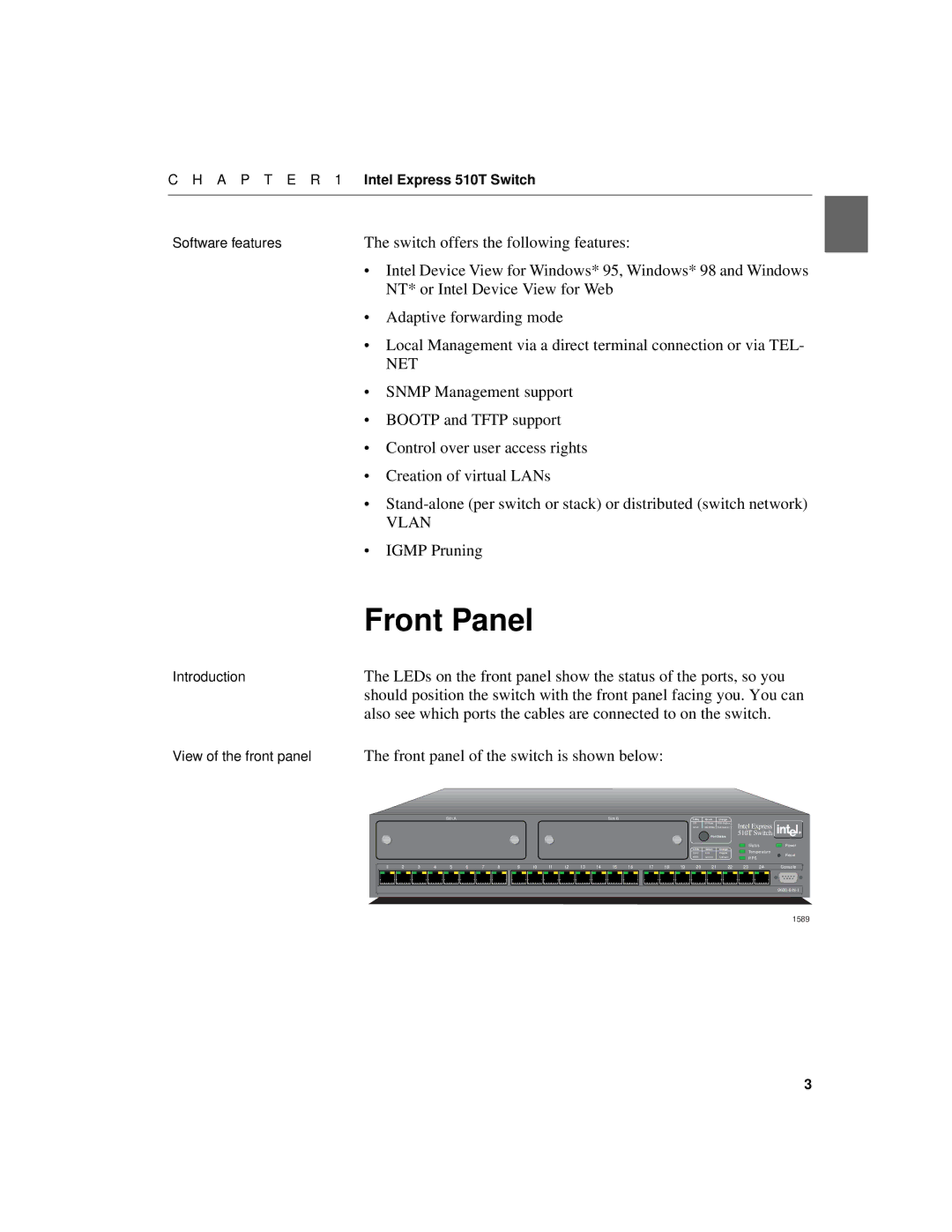
Front Panel
These ports are on the front panel
Inserted to expand the functionality of the switch
LEDs on the front panel have the following functions
Buttons on the front panel have the following functions
Switch’s rear panel has the following parts
Installation
Switch
Rear Panel
Consult your dealer before proceeding with the installation
Before Installation
Positioning and Installing the Switch
Erating temperature for the switch
To mount the switch in a standard equipment rack
Mounting screws are not provided because the required sizes
May vary from rack to rack
Installing a Module
Lems
Connecting Other Devices
100Base-TX network interface card installed
Switch’s RJ-45 ports using UTP cable Category
Install and configure it correctly
Types using an appropriate adapter. For example, use a UTP
Connecting the Power
They are operating correctly
Start-up
LEDs reflect the state of each port
All ports operate in auto-negotiation mode
All ports are enabled
Spanning Tree is disabled on all ports
No access restrictions to Local Management Telnet
LEDs give information about the state of the switch
Show how the switch is operating
Other LEDs on the front panel
5 seconds, where they have the following meaning
Intel Device View
System Requirements
OpenView* or Intel LANDesk Manager
Installation and Removal
Removal of Intel Device View
Using Intel Device View
Monitors their activities
Before a switch is contacted
View, see Setting the Preferences, p
Switched on and off
Help menu has the following commands for the switch
After a Switch or Stack is Contacted
To change the polling parameters
Setting the Preferences
Change the values
Timeout parameters
Change the community
Type the new community name Click OK
Switches
Installing and Managing
Select DeviceManage The Manage dialog box appears
Type in the switch’s IP Address or MAC address
Device View window
This window, even switches that are already configured as a
Ate or expand an existing stack
Select DeviceManage, and the Manage dialog opens
Device Tree
Recognized as a switch
Device Tree displays the separate subnets on your LAN as
Ured devices on the LAN
Right mouse button, the following functions are available
Wizard for new switches
Without a device selected
Device View Main Display
Face side of the switch or stack is displayed
You time
Displays monitoring information
Right click a single switch and Intel Device View offers
Status of the Vlan links
Intel Device View offers
Selected
Right click a single port and Intel Device View offers
Switch and ports are displayed in different colors
Explorer
Get it working properly in case of problems
Diagnostics Window
Right click a message and Intel Device View offers
Trap Window
Traps window displays all traps generated by the switch
Ing to the severity of the trap
System Window
Errors Window
Tings, modules inserted in slots
Right click a message and Intel Device View offers
Setups that affect the switch, or stack, and the ports
Standard Configuration
Switch or Stack
Changing the Setup
System
With a switch or stack in the Device View window
Click System
Click IP
Internet Protocol
Local Time
Authentication
Add a new entry to the list
Only rights and access to communities. You can
Delete an entry
Edit existing entries
Can
Traps
Are sent
Click Traps
Connections to printers and other similar devices. You can
Permanent Entries
Link Aggregation
Tween two switches or stacks. You can
Port Mirroring
To add a mirrored port to a switch
Forwarded or mirrored
Local Management
Changing configurations
Type the new time Click OK
Switching
Check the box to enable this mode
Click the default forwarding mode you want Click OK
Adaptive Forwarding Mode
Spanning Tree
As the root bridge. To change the priority value
From a switch that is, or attempting to become, the root
Type the required value
Ceived and discarded
Port
General Changes
Switch. The MAC address of those devices are removed from
Port Mode
Click the port you want to disable
Able the port
Select Port Setup Click Port Mode Click Speed 10 or Speed
Port Specific Spanning Tree
Default uses the same flow control as specified in Device
Change the flow mechanism on a port
Flow Control, click the flow control you want
Select the Port status box
A P T E R 3 Standard Configuration
Page
VLANs Virtual LANs
Cies is used
Devices can belong to one or more VLANs
MAC address
IP address and IP net
Click the name of the Vlan you want to delete. Note you
To delete a Vlan
Cannot delete a Vlan if it is the Designated Manage
Management you can now delete the first Vlan
Information using VLANs between
For switches in a stack there is an exchange
Switches in the stack these switches are
Their own domain Stdalone
Igmp pruning and IP Multicast addresses
You should
Based on Igmp are discarded
Ets in all other VLANs without IP links
Check Enabled Pruning timeout, type the new value Click OK
Managing the Switch
Information about the Switch
Management using Intel Device View
Name and how long the switch has been running
To update the information, click Refresh
Monitoring the Switch’s Performance
Select Device ActivityTx Packets
Spanning Tree Statistics
Switch contains several Rmon functions. These function pro
Ment on the switch
Lowing information, History, Alarm and Event Log are switch
Right-click a switch and select MonitoringRMON His
AlarmsConfigure. The Alarm Table window opens
Right-click a switch and select MonitoringRMON
Which lists all alarms
Click Add to add an alarm to the list
Monitoring the Stack’s Performance
Right-click the stack border and select IntraStack Traf
Stack, or across the Matrix Module
Monitoring the total packet activity per port
A P T E R 5 Managing the Switch
Specific switch and select Spanning Tree
Monitoring VLANs
That switch
Title bar
To view the VLANs on the switch
To view the Vlan mode and Domain name
Monitoring the Port’s Performance
To view the links between switches in a distributed Vlan
This provides status information about the server
Play Legend for further information on LED states
Select Port DetailsPerformance
Select Port DetailsDistribution
Monitoring the VLANs on To view the VLANs on the port
Switch has various tools to help with management
Tools for the Switch
Local disk or file server
To receive the response
Sonnel
Switch’s Telnet facility has the following main features
A P T E R 5 Managing the Switch
Load new software to the switch
Software Update lets you
Reset the switch if necessary
Access from the Console port
Type in the DNS name
Simply lost control of the switch
IP address is displayed
Tools for the Stack
Each Matrix port has a unique color
To on the Matrix Module
Port Brown Yellow
A P T E R 5 Managing the Switch
Page
Technical Specifications
Switch has the following approvals
Physical Specifications
Switch has the following physical specifications
Switch has the following number of LEDs
Switch has the following environmental specifications
Port Power Status Temperature
Switch has the following number of connections
Performance Specifications
Power Specifications
Power consumption 100W maximum
Memory sizes are as follows
This switch supports the following protocols
Flash Memory MB
Buffer RAM MB
Igmp version RFC Rsvp version
Console Port Use and Troubleshooting
Use of the Console Port
Tains the Vlan policy database
Doing backup of the configurations
An external machine e.g. MS Windows*, Unix* or other, if
Manual Tftp
Using Maintenance Mode
Recovering from Start-up Failure
Maintenance Mode offers three facilities
Ory. From Maintenance Mode the switch is forced to issue a
109
Loads software using the Bootp or Tftp pro
Loads software using the Tftp protocol
Dumps memory contents
Resets the switch
Troubleshooting Procedure
Troubleshooting Tools
Isolating the Problem
Tools available for troubleshooting on the switch are
Mon switch malfunctions
Further Evaluation of the Problem
Performance Problems
Start-up Problems
Communication Problems
Customer Support
Retrieving Information for Customer
Sible, use Tftp procedures
Support
Various files suitable for Tftp transfer
117
Page
Limited Hardware Warranty
Limited Hardware Warranty Europe only
121
Federal Communications Commission FCC Statement
Avertissement
Advertencias
101
Index
113
114
Vii Viii
LED
Vii 102
103
110
Rmon
116 102
116
Vlan
132
Customer Support Technicians
Automated Support