Connecting Up
Home theater video connections
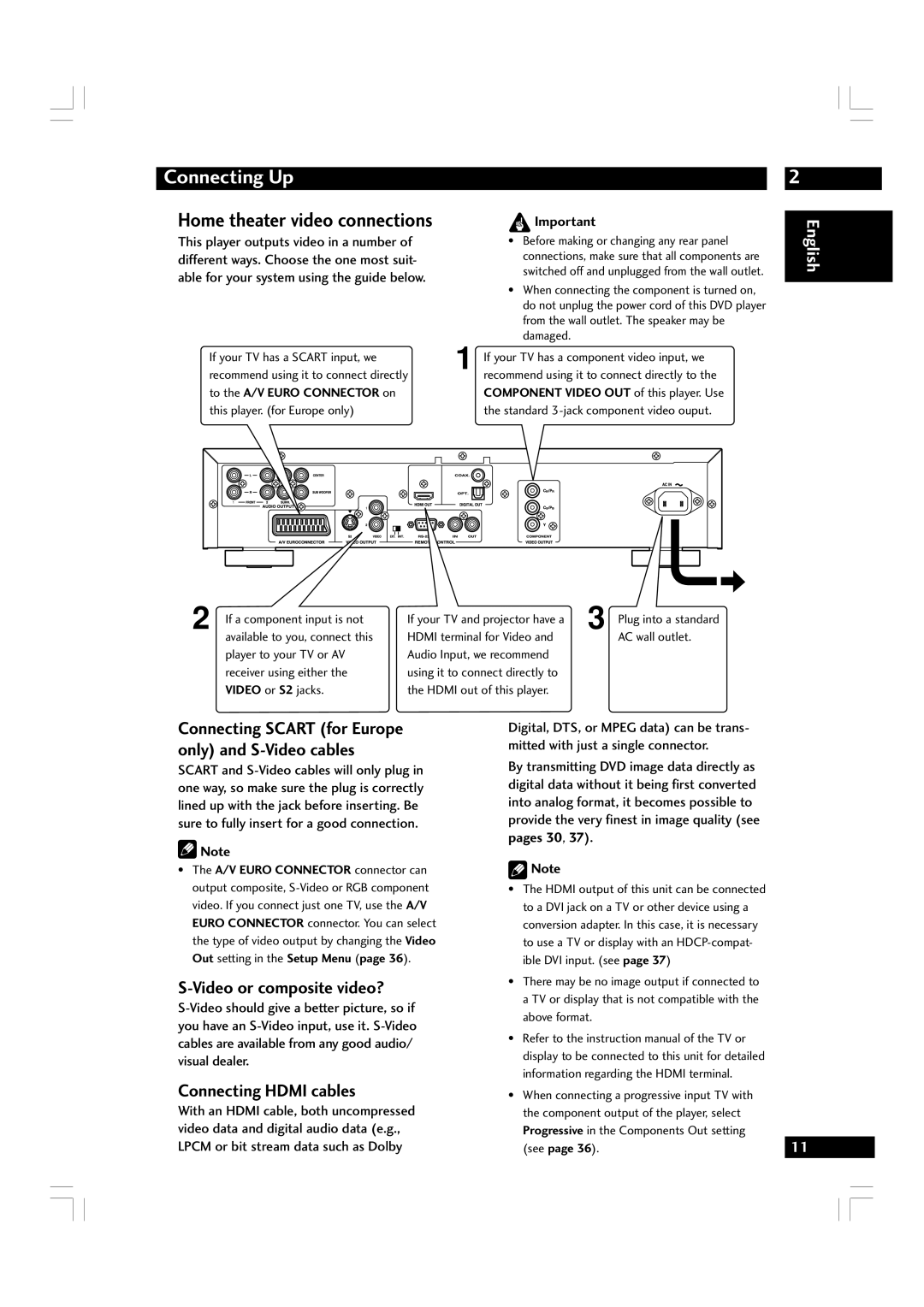
This player outputs video in a number of different ways. Choose the one most suit- able for your system using the guide below.
2
 Important
•Before making or changing any rear panel connections, make sure that all components are switched off and unplugged from the wall outlet.
•When connecting the component is turned on, do not unplug the power cord of this DVD player from the wall outlet. The speaker may be damaged.
English
If your TV has a SCART input, we | 1 If your TV has a component video input, we | |||||||||||
recommend using it to connect directly |
| recommend using it to connect directly to the | ||||||||||
to the A/V EURO CONNECTOR on |
| COMPONENT VIDEO OUT of this player. Use | ||||||||||
this player. (for Europe only) |
| the standard | ||||||||||
|
|
|
|
|
|
|
|
|
|
|
|
|
|
|
|
|
|
|
|
|
|
|
|
|
|
|
|
|
|
|
|
|
|
|
|
|
|
|
|
|
|
|
|
|
|
|
|
|
|
|
|
|
|
|
|
|
|
|
|
|
|
|
|
|
|
|
|
|
|
|
|
|
|
|
|
|
|
|
|
|
|
|
|
|
|
|
|
|
|
|
|
|
|
|
|
|
|
|
|
|
|
|
|
2 If a component input is not available to you, connect this player to your TV or AV receiver using either the VIDEO or S2 jacks.
If your TV and projector have a | 3 Plug into a standard |
HDMI terminal for Video and | AC wall outlet. |
Audio Input, we recommend |
|
using it to connect directly to |
|
the HDMI out of this player. |
|
Connecting SCART (for Europe only) and S-Video cables
SCART and
 Note
•The A/V EURO CONNECTOR connector can output composite,
S-Video or composite video?
Connecting HDMI cables
With an HDMI cable, both uncompressed video data and digital audio data (e.g., LPCM or bit stream data such as Dolby
Digital, DTS, or MPEG data) can be trans- mitted with just a single connector.
By transmitting DVD image data directly as digital data without it being first converted into analog format, it becomes possible to provide the very finest in image quality (see
pages 30, 37).
 Note
•The HDMI output of this unit can be connected to a DVI jack on a TV or other device using a conversion adapter. In this case, it is necessary to use a TV or display with an
•There may be no image output if connected to a TV or display that is not compatible with the above format.
•Refer to the instruction manual of the TV or display to be connected to this unit for detailed information regarding the HDMI terminal.
•When connecting a progressive input TV with the component output of the player, select Progressive in the Components Out setting
(see page 36). | 11 |
|
|
|
|
|
|
|
|
|
|
|
|
|
|
|
|
|
|