DVD DivX 450 PRO 6967510100.book Page 8 Thursday, August 4, 2005 5:06 PM
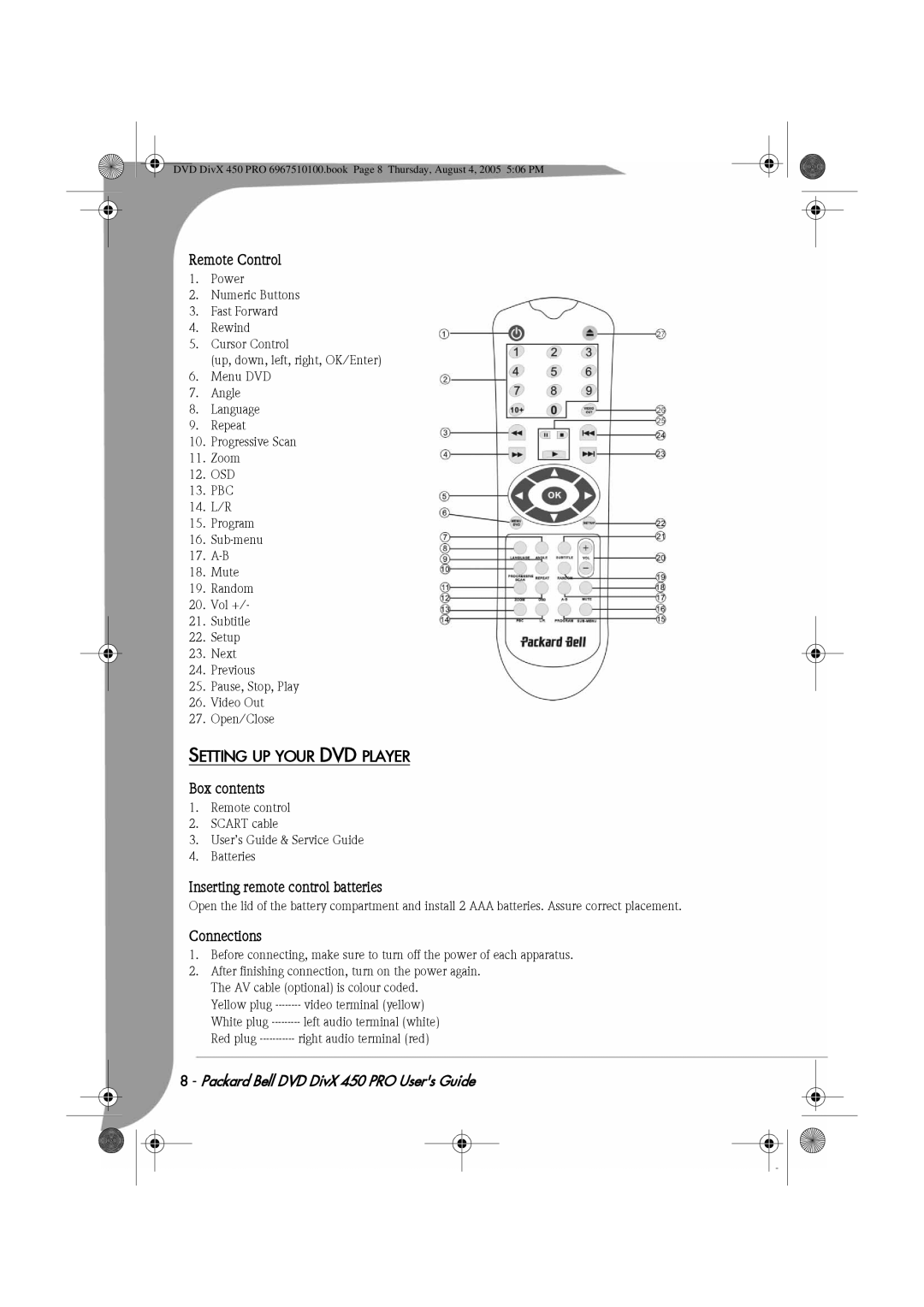
Remote Control
1.Power
2.Numeric Buttons
3.Fast Forward
4.Rewind
5.Cursor Control
(up, down, left, right, OK/Enter)
6.Menu DVD
7.Angle
8.Language
9.Repeat
10.Progressive Scan
11.Zoom
12.OSD
13.PBC
14.L/R
15.Program
16.
17.
18.Mute
19.Random
20.Vol +/-
21.Subtitle
22.Setup
23.Next
24.Previous
25.Pause, Stop, Play
26.Video Out
27.Open/Close
SETTING UP YOUR DVD PLAYER
Box contents
1.Remote control
2.SCART cable
3.User’s Guide & Service Guide
4.Batteries
Inserting remote control batteries
Open the lid of the battery compartment and install 2 AAA batteries. Assure correct placement.
Connections
1.Before connecting, make sure to turn off the power of each apparatus.
2.After finishing connection, turn on the power again. The AV cable (optional) is colour coded.
Yellow plug