Functional Overview
English
Remote control
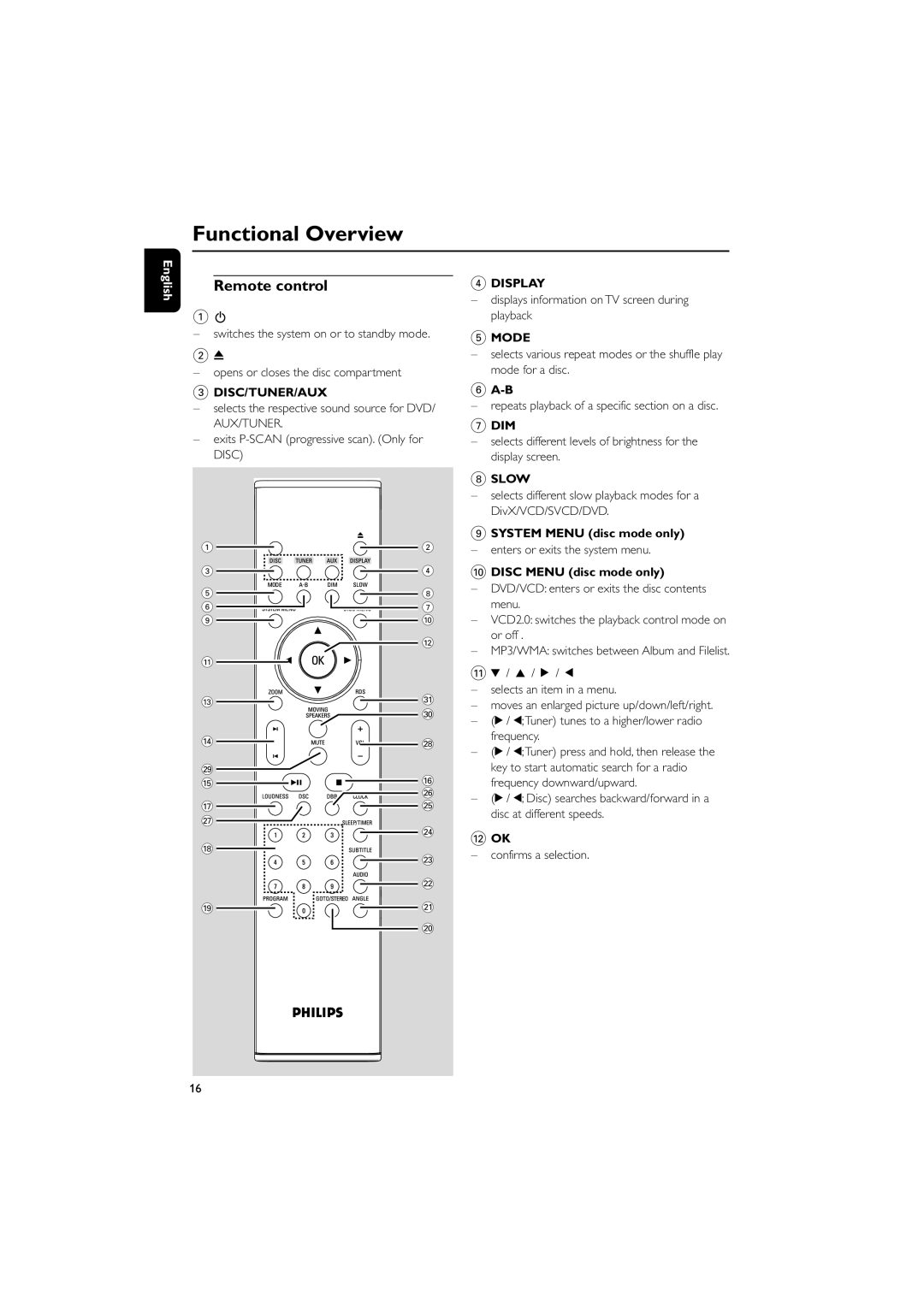
1B
–switches the system on or to standby mode.
20
–opens or closes the disc compartment
3DISC/TUNER/AUX
–selects the respective sound source for DVD/ AUX/TUNER.
–exits
1 | 2 | |
3 | 4 | |
5 | 8 | |
6 | 7 | |
9 | 0 | |
| @ | |
! |
| |
# | ⁄ | |
| º | |
$ | • | |
ª |
| |
% | ^ | |
§ | ||
| ||
& | ∞ | |
≥ |
| |
| ≤ | |
* |
| |
| £ | |
| ™ | |
( | ¡ | |
| ) |
4DISPLAY
–displays information on TV screen during playback
5MODE
–selects various repeat modes or the shuffle play mode for a disc.
6
–repeats playback of a specific section on a disc.
7DIM
–selects different levels of brightness for the display screen.
8SLOW
–selects different slow playback modes for a DivX/VCD/SVCD/DVD.
9SYSTEM MENU (disc mode only)
– enters or exits the system menu.
0DISC MENU (disc mode only)
–DVD/VCD: enters or exits the disc contents menu.
–VCD2.0: switches the playback control mode on or off .
–MP3/WMA: switches between Album and Filelist.
!4 / 3 / 2 / 1
–selects an item in a menu.
–moves an enlarged picture up/down/left/right.
–(2 / 1;Tuner) tunes to a higher/lower radio frequency.
–(2 / 1;Tuner) press and hold, then release the key to start automatic search for a radio frequency downward/upward.
–(2 / 1; Disc) searches backward/forward in a disc at different speeds.
@OK
–confirms a selection.
16