COPYRIGHT © 2005 MERIT INDUSTRIES, INC.
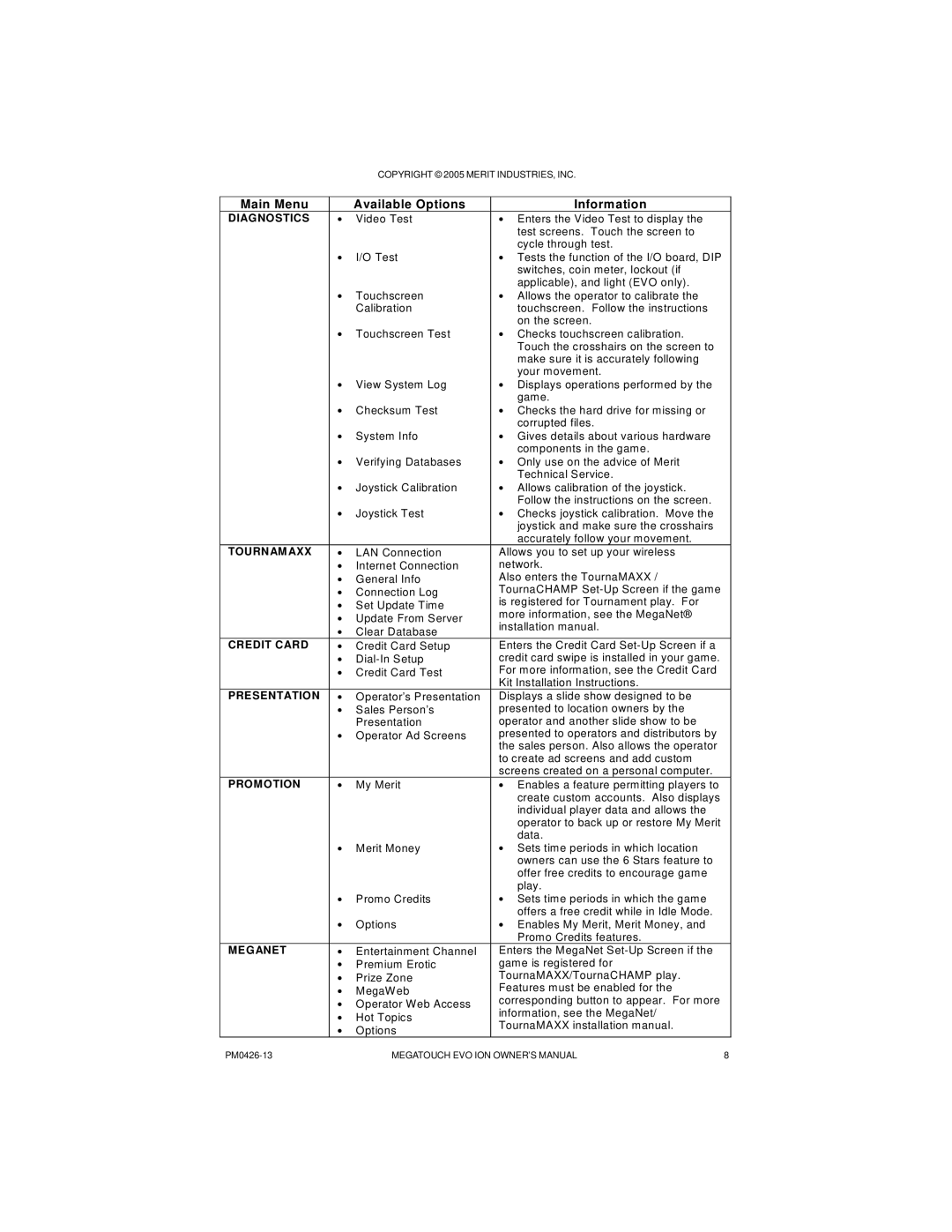
Main Menu |
| Available Options |
| Information |
DIAGNOSTICS | • | Video Test | • Enters the Video Test to display the | |
|
|
|
| test screens. Touch the screen to |
|
|
|
| cycle through test. |
| • | I/O Test | • Tests the function of the I/O board, DIP | |
|
|
|
| switches, coin meter, lockout (if |
|
|
|
| applicable), and light (EVO only). |
| • | Touchscreen | • Allows the operator to calibrate the | |
|
| Calibration |
| touchscreen. Follow the instructions |
| • |
| • | on the screen. |
| Touchscreen Test | Checks touchscreen calibration. | ||
|
|
|
| Touch the crosshairs on the screen to |
|
|
|
| make sure it is accurately following |
|
|
|
| your movement. |
| • | View System Log | • Displays operations performed by the | |
|
|
|
| game. |
| • | Checksum Test | • Checks the hard drive for missing or | |
|
|
|
| corrupted files. |
| • | System Info | • Gives details about various hardware | |
|
|
|
| components in the game. |
| • | Verifying Databases | • Only use on the advice of Merit | |
|
|
|
| Technical Service. |
| • | Joystick Calibration | • Allows calibration of the joystick. | |
| • |
| • | Follow the instructions on the screen. |
| Joystick Test | Checks joystick calibration. Move the | ||
|
|
|
| joystick and make sure the crosshairs |
|
|
|
| accurately follow your movement. |
TOURNAMAXX | • | LAN Connection | Allows you to set up your wireless | |
| • | Internet Connection | network. | |
| • | General Info | Also enters the TournaMAXX / | |
| • | Connection Log | TournaCHAMP | |
| • | Set Update Time | is registered for Tournament play. For | |
| more information, see the MegaNet® | |||
| • | Update From Server | ||
| installation manual. | |||
| • | Clear Database | ||
|
|
| ||
CREDIT CARD | • | Credit Card Setup | Enters the Credit Card | |
| • | credit card swipe is installed in your game. | ||
| • | Credit Card Test | For more information, see the Credit Card | |
|
|
| Kit Installation Instructions. | |
PRESENTATION | • | Operator’s Presentation | Displays a slide show designed to be | |
| • | Sales Person’s | presented to location owners by the | |
|
| Presentation | operator and another slide show to be | |
| • | Operator Ad Screens | presented to operators and distributors by | |
|
|
| the sales person. Also allows the operator | |
|
|
| to create ad screens and add custom | |
|
|
| screens created on a personal computer. | |
PROMOTION | • | My Merit | • Enables a feature permitting players to | |
|
|
|
| create custom accounts. Also displays |
|
|
|
| individual player data and allows the |
|
|
|
| operator to back up or restore My Merit |
|
|
|
| data. |
| • | Merit Money | • Sets time periods in which location | |
|
|
|
| owners can use the 6 Stars feature to |
|
|
|
| offer free credits to encourage game |
|
|
|
| play. |
| • | Promo Credits | • Sets time periods in which the game | |
|
|
|
| offers a free credit while in Idle Mode. |
| • | Options | • Enables My Merit, Merit Money, and | |
|
|
|
| Promo Credits features. |
MEGANET | • | Entertainment Channel | Enters the MegaNet | |
| • | Premium Erotic | game is registered for | |
| • | Prize Zone | TournaMAXX/TournaCHAMP play. | |
| • | MegaWeb | Features must be enabled for the | |
| • | Operator Web Access | corresponding button to appear. For more | |
| information, see the MegaNet/ | |||
| • | Hot Topics | ||
| TournaMAXX installation manual. | |||
| • | Options | ||
|
|
| ||
MEGATOUCH EVO ION OWNER’S MANUAL | 8 |