Menu operation
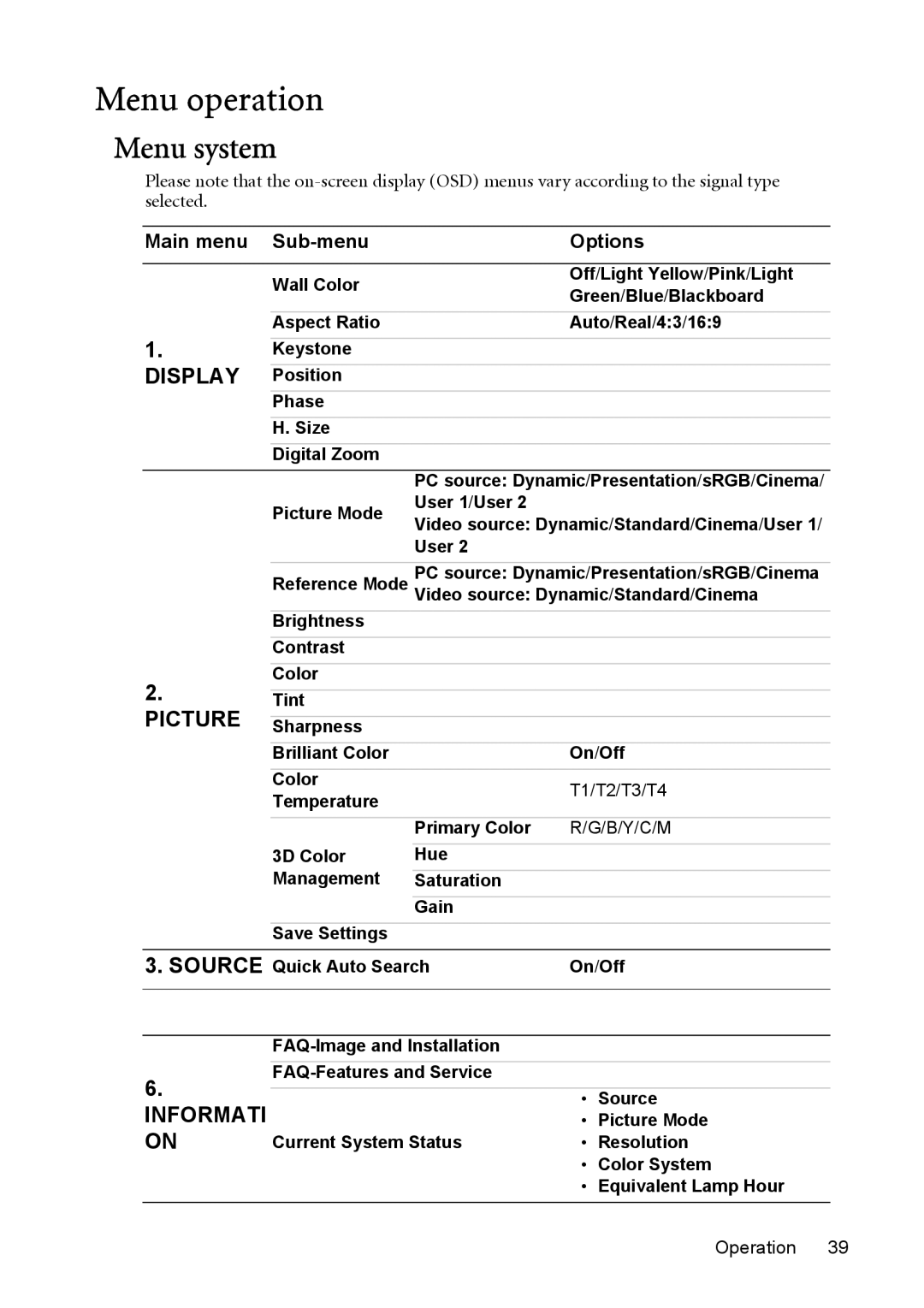
Menu system
Please note that the
Main menu |
|
| Options | |
|
|
|
| |
| Wall Color |
| Off/Light Yellow/Pink/Light | |
|
| Green/Blue/Blackboard | ||
|
|
| ||
| Aspect Ratio |
| Auto/Real/4:3/16:9 | |
1. |
|
|
|
|
Keystone |
|
|
| |
DISPLAY |
|
|
|
|
Position |
|
|
| |
| Phase |
|
|
|
| H. Size |
|
|
|
| Digital Zoom |
|
|
|
|
| PC source: Dynamic/Presentation/sRGB/Cinema/ | ||
| Picture Mode | User 1/User 2 |
|
|
| Video source: Dynamic/Standard/Cinema/User 1/ | |||
|
| |||
|
| User 2 |
|
|
|
|
| ||
| Reference Mode | PC source: Dynamic/Presentation/sRGB/Cinema | ||
| Video source: Dynamic/Standard/Cinema | |||
| Brightness |
|
|
|
| Contrast |
|
|
|
2. | Color |
|
|
|
Tint |
|
|
| |
PICTURE |
|
|
|
|
Sharpness |
|
|
| |
| Brilliant Color |
| On/Off | |
| Color |
| T1/T2/T3/T4 | |
| Temperature |
| ||
|
|
|
| |
|
| Primary Color | R/G/B/Y/C/M | |
| 3D Color | Hue |
|
|
| Management |
|
|
|
| Saturation |
|
| |
|
| Gain |
|
|
| Save Settings |
|
|
|
3. SOURCE Quick Auto Search | On/Off | |||
|
|
|
| |
|
|
|
| |
|
|
| ||
6. |
|
| ||
|
| • | Source | |
INFORMATI |
|
| • | Picture Mode |
ON | Current System Status | • | Resolution | |
|
|
| • | Color System |
|
|
| • | Equivalent Lamp Hour |