BenQ M555C
Copyright
Safety Information
Exposure to Radio Frequency Signals
Batteries
Antenna Care
Phone Operation
Driving
Hearing Aids
Electronic Devices
Pacemakers
Other Medical Devices
Aircraft
Vehicles
Posted Facilities
Blasting Areas
For Vehicles Equipped with an Air Bag
Vi Safety Information
Table of Contents
Redialling the last number
Operations during a call
Ccess Obile I Nternet
SDN
100
109
124
122
123
126
Xiv Table of Contents
Appearance
Front
Bottom
Side
Back
Status bar Time and date Labels for soft keys
Idle mode screen
Idle screen icons
Icons often shown on the idle screen
Receiving a short text message or having unread
Keypad operations
Idle mode
Functional keys
Scroll key
Menus
Right soft key
Input mode
Alphanumeric keys
Zero key
C a b c A¨ Å Æ ç à ä å æ β
Your SIM card
Inserting your SIM card
Fitting the battery
Battery
Removing your SIM card
Removing the battery
Charging the battery
Preparing your phone
Handsfree headset
Inserting handsfree headset
What is PIN?
Turning on your phone
Correcting a phone number to be dialled
Making a phone call
Keys on the keypad. Then press to send your call
Ending a phone call
Answering a phone call
Speed dialling
Rejecting an incoming call
Turning off the phone
Redialling the last number
Listening to a voicemail
Making an international call
Last missed, dialed, and received calls
Making an emergency call
Dialing an extension number
Received calls. Press To scroll to the call you want
Press to redial the phone number of the call
Screen and press OK to save the number
Your phone book
View number
Press Select to view the phone numbers and e-mail address
Edit
Search
Spelling and press OK
Add name
Delete
Contact to and press Select to select
Set group
Adds the phone book contact to a preferred caller group list
Using the location number
Adding Phone book contacts from idle screen
Accessing the last dialed/received calls
Adjusting the earpiece volume
Accessing your phone book
Operations during a call
Swapping between two calls
Making a second call
Incoming call waiting
Hold
Volume
In-call menu
End current
Multiparty
Dtmf on/off
Main menu
Join all
End current
Private
Exclude
End all calls
SMS text message
Receiving a message
Messages, together with
EMS message
Ringing melody
Chat message
Keypad lock
Silent profile
Previous profile, long press
Features of iTAP
ITAP input
Widely used punctuation and symbols included
Tips on using iTAP
To move the cursor up/down between lines of text
Demo of iTAP
If iTAP doesnt provide the word you want, you can press
Tips on using ABC input
ABC input
For example, to enter Love
SYM input
Input
What is EMS?
Message templates and EMS objects
Input modes
Using the Q.Access menu
Access
Programming the Q.Access menu
Access
Logging on to the Internet
Mobile Internet
Surfing the Internet
Logging off the Internet
Home
Using the browser menu
Back
Exit
Inbox
Settings
Bookmarks
Save Image
Circuit Prompt
Scroll Mode
Proxy
Circuit Linger
Key Press Timeout
Security
About
Advanced
URL Direct Dial UDD
Com
Input Examples
Net
Org
Com.tw
Net.tw
Org.tw
11. .gov.cn
Net.cn
10 .org.cn
Info
Advanced .com.tw URL input
Advanced .net URL input
URL ending with
Navigating the menus
Menus
All Calls
Phone book
Recent Calls
Missed Calls
Delete call logs
Received calls
Dialled numbers
Call costs
What is PIN2?
View names
Speed dial
OK to save all of the settings. If you want to give up all
Caller group
Ring Type
View List
Rename
To go to and press Select
SIM to phone
Copy record
Image type
Copy one
Erase original
Copy all
Phone to SIM
Choice
Save nos. to
SIM card
Phone memory
Delete all
Used space
You can delete data of all phone book contacts
Own number
Then press Edit to edit the current record
Delete
Messages
Here you can view the messages you have received recently
Chat
Save EMS
Save Melody
Edit
OK to send the message directly. Alternatively, you can
Save to SIM
Send To
Send by Name
Call to Sender
Forward
Text reply
Send by Group
Outbox
Backup
Extract nos
Create message
Quick Message
Ring Message
Animation Message
SMS Chat
Icon Message
Use and press Select to enter the number
Receiving a reply to your chat message
Message settings
Message center
Reply Path
Message lifetime
Message format
Notification
Voicemail
Listening to a voicemail
Voicemail settings
Box numbers
Alert by SMS
Alert by call
Alert match
Cell Broadcast
CB switch
Activates/deactivates the cell broadcast feature
Read Cell Broadcast
Language
Settings
Immediate Display CB
Set CB subjects
Current list
Services
WAP
Appointments you have previously scheduled
Schedule
Set reminder
Date you want is highlighted, press
Repeat
Alarm state
Time
Tone
View today
View all
Delete all
Set time
Alarm
Tools
Set tone
Hour Minder
Alarm period
Stop Watch
Vibration
Using the calculator feature
Calculator
When the calculator screen appears, press OPTIONS. Select
Auto Time Zone
Golf Genius
Off
New round
Hdcp
Enter Score
Score Card
Statistic
Load Round
New/Edit Course
Mini Mouse
Query Course
Language
Settings
Phone settings
Under this menu you can customize the way your phone works
Backlight Level
Color Scheme
Wallpaper
Backlight Period
Digital Clock
Display
Standard
Starry Night
Auto Redial
Default input
Idle Clock
Connected Alert
Call waiting
Call settings
Auto Keylock
Show your number
Divert all calls
By service
Call Divert
Status
Cancel all
Divert when busy
Divert when not found
Cancels all Call Divert settings
Network options
Network settings
Change network password
Automatic
Set PIN1
Security settings
Change PIN1
Bar incoming
Handset lock
Handset call barring
Bar outgoing
Bar prefixes
Disables the Bar outgoing feature
Network call barring
Bar foreign calls
Bar incoming if abroad
Only local and home country
Bar incoming calls
Bar outgoing calls
Fixed dial list
Fixed dial settings
Fixed dialling
Change PIN2
Blacklist
Blacklist settings
Privacy Code
Select group
Quick Access
SIM Lock
Auto Setting
Wap Settings
Activate Setting
Manual Setting
APN Name
Gprs Settings
Password
User ID
Time format
Clock settings
Set date
Date format
Profiles
Reset settings
Select profile
Edit profile
Dtmf tones
Answer Mode
Keypad tones
Message alert
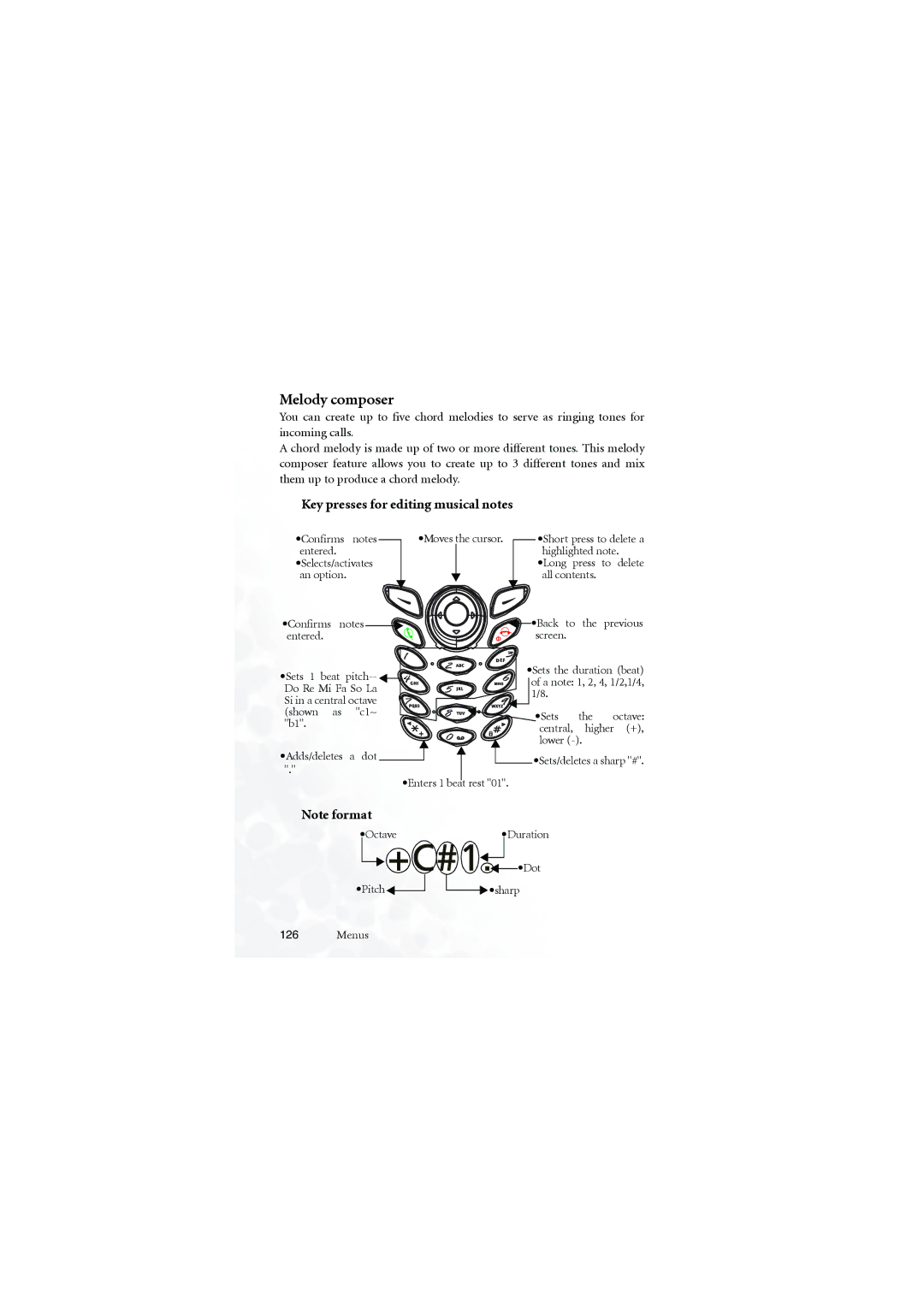
Melody composer
Key presses for editing musical notes
Editing musical notes
Entering a default pitch note
Adjusting the duration of a note
Entering a rest
Adding a sharp to a note
Adjusting the octave of a note
Steps for composing a chord melody
Press to add a note sharp #. To remove a sharp from a
Menus
Add entry
Melody composer menu you can choose from the following
Composes another chord melody
Memory size
User1
Erase
Melody
Download
Format file system
Baud rate setting
Turn Modem off/on
Menu MAP
Care and Maintenance
Where Signal Is weak
Signal Can
You Are Using Your Avoid
Time being Battery needs to be
Error
Battery if
Switch
Are Clean
Service
Dial settings, and turn
Setting,
You Have Barred
Blocked
Battery
Your PIN is Have Entered a Contact
Or use
Appendix
Appendix
Appendix


 •Dot
•Dot

 •sharp