Citrix NetScaler
Citrix NetScaler Policy Configuration and Reference Guide
Copyright and Trademark Notice
Contents
Chapter
Converting Text to Hexadecimal Format
Contents
Citrix NetScaler Policy Configuration and Reference Guide
Contents Vii
Blocking Access by Robots
Accommodating Browser Dependent Content
Blocking Access to Inline Images
Reducing Web Server Redirects
About This Guide
Preface
Citrix NetScaler Policy Configuration and Reference Guide
Preface
New in This Release
Audience
Convention Meaning Boldface
Formatting Conventions
Formatting Conventions
To view the documentation
Getting Service and Support
Related Documentation
To provide feedback from the Knowledge Center home
Documentation Feedback
Advanced and Classic Policies
Introduction to Policies Expressions
Basic Components of an Advanced or a Classic Policy
Benefits of Using Advanced Policies
NetScaler Feature, Policy Type, and Policy Usage
How Different NetScaler Features Use Policies
Chapter Introduction to Policies and Expressions
DNS
Authorization
Authorization policies authorize users
Associated cache server
AAA Traffic Classic
Authorization policies, however, can be
Access Classic
About Actions and Profiles
Functions
Feature Use of an Action Use of a Profile
Use of Actions and Profiles in Different NetScaler Features
Pre-Authentication. Uses
Authorization. Uses Allow
Server
About Policy Bindings
About Evaluation Order of Policies
About Advanced Expressions
Advanced and Classic Expressions
Order of Evaluation Based on Traffic Flow
About Classic Expressions
Chapter
Before You Proceed
Citrix NetScaler Policy Configuration and Reference Guide
Configuring Advanced Policies
Argument Specifies
Creating or Modifying an Advanced Policy
Advanced-Policy Parameters
Following is an example of a Rewrite policy and action
Policy Configuration Examples
Binding Advanced Policies
Feature-Specific Differences in Policy Bindings
Feature-Specific Bindings for Advanced Policies
NetScalers integrated
Policies Global default Responder function Policy label
Provide rules for modifying
Address of the incoming
Bind Points and Order of Evaluation
Entries in a Policy Bank
Advanced Policy Evaluation Across Features
Chapter Configuring Advanced Policies
Optional
Evaluation Order Within a Policy Bank
Format of Each Entry in a Policy Bank
How Policy Evaluation Ends
Example
How Features Use Actions After Policy Evaluation
Binding a Policy Globally
Details pane, click Feature Name policy manager
Binding a Policy to a Virtual Server
Displaying Policy Bindings
Unbinding an Advanced Policy
Unbind responder global policyName
Creating a Policy Label
Creating Policy Labels
To create a policy label by using the configuration utility
Binding a Policy to a Policy Label
Configuring a Policy Label or Virtual Server Policy Bank
Entries in a Policy Bank
Attribute Description
Example
Configuring a Policy Label
Choices are Integrated Caching, Rewrite, or Responder
Configure Virtual Server dialog box click the Policies tab
Configuring a Policy Bank for a Virtual Server
Chapter Configuring Advanced Policies
At the NetScaler command prompt, for the Responder, type
Configuring and Binding Policies with the Policy Manager
Click Regenerate Priorities
To remove unused policies by using the Policy Manager
Citrix NetScaler Policy Configuration and Reference Guide
Configuring Advanced Expressions Getting Started
Basic Elements of an Advanced Expression
Expression Characteristics
Prefixes
Http.res.header.myheader
Features Content Switching
Feature Types of Expression Prefix Used in the Feature
Single-Element Expressions
Operations
Operation Determines whether or not
Basic Operations on Expression Prefixes
Basic Operations for Expressions
Basic Types of Operations
Configuring Advanced Expressions Getting Started
Compound Advanced Expressions
Parentheses in Compound Expressions
Booleans in Compound Expressions
Compound Operations for Strings
String-Based Operations for Compound Advanced Expressions
Logical operations on strings
Arithmetic Operations for Compound Advanced Expressions
Compound Operations for Numbers
Expression on the right
Num % num
Returns 12 binary
Result of applying the ~ operator is -11 a binary 1110011
Whole expression evaluates to 8 binary
Binary 1100 and numeric.expression2 returns 10 binary
Right-side number argument number of bits
Following example assumes that numeric.expression1 returns
Integer Value Following is an example
Number .ADD
Number .SUB
Integer Number value Following is an example
Integer Integer argument Following is an example
Number .LE
Number .LT
Binary value of 10 is 1010, and the result of applying
1110011, 32 bits total with all ones to the left
Result of applying the Bitneg operator is -11 a binary
Expression as an argument rather than an integer
Assumes that numeric.expression returns 12 binary
Caret performs a similar function to BITXOR, but takes
Bitxor operator to the entire expression is 6 binary
Another expression as an argument rather than an integer
Number.LSHIFT
Double .ADDi
Number.RSHIFT
Value represented by double
Parameters
Value represented by double is greater than or equal to
Double .GEi
Double .GTi
Value represented by double is greater than the argument
Classic Expressions in Advanced Expressions
Configuring Advanced Expressions in a Policy
Following is an example of configuring a caching policy
HTTP.REQ.BODY1000.BETWEENthis,that
Click Advanced Expressions
Configuring Named Advanced Expressions
Chapter
Citrix NetScaler Policy Configuration and Reference Guide
Advanced Expressions Evaluating Text
About Operations on Text
About Text Expressions
Chapter Advanced Expressions Evaluating Text
Compounding and Precedence in Text Expressions
Categories of Text Expressions
Guidelines for Text Expressions
Expression Prefixes for Text in Http Requests and Responses
Expression Prefixes for Text
Http Expression Prefixes that Return Text
Prefix Description
Myhost.com8080, the domain is myhost.com
Returns the domain name part of the host name. For
Returns incorrect results if the host name has an IP
Address. For information on expressions for IP
URL
LISTT,.COUNT
LISTT,. IGNOREEMPTYELEMENTS.COUNT
HTTP.REQ.USER.EXTERNALGROUPS
HTTP.REQ.USER.GROUPS
For example, the following expression returns a
Returns a list of internal groups to which the user
User belongs
HTTP.REQ.USER.INTERNALGROUPS
Group
Returns the Http version listed in the request
Default value of 80 or 443 for Https connections
Returns a portion of the Http response body.
Integer argument
Expression Prefixes for VPNs and Clientless
VPN and Clientless VPN Description Expression
VPN and Clientless VPN Expression Prefixes that Return Text
When evaluating this header
By default, is not considered an empty element
Evaluates the server portion of the host name
Extracts a slash- / separated list from the path
Evaluates the protocol in the URL
Extracts a name-value list, using the =
Delimiters from the query string in a URL
This method ignores the empty elements in a
Hostname
List delimiter is a comma , the following list
Ignores empty elements in a list. For example, if
Has an empty element following a=10
Evaluating this header
Example, the following list contains an empty
Ignores empty elements in a name-value list. For
Element after a=10
As another example, consider the following http
Is case insensitive
Results in Boolean True if the host name
Following expression returns True
Evaluates the server part of the host name
For example, if the delimiter in a list is ,
This method ignores the empty elements in a list
Entry a=10
Consider the following header
Preceding example, the element following
Example, the following list uses a semicolon
=11 is not considered an empty element
Evaluating the same header
Basic Operations on Text
Operations on Text
Basic Operations on Text
Returns a Boolean True value if the target contains
Operations for Controlling Case Sensitivity
Operations for Calculating the Length of a String
Operations on Case Sensitivity of Text
Basic Text Operation Description
Operations on the Length of a String
Complex Operations on Text
Operations on Strings Based on a Character Count
Case Operation Description
Basic Operations on a Portion of a String
Operations on a Portion of a String
Character Count Operation Description
Object of 0 length
Object is greater than or equal to the sum starting string
Returns a Boolean True value if the length of the text
Matches starting string, and if the suffix of the target
Matches ending string
Operation Description
Converting Text to a Hash Value
Base64 encoding algorithm
Operator Description
Applying the Base64 decoding algorithm. The operation
Raises an Undef if text is not in B64-encoded format
Converting Text to Hexadecimal Format
Citrix NetScaler Policy Configuration and Reference Guide
Advanced Expressions Working with Dates, Times, and Numbers
Format of Dates and Times in an Expression
Expressions for the NetScaler System Time
Dates and Times in a Rewrite Action
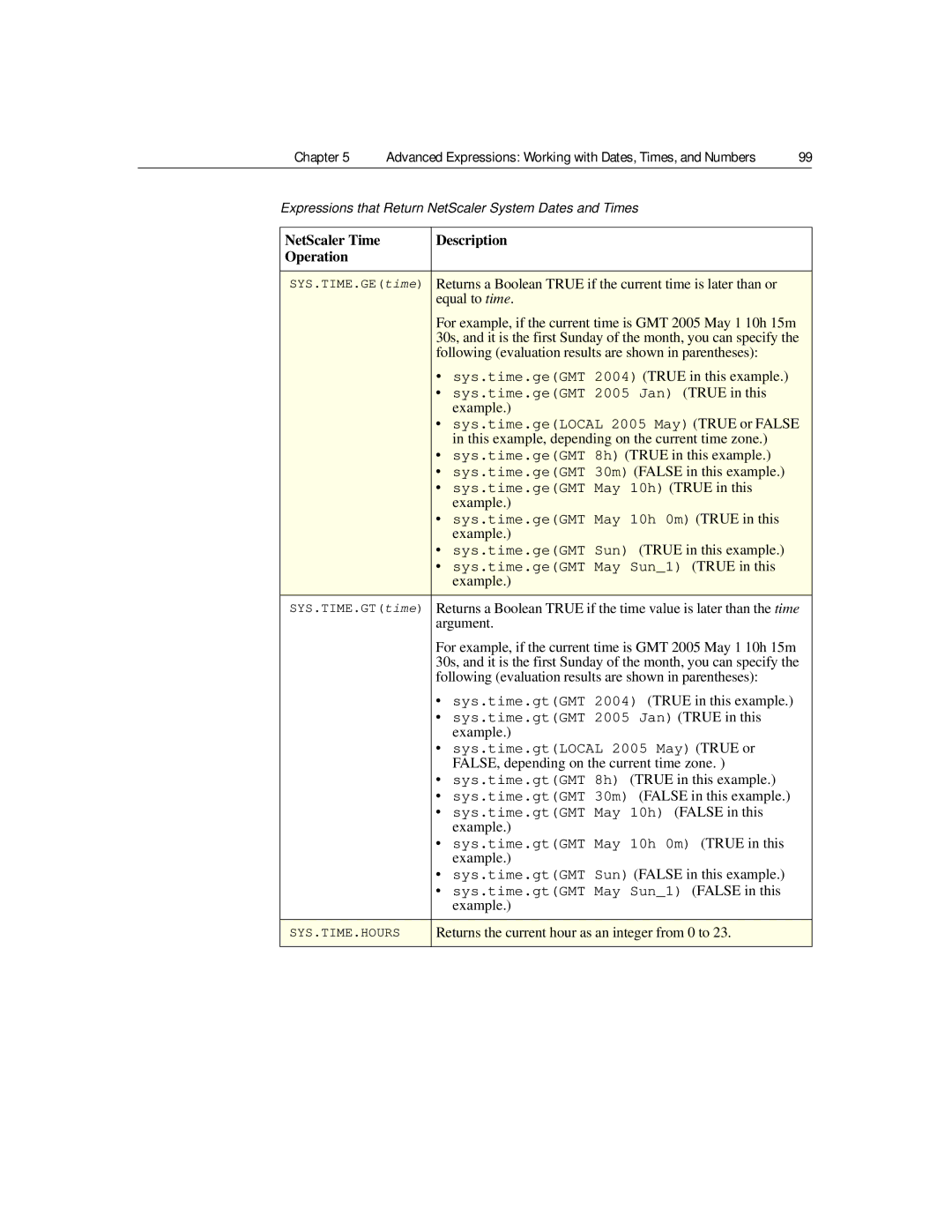
NetScaler Time Description Operation
Expressions that Return NetScaler System Dates and Times
Advanced Expressions Working with Dates, Times, and Numbers
Is equal to the time argument
Scheduled reboot, and returns an integer
Sys.time.leGMT 2006 True in this example
False depending on the current timezone
Time2
Expressions for SSL Certificate Dates
True
SSL Certificate Operation Description
10h 15m 30s, and it is the first Sunday of the month
For example, if the current time is GMT 2005 May
You can specify the following evaluation results for
This example are in parentheses
Extracts the last hour that the certificate is valid
Closest boot time is in the past, the integer is
Returns a Boolean True if the time precedes or is
Equal to the time argument
If it is in the future, the integer is positive
System time and the specified time and returns an
Extracts the last weekday that the certificate is valid
To give the weekday in the time value
Time1, time2 arguments. Both the time1, time2
Returns a Boolean True if the time value is between
Arguments must be fully specified
LOCAL, and time2 must be bigger than time1
After or equal to the time argument
Returns a Boolean True if the time is greater than
Results are in parentheses
Returns a Boolean True if the time occurs after
Returns the current month as an integer from
Extracts the last minute that the certificate is valid
Returns the number of seconds between the current
NetScaler system time and the specified time as an
Returns the current second as an integer from 0 to
Extracts the last second that the certificate is valid
6 Saturday
Element of time from time2, it is assumed to have
Prefixes That Evaluate Http Date Headers
Expressions for Http Request and Response Dates
111
Citrix NetScaler Policy Configuration and Reference Guide
Advanced Expressions Parsing HTTP, TCP, and UDP Data
About Evaluating the Payload Body
About Evaluating Http and TCP Payload
115
Expressions for Http Headers
Http Header Prefix Description
Prefixes for Http Headers
Prefixes That Extract Http Headers
Advanced Expressions Parsing HTTP, TCP, and UDP Data
As a slash- / separated list. Multiple
Returns the value of Path field of the cookie
First instance is returned
For example, the following is a cookie with
Operate as a comma-separated list
Returns the value of Port field of the cookie
From Set-Cookie Customer =
ABC PATH=/a/b/c PORT= 80
First cookie with the specified name. For
Returns the value of the Domain field
Example, the following expression returns a
DOMAIN=.xyz.com
From the cookie Set-Cookie Customer
Named cookie as a , separated list. For
Operations That Evaluate Http Headers
Operations for Http Headers
Returns the value of Version field of the nth
Header type exists
Following is an example of request with two headers
Any instance of the header value
Following returns a Boolean True
Does not concatenate the different values
Instance to the first
STR string
Following is an example of a request
Following extracts the string def from the last
Occurs instance number of places before the final
Or a response. This operation returns the header that
Used in bidirectional policies
Instance number argument cannot exceed
Operations for Cache-Control Headers
Prefixes for Cache-Control Headers
Prefixes That Extract Cache-Control Headers
Cannot exceed
Http Header Operation Description
Operations That Evaluate Cache-Control Headers
127
Has the value Max-Stale
Has the value Min-Fresh
Has the value Must-Revalidate
Has the value No-Transform
Expressions for Extracting Segments of URLs
Prefixes That Extract URLs
Expressions for Numeric Http Payload Data Other Than Dates
Prefixes That Evaluate Http Request or Response Length
URL Prefix Description
Html or XML Operation Description
Operations That Evaluate Html and XML Encoding
Returns the response status code
Specifies how to treat the plus character +.
Where xx is a hex-based representation
Converts unsafe URL characters to %xx values
Read-only operation
Where the colon is the Ascii equivalent
With the character Y where XXX represents
Decoded to http//, where the colon is
Where WW and XX represent two distinct
GET Operation Description
Expressions for TCP, UDP, and Vlan Data
Prefixes that Extract TCP and UDP Data
MX mail exchanger. This DNS record describes
Enables locating the domain name that is
Domain and the priority for each server
NS. This is a name server record that includes a
XPath and Json Expression Prefixes that Return Text
XPath and Json Expressions
XPath string conversion routine
Or a string. Node-sets are converted to
File Book creator person Namename , titletitle
Json file and returns a Boolean True if
That are enclosed by /Book a node-set
For example, consider the following Json
First 1000 bytes of the body of the Json
File and returns the corresponding string
MARKUPxp%/Book/creator%
Text.XPATHWITH
Bytes of the body
Citrix NetScaler Policy Configuration and Reference Guide
About SSL and Certificate Expressions
Advanced Expressions Parsing SSL Certificates
Returns the SSL client certificate in the current
Prefixes for Text-Based SSL and Certificate Data
SSL transaction
SSL cryptographic cipher is exportable
Advanced Expressions Parsing SSL Certificates
Prefixes for Numeric Data in SSL Certificates
Expressions for SSL Certificates
Based on the preceding Issuer definition
Issuer in the certificate as a name-value list. An
Returns a Boolean True if the client has an SSL
Returns the Distinguished Name DN
An Authority Key Identifier extension
Returns the Issuer Distinguished Name
Certificate as a name-value list. An equals sign
= is the delimiter for the name and the value
False
IGNOREEMPTYELEMENTS.COUNT
CLIENT.SSL.CLIENTCERT.ISSUER
Citrix NetScaler Policy Configuration and Reference Guide
Expressions for IP Addresses and IP Subnets
Operations for IPV4 Addresses
Prefixes for IPV4 Addresses and IP Subnets
Prefixes That Evaluate IP and MAC Addresses
Operations on IPV4 Addresses
Qual1.qual2.qual3.qual4.qual5.qual6
About IPv6 Expressions
IPv6 Expression Prefixes that Return Text
Expression Prefixes for IPv6 Addresses
IP header
Returns the IPv6 address in the source field of the IP
IPv6 Operation Description
Operations for IPV6 Prefixes
Operations That Evaluate IPv6 Addresses
Prefixes for MAC Addresses
Expressions for MAC Addresses
Operations for MAC Addresses
Prefixes That Evaluate MAC Addresses
155
Expressions for Numeric Client and Server Data
Prefixes That Evaluate Numeric Client and Server Data
Citrix NetScaler Policy Configuration and Reference Guide
Matching Text With Strings in a Set
Matching Operators Description
Operators That Use a Pattern Set
Patternsetname
To patternsetname
Setname
Name
Configuring a Pattern Set
161
At a NetScaler command prompt, type
Add policy patset myPatSet
163
Matching Text With a Pattern
165
Basic Characteristics of Regular Expressions
Operations for Regular Expressions
Regular expression argument. If the regular
Selects text that precedes the string that matches
From text/plain
Expression does not match any text in the target
Settextmodeignorecase
Regular Expression Operation Description
Text following the string that matches
Insensitive, multi-line match, where the dot
Header value. The header instances are matched
From the last to the first
Following example selects NS-CACHE-9.0
Transforming Text and Numbers into Different Data Types
First
Typecasting Operations
Are ignored
If the current text mode is Ignorecase and you specify
As the delimiter, an uppercase P is not treated as a
Delimiter
Urlencoded by default
Hostname path? query, and the text mode is set to
Treats a numeric string like an IP address
For example, the following policy matches Http requests
String, adds 4 to the number, and inserts an Http header
Following policy extracts a numeric portion of a query
For example, this policy would extract 4444 from
Following Http response header
HTTP.REQ.COOKIE.TYPECASTHTTPHEADERT
HTTP.REQ.SETCOOKIE
HTTP.REQ.COOKIE.TYPECASTHTTPHEADER
That you specify in a name argument
Converts the designated text to a multi-line Http header
For example, the following expression converts
MyHeader to InHeader
Betweengmt 2004, GMT 2006 True
Eqgmt 2005 True
Time value argument t
Eqgmt 2005 Dec False
EQLocal 2005 May True or FALSE, depending on
Gtgmt 2005 Jan True
Gtgmt 2004 True
GTLocal 2005 May True or FALSE, depending on
Gtgmt 8h True
Legmt 2005 Dec True
Legmt 2006 True
LELocal 2005 May True or FALSE, depending on
Legmt 8h False
Time is in the future scheduled reboot time, the integer is
Most recent reboot or the number of seconds to the next
Value as an integer that ranges from 0 to
Value as an integer that ranges from 1 January to
Time1 and time2
Double to an integer
Extracts the year from the current system time and returns
Transforms the double-precision number represented by
Expressions for Controlling the Traffic Rate
Advanced Policies Controlling Rate of Traffic
About Policies that Monitor the Traffic Rate
Configuring Policies That Control the Traffic Rate
Chapter
About Http Callout Policies
About Calling Out to an External Application
187
Following is an example of a response
Parameter Specifies
Configuring an Http Callout Policy
Elements in an Http Callout Policy
Server mutually
Attribute-based Http Method httpMethod
Expression that derives the value. Examples
URL stem expression urlStemExpr
Expression to 8191 characters
Example, if you configure a return type of text, the result
NetScaler does not check the validity of this request. You
Must manually validate the request
191
Examples
To modify a callout policy using the NetScaler command line
To view a callout policy using the NetScaler command line
To delete a callout policy using the NetScaler command line
Invoking an Http Callout Policy
193
If the return type is NUM, the following expression is valid
195
Citrix NetScaler Policy Configuration and Reference Guide
Where Classic Policies Are Used
Configuring Classic Policies Expressions
Http
Auditing of user access
Configuring Classic Policies and Expressions
Click Policies
Viewing Classic Policies
201
Configuring a Classic Policy
To create a classic policy using the NetScaler command line
At the command line, type
203
Configuring a Classic Expression
REQ.IP.SOURCEIP == 200.0.0.0 -netmask
205
Flow Type.protocol.qualifier.operator.value.header Name
207
Binding a Classic Policy
Configure Virtual Server dialog box, click the Policies tab
209
Creating Named Classic Expressions
Citrix NetScaler Policy Configuration and Reference Guide
Expression Prefix Descriptions
Expressions Reference
Advanced Expressions
Citrix NetScaler Policy Configuration and Reference Guide
Appendix a Expressions Reference
Operates on the Vlan through which the current
Expression Prefixes for Text in Http
Ignores spaces in the data. See the table Http
Appendix a Expressions Reference 217
Obtains the Expires field of the cookie as a date
Appendix a Expressions Reference 219
SERVER.INTERFACE.ID.EQLA/1
Appendix a Expressions Reference 221
Ignores spaces in the data. For an example, see
VPNs, on
Appendix a Expressions Reference 223
Expression Element Definition
Classic Expressions
Operators
Appendix a Expressions Reference 225
General Expressions
REQ.HTTP.URLQUERYLEN
REQ.SSL.CLIENT.CERT.ISSUER
REQ.SSL
REQ.SSL.CLIENT.CERT
Appendix a Expressions Reference 227
Actual Expression Definition
Client Security Expressions
Expression Element
Expression Definition
Network-Based Expressions
Appendix a Expressions Reference 229
File System Expressions
Date/Time Expressions
Time
Date
Appendix a Expressions Reference 231
Built-In Named Expressions General
Always returns a value of False
Appendix a Expressions Reference 233
Nstrue Nsurlpathbin
Nsfarclient
Nsmsexcel Nsmsie Nsmsppt Nsmsword
Appendix a Expressions Reference 235
Built-InNamed Expressions Anti-Virus
Built-InNamed Expressions Personal Firewall
Any version of Norton Internet Security
Built-InNamed Expressions Client Security
Expression Definition Norton Internet Security
Expression Type Sample Expressions
Summary Examples of Advanced Expressions and Policies
Examples of Advanced Expressions
Look for a particular file type in an
Content-Type header
Http request based on the file
Extension
Purpose Example
Examples of Advanced Expressions and Policies
This policy uses
To https// in all URLs
Responder functionality
Modify a URL to redirect
Through unchanged
Limit the number
Check the client IP
NS-Client header
Remove old headers from
Request and insert an
NS-Client header,
Request, insert an
Then modify the insert
Header action so that
Citrix NetScaler Policy Configuration and Reference Guide
Redirecting an External URL to an Internal URL
Tutorial Examples of Advanced Policies for Rewrite
Bind the policy globally
Redirecting Http to Https
Redirecting a Query
Appendix C
247
Removing Unwanted Headers
249
Reducing Web Server Redirects
Masking the Server Header
Add rewrite policy polmask-server true actmask-server
Tutorial Examples of Classic Policies
Citrix NetScaler Policy Configuration and Reference Guide
Appendix D Tutorial Examples of Classic Policies 253
REQ.HTTP.HEADER URL Contains string
Appendix D Tutorial Examples of Classic Policies 255
Application Firewall Policy to Protect Scripted Web Pages
DNS Policy to Drop Packets from Specific IPs
Add dns policy polddosdrop
SSL Policy to Require Valid Client Certificates
Citrix NetScaler Policy Configuration and Reference Guide
Migration of Apache modrewrite Rules to Advanced Policies
NetScaler solution for converting a URL
Apache modrewrite solution for converting a URL
Converting URL Variations into Canonical URLs
Converting Host Name Variations to Canonical Host Names
NetScaler solution for moving the document root
Apache modrewrite solution for moving the document root
Moving a Document Root
Appendix E
Working with Structured Home Directories
Moving Home Directories to a New Web Server
NetScaler solution for structured home directories
Apache modrewrite solution for structured home directories
NetScaler solution for redirection if a URL is wrong method
Redirecting Invalid URLs to Other Web Servers
Rewriting a URL Based on Time
NetScaler solution for rewriting a URL based on the time
265
Redirecting to a New File Name Invisible to the User
Redirecting to New File Name User-Visible URL
Apache modrewrite solution for browser-specific settings
Accommodating Browser Dependent Content
267
Blocking Access by Robots
Creating Extensionless Links
Blocking Access to Inline Images
NetScaler solution for blocking access to an inline image
NetScaler policy for adding a .php extension to all requests
269
Redirecting a Working URI to a New Format
Apache modrewrite solution
NetScaler solution using regular expressions
NetScaler solution
NetScaler solution using pattern sets
Ensuring That a Secure Server Is Used for Selected Pages
Bind patset pat1 page4 Bind patset pat1 page5
Operators for Extracting and Evaluating Numeric Data
New Advanced Expression Operators in This Release
New Operators for Extracting and Evaluating Numeric Data
Number.TYPECASTIPADDRESSAT
Operators Operation
Operators for Extracting and Evaluating Text
New Operators for Evaluating Text
Operators for the Client and ipv6 Expression Prefixes
Operators for Extracting and Evaluating Http Data
New Operators for Extracting and Evaluating Http data
Operators for Client and ipv6 Expression Prefixes
Operators for Evaluating Groups to Which a User Belongs
XPath and Json Operators for Evaluating XML and Json Data
XPath and Json Operators for Evaluating XML and Json Text
Operators for Evaluating Groups to Which a User Belongs
Index
Introduction to 224 migration to advanced
RES.VLANID
Index 279
CLIENT.ETHER.DSTMAC
HTTP.RES.SETCOOKIE2.COOKIEname, i
Index
Omain 82 VPN.CLIENTLESSHOSTURL.HOSTNAME.E
Authkeyid
Citrix NetScaler Policy Configuration and Reference Guide
Index
Useinvocationresult
VPN 65 Character 57 ? character
Citrix NetScaler Policy Configuration and Reference Guide