W . d e l l . c o m s u p p o r t . d e l l . c o m
Service Tag CD or DVD eject button CD or DVD activity light
August WD741
Contents
Solving Problems
Resolving Software and Hardware Incompatibilities
Using Microsoft Windows XP System Restore
105
101
102
104
118
111
115
116
Contents
Finding Information
What Are You Looking For? Find It Here Warranty information
Finding Information
Service Tag and Microsoft Windows License
At premier.support.dell.com. The website may not be
Order status, warranty, and repair information
Updates
What Are You Looking For? Find It Here
Click the arrow icon
Click the topic that describes your problem
Follow the instructions on the screen
Setting Up and Using Your Computer
Setting Up a Printer
Printer Cable
Connecting a USB Printer
Connecting to the Internet
USB connector on computer USB printer cable
Setting Up Your Internet Connection
Playing CDs and DVDs
DVD player includes the following basic buttons
Adjusting the Volume
How to Copy a CD or DVD
Adjusting the Picture
Copying CDs and DVDs
Helpful Tips
Using Blank CDs and DVDs
Using a Media Card Reader Optional
Connecting Two Monitors
TV-OUT connector VGA blue connector
Connecting Two Monitors With VGA Connectors
Optional DVI adapter
Changing the Display Settings
Connecting a TV
Connecting to a Network Adapter
Setting Up a Home and Office Network
Network Setup Wizard
Standby Mode
Power Management
Hibernate Mode
Power Schemes Tab
Power Options Properties
Advanced Tab
Ieee
Hibernate Tab
RAID Level 0 Configuration
About Your RAID Configuration
Hyper-Threading
Segment Hard drive
RAID Level 1 Configuration
Setting Your Computer to RAID-Enabled Mode
Configuring Your Computer for RAID
Segment
Creating a RAID Level 0 Configuration
Configuring for RAID Using the Intel RAID Option ROM Utility
Deleting a RAID Volume
Creating a RAID Level 1 Configuration
Configuring for RAID Using the Intel Application Accelerator
Migrating to a RAID Level 0 Configuration
Migrating to a RAID Level 1 Configuration
To Remove Spare Marking From a Spare Hard Drive
Rebuilding a Degraded RAID Level 1 Configuration
Creating a Spare Hard Drive
To Mark a Drive as a Spare Hard Drive
Battery Problems
Troubleshooting Tips
Solving Problems
CD and DVD drive problems
Drive Problems
Hard drive problems
Mail, Modem, and Internet Problems
Problems writing to a CD/DVD-RW drive
Solving Problems
Use these characters in filenames
Error Messages
Keyboard Problems
Media Card Reader Problems
Program stops responding
Lockups and Software Problems
Computer does not start up
Computer stops responding
Program is designed for an earlier Windows operating system
Other software problems
Solid blue screen appears
Mouse Problems
Memory Problems
Network Problems
Product Information Guide
Power Problems
Scanner Problems
Printer Problems
No sound from speakers
Sound and Speaker Problems
No sound from headphones
Video and Monitor Problems
If the screen is blank
If the screen is difficult to read
Solving Problems
Light Pattern Problem Description
Diagnostic Lights
Modules installed, remove
Light Pattern Problem Description Suggested Resolution
If the problem still exists, install a
If the problem persists, contact Dell
Determine if a conflict exists by
If there is an error message on your
Screen identifying a problem with a
Installed on your computer
Dell Diagnostics Main Menu
Dell Diagnostics
Option Function
Drivers
What Is a Driver?
Tab Function
Windows XP
Reinstalling Drivers
Using Windows XP Device Driver Rollback
Identifying Drivers
Resolving Software and Hardware Incompatibilities
Manually Reinstalling Drivers
Restoring Your Operating System
Creating a Restore Point
Using Microsoft Windows XP System Restore
Restoring the Computer to an Earlier Operating State
Undoing the Last System Restore
Using Dell PC Restore by Symantec
Enabling System Restore
Troubleshooting Tools
Turn Off Your Computer
Removing and Installing Parts
Before You Begin
Recommended Tools
Before Working Inside Your Computer
Front View of the Computer
System shutdown
System
Back View of the Computer
Removing the Computer Cover
Removing and Installing Parts
Inside View of Your Computer
Power supply
System Board Components
Memory Overview
Memory
Addressing Memory With 4-GB Configurations
Securing clips Connector
Installing Memory
To processor
Notches Memory module Cutouts Crossbars
Removing Memory
Cards
PCI Cards
Installing a PCI Card
Release tab
Release tabs Removing and Installing Parts
Removing a PCI Card
PCI Express Cards
Release tabs Card retention
Installing a PCI Express Card
Piano bracket May not be present on all computers
Release tab card retention mechanism
PCI Express Card slot
PCI Express X16 card Card Securing tab
Release tab
Removing and Installing Parts
Release tabs Lever on chassis wall
Removing a PCI Express Card
PCI Express
Door Piano bracket May not be present on all computers
Removing and Installing Parts
Removing the Drive Panel
Drive Panels
Sliding plate lever Drive panel
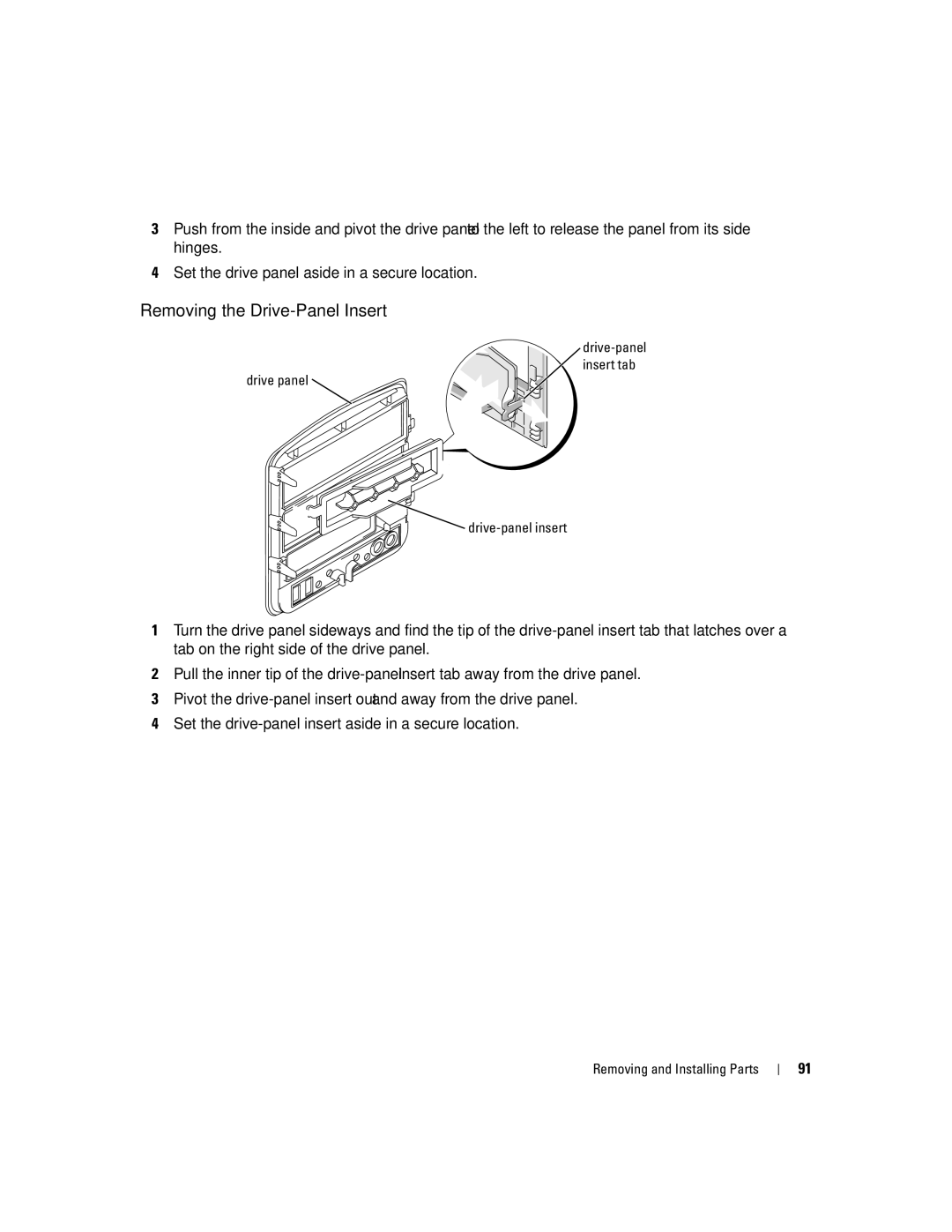
Drive-panel Insert tab Drive panel Drive-panel insert
Removing the Drive-Panel Insert
Center drive
Replacing the Drive-Panel Insert
Panel tab Drive-panel insert
Replacing the Drive Panel
Drives
Hard Drive
General Installation Guidelines
Hard drive Removing and Installing Parts
Power cable Hard drive cable
Removing a Hard Drive
Hard drive Hard drive bracket Removing and Installing Parts
Installing a Hard Drive
Adding a Second Hard Drive
Hard drive Hard drive bracket
Removing a Floppy Drive
Floppy Drive
Sliding plate lever
100
Floppy drive cable Sliding plate
Media Card Reader
Installing a Floppy Drive
101
102
Removing a Media Card Reader
USB cable Media Card Reader Not present on all computers
103
104
Installing a Media Card Reader
Media Card Reader Screws
105
CD/DVD Drive
106
Removing a CD/DVD Drive
CD/DVD drive Shoulder screws Removing and Installing Parts
Installing a CD/DVD Drive
107
108
Replacing the Battery
Battery
109
Replacing the Computer Cover
Battery Battery socket Tab
110
111
Specifications
112
113
114
50.8 cm/sec
System Setup
Overview
115
System Setup Screens
Entering System Setup
116
117
118
System Setup Options
RAID On
119
Remotely from Suspend
120
Monday through Friday
Up from Hibernate or Off
121
Boot Sequence
Option Settings
Changing Boot Sequence for the Current Boot
122
Changing Boot Sequence for Future Boots
123
Clearing Forgotten Passwords
124
Clearing Cmos Settings
Cleaning Your Computer
Computer, Keyboard, and Monitor
CDs and DVDs
Dell Technical Support Policy U.S. Only
Mouse
Floppy Drive
126
Definition of Dell-Installed Software and Peripherals
FCC Notices U.S. Only
Definition of Third-Party Software and Peripherals
127
Class a Class B
FCC Identification Information
Contacting Dell
128
Aruba
129
Australia Sydney
130
Chile Santiago
131
Canada North York, Ontario
Cayman Islands
Colombia
132
Costa Rica
133
Germany Langen Website support.euro.dell.com
134
Home and Small Business
Corporate
135
Area Codes Local Numbers, Toll-Free Numbers
136
Italy Milan Website support.euro.dell.com
Jamaica
Korea Seoul
137
Malaysia Penang Website support.ap.dell.com
138
Luxembourg Website support.euro.dell.com
Macao
Netherlands Amsterdam Website support.euro.dell.com
139
Montserrat
Netherlands Antilles
140
141
Countries
142
09/091
Southeast Asian and Pacific
Switzerland Geneva Website support.euro.dell.com
143
Taiwan Website support.ap.dell.com
Bracknell Website support.euro.dell.com
144
Trinidad/Tobago
Turks and Caicos Islands
Venezuela
145
Business
Virgin Islands
Appendix
Index 147
Index
148 Index
Index 149
Device Driver Rollback, 58 Files and Settings Transfer
Booting to devices, 121 connectors, 66 Warranty Windows XP
150 Index