G e t t i n g S t a r t e d
STYLISTIC PEN TABLET PC FEATURES
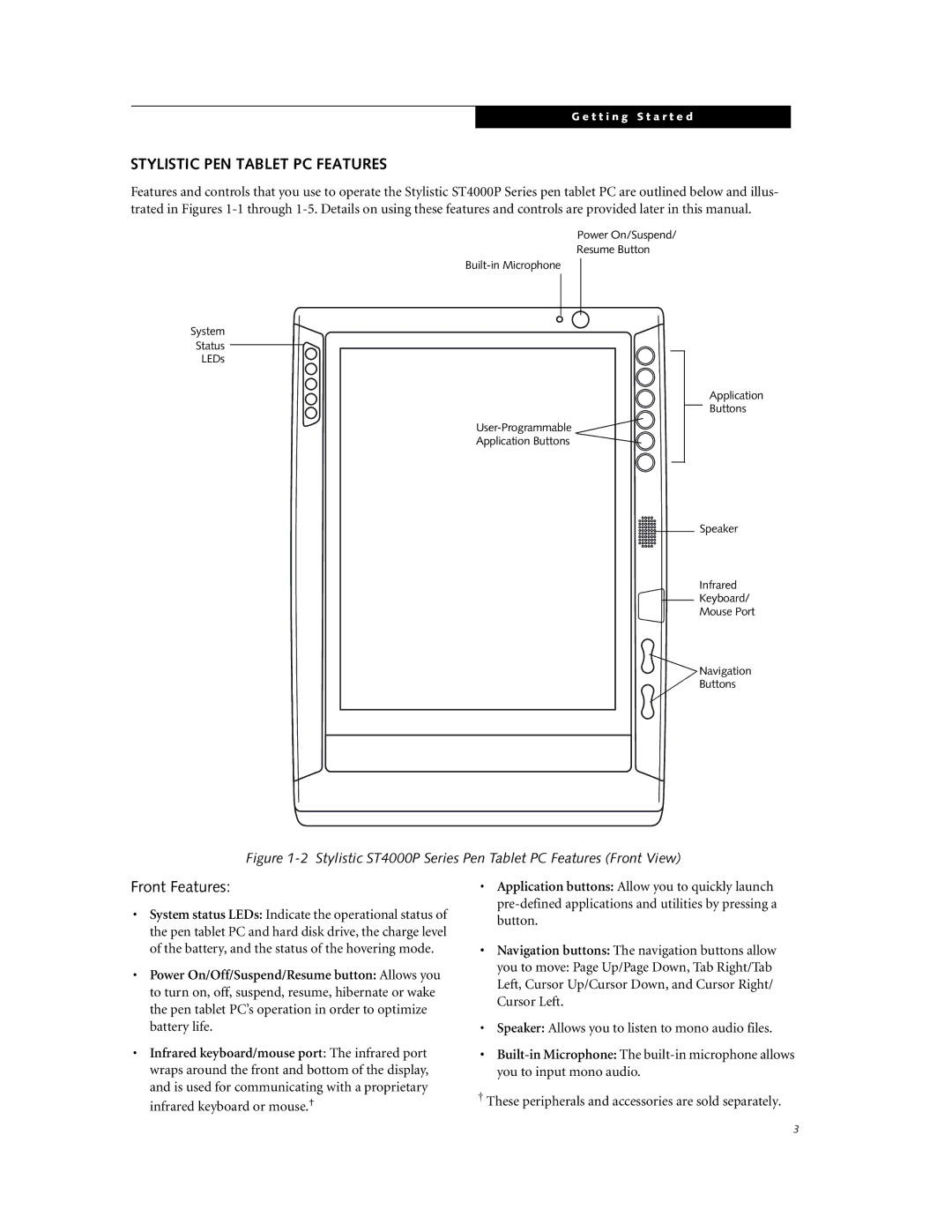
Features and controls that you use to operate the Stylistic ST4000P Series pen tablet PC are outlined below and illus- trated in Figures
Power On/Suspend/
Resume Button
System
Status
LEDs
Application
Buttons

Application Buttons
Speaker
Infrared
Keyboard/
Mouse Port
 Navigation
Buttons
Figure 1-2 Stylistic ST4000P Series Pen Tablet PC Features (Front View)
Front Features:
•System status LEDs: Indicate the operational status of the pen tablet PC and hard disk drive, the charge level of the battery, and the status of the hovering mode.
•Power On/Off/Suspend/Resume button: Allows you to turn on, off, suspend, resume, hibernate or wake the pen tablet PC’s operation in order to optimize battery life.
•Infrared keyboard/mouse port: The infrared port wraps around the front and bottom of the display, and is used for communicating with a proprietary infrared keyboard or mouse.†
•Application buttons: Allow you to quickly launch
•Navigation buttons: The navigation buttons allow
you to move: Page Up/Page Down, Tab Right/Tab Left, Cursor Up/Cursor Down, and Cursor Right/ Cursor Left.
•Speaker: Allows you to listen to mono audio files.
•
†These peripherals and accessories are sold separately.
3