Maintenance & Service Guide
Maintenance & Service Guide
About This Book
Page
Table of contents
600B MT PC
Computer Diagnostic Features
Password Security and Resetting Cmos
Installing and Customizing the Software
Installing the Operating System
Downloading Microsoft Windows Updates
Installing or Upgrading Device Drivers Windows systems
Accessing Disk Image ISO Files
Protecting the Software
Computer Setup F10 Utility
Computer Setup F10 Utilities
Using Computer Setup F10 Utilities
1Computer Setup F10 Utility
Computer Setup-File
2Computer Setup-File
Computer Setup-Storage
3Computer Setup-Storage
Configuration
Option Description Device
Boot Order
Storage Options Sata Emulation
DPS Self-Test
Computer Setup-Security
4Computer Setup-Security
Network Boot
USB Security
Slot Security
System IDs
Computer Setup-Power
Computer Setup-Advanced
5Computer Setup-Power
6Computer Setup-Advanced for advanced users
Bus Options
Device Options
Serial ATA Sata Drive Guidelines and Features
Serial ATA Hard Drive Characteristics
Sata Hard Drives
Sata Hard Drive Cables
Smart ATA Drives
Hard Drive Capacities
Drive/Partition Capacity Limits
File System Controller Type Operating System Partition
Chassis Designation
Micro Tower
Electrostatic Discharge Information
Generating Static
Preventing Electrostatic Damage to Equipment
Relative Humidity Event 55% 40% 10%
Personal Grounding Methods and Equipment
Grounding the Work Area
Static Shielding Protection Levels Method Voltage
Operating Guidelines
Recommended Materials and Equipment
General Cleaning Safety Precautions
Cleaning the Computer Case
Cleaning the Keyboard
Routine Care
Service Considerations
Cleaning the Monitor
Cleaning the Mouse
Tools and Software Requirements
Cables and Connectors
Screws
Hard Drives
Lithium Coin Cell Battery
Removal and Replacement Procedures Micro Tower MT Chassis
Preparation for Disassembly
Access Panel
Front Bezel
Installing Additional Memory
DIMMs
DDR3-SDRAM DIMMs
Populating Dimm Sockets
Installing DIMMs
1DIMM Socket Locations -600B MT PC
Description Socket Color Insertion Order
XMM3 populate first
Page
Connector Name Connector Color Description
Cable Management
Cable Connections
Drives
Drive Positions
2Drive Positions
Installing and Removing Drives
System Board Connector System Board Label Color
3System Board Drive Connections -600B MT PC
Removing the Hard Drive
Front I/O Assembly
Power Switch/LED Assembly
Memory modules Installing Additional Memory on page25
System Board
Battery
Type 1 Battery Holder
Type 2 Battery Holder
Restore and Recovery
Microsoft System Restore
System Recovery
System Recovery Options
System Recovery from the Windows Start Menu
System Recovery at System Startup
System Recovery from Recovery Discs
Recovery Discs
Choosing Recovery Discs
Creating Recovery Discs
Computer Diagnostic Features
Hewlett-Packard Vision Diagnostics
Accessing HP Vision Diagnostics
Survey Tab
Test Tab
Status Tab
Errors Tab
History Tab
Saving and Printing Information in HP Vision Diagnostics
Downloading the Latest Version of HP Vision Diagnostics
Help Tab
Protecting the Software
Troubleshooting Without Diagnostics
Safety and Comfort Before You Call for Technical Support
Helpful Hints
Page
Solving General Problems
Computer will not turn on or start Cause
Click Start Task Manager
End Task
Computer shuts down automatically Cause Solution
Cause Solution
Computer date and time display is incorrect Cause Solution
Cannot remove computer cover or access panel Cause
Poor performance is experienced Cause Solution
Lower the display resolution for the current application or
Solving Diskette Problems
Diskette drive light stays on Cause Solution
Tab. Under Errorchecking click Check Now
Diskette drive cannot write to a diskette Cause Solution
Problem has occurred with a disk transaction Cause Solution
Diskette drive cannot read a diskette Cause Solution
Invalid system disk message is displayed Cause Solution
Cannot Boot to Diskette Cause Solution
Solving Hard Drive Problems
Hard drive error occurs Cause Solution
Disk transaction problem Cause Solution
Drive not found identified Cause Solution
Solving Media Card Reader Problems
Can not write to the media card Cause Solution
Not recognized by the computer Cause Solution
Computer’s software is used to safely eject the card
Solving Display Problems
Blank screen no video Cause Solution
Personalization , select Adjust screen resolution
Dim characters Cause Solution
Image is not centered Cause Solution
Select ImageControl/ Horizontal Position or Vertical
Out of Range displays on screen Cause Solution
Solving Audio Problems
Enable digital CD audio for this CD-ROM device is
Line-in jack is not functioning properly Cause Solution
Sound cuts in and out Cause Solution
Solving Printer Problems
Printer will not print Cause Solution
Printer will not turn on Cause Solution
Printer prints garbled information Cause Solution
Solving Keyboard and Mouse Problems
Optical mouse does not track cursor well Cause Solution
Cursor moves too fast or too slow Cause Solution
Click Start Control Panel Hardware
Sound Mouse
Click the Pointer Options tab
Solving Hardware Installation Problems
New device does not work Cause Solution
Click Hardware and Sound
Click Device Manager
Solving Network Problems
Wake-on-LAN feature is not functioning Cause Solution
Check box to Allow this device to wake Computer
Network status link light never flashes Cause Solution
Diagnostics reports a failure Cause Solution
Match current configuration
New network card will not boot Cause Solution
Solving Memory Problems
Out of memory error Cause Solution
Memory count during Post is wrong Cause Solution
Insufficient memory error during operation Cause Solution
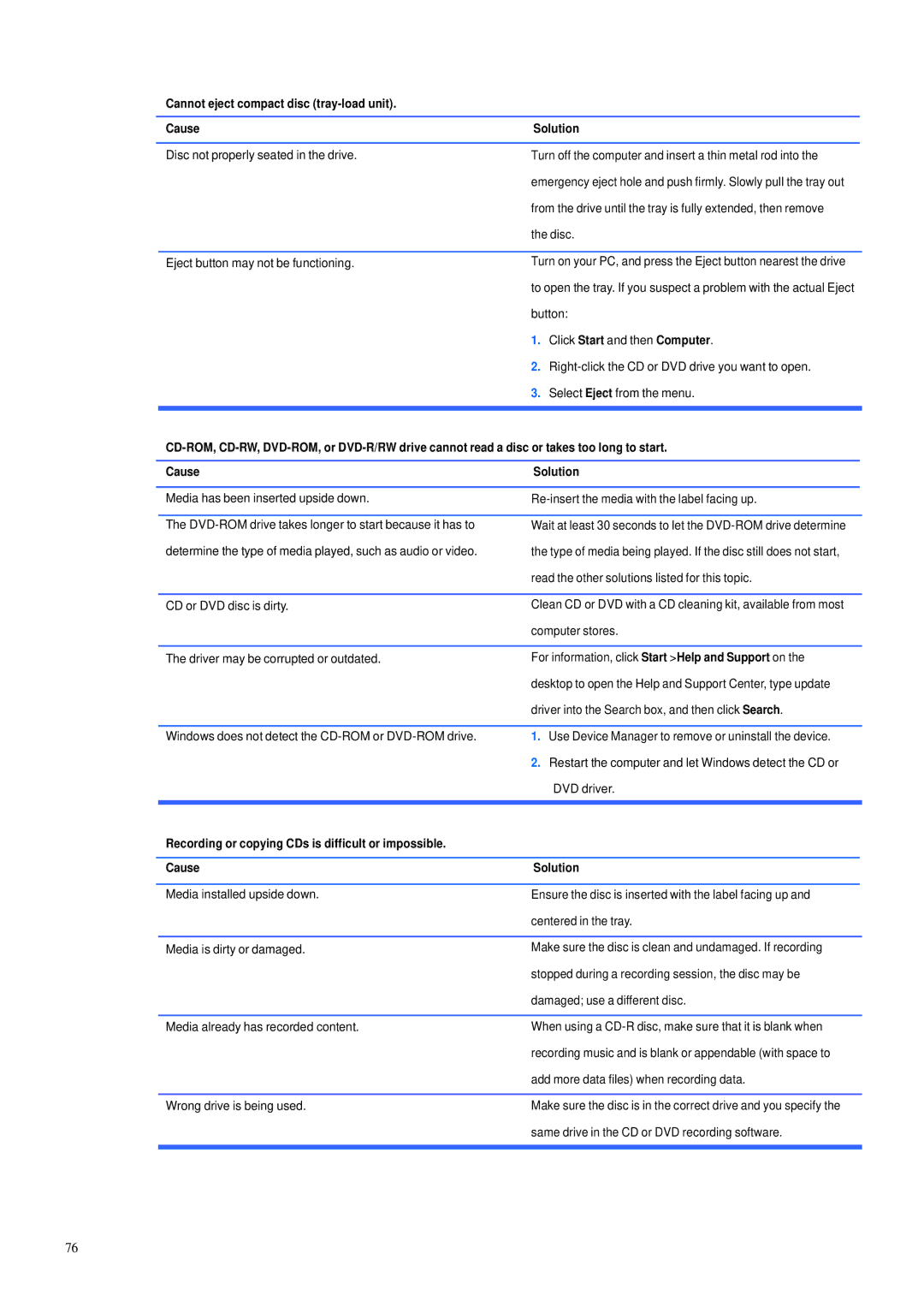
Solving CD-ROM and DVD Problems
Movie will not play in the DVD drive Cause Solution
Cannot eject compact disc tray-load unit Cause Solution
Restart your PC if necessary
Solving USB Flash Drive Problems
USB flash drive not found identified Cause Solution
System will not boot from USB flash drive Cause Solution
Solving Front Panel Component Problems
Solving Internet Access Problems
Unable to connect to the Internet Cause Solution
Windows
Select Start Control Panel
Click Network and Internet
Click Internet Options
Solving Software Problems
Contacting Customer Support
Post Error Messages
Post Text Messages
1Numeric Codes and Text Messages
Control panel message Description Recommended action
Interpreting Post Diagnostic Audible Codes
2Diagnostic Audible Codes
Opened Warning item and select Clear
Beep Definition Possible Cause Recommended Action
Duration of each beep or pause is defined below
Beep/Pause Type Action
Password Security and Resetting
Resetting the Password Jumper
Clearing and Resetting the Cmos
Connector Pin Assignments
Connector and Icon Pin Signal
Connector and Icon 1/8 miniphone Pin Signal
Ethernet BNC
Pin Power for CPU
Headphone
Line-in Audio
Line-out Audio
Pin Power
Monitor
X1, x4, x8, and x16 PCI Express Connector Pin a Signal
PCI Express
X1, x4, x8, and x16 PCI Express Connector Pin B Signal
Power Cord Set Requirements
Japanese Power Cord Requirements
General Requirements
Country-Specific Requirements
Country Accrediting Agency
Specifications
600B MT PC models