Flowchart 2.10-No OS Loading, Hard Drive, Part
No OS
Flowchart 2.11-No OS Loading, Hard Drive, Part
Flowchart 2.12-No OS Loading Hard Drive, Part
Flowchart 2.12-No OS Loading, Hard Drive, Part
Flowchart 2.13-No OS Loading, Diskette Drive
OS not loading
Flowchart 2.14-No OS Loading, Optical Drive
Flowchart 2.15-No Audio, Part
Flowchart 2.16-No Audio, Part
Flowchart 2.17-Nonfunctioning Device
Cmos
Flowchart 2.18-Nonfunctioning Keyboard
Flowchart 2.19-Nonfunctioning Pointing Device
Pointing device Not operating Properly Connect notebook
Flowchart 2.20-No Network/Modem Connection
Illustrated Parts Catalog
Serial Number Location
Illustrated Parts Catalog
Display hinge brackets not illustrated
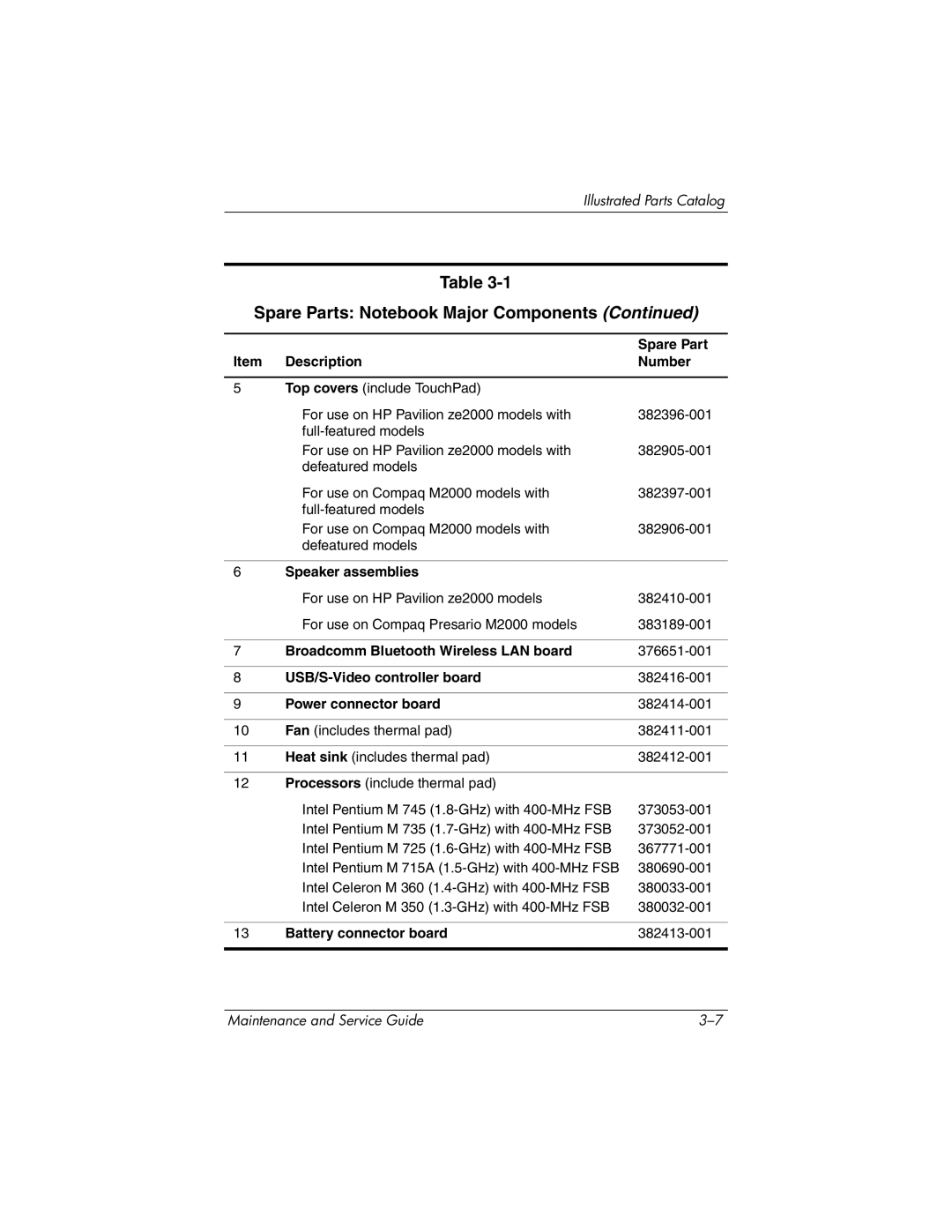
Spare Parts Notebook Major Components
Item Description Number
Illustrated Parts Catalog
Item Description Number Keyboards
Illustrated Parts Catalog
Broadcomm Bluetooth Wireless LAN board
Power connector board
Battery connector board
Spare Part
Illustrated Parts Catalog
Base enclosures
Miscellaneous Plastics Kit
Illustrated Parts Catalog
Battery packs
Item Description Number Mini PCI communications cards
Memory modules 266 MHz
Optical drives include bezel
Miscellaneous Plastics Kit
Miscellaneous Plastics Kit Spare Part Number Information
Mass Storage Devices
USB digital drive not illustrated
Mass Storage Devices Spare Part Number Information
Optical drives
Miscellaneous
Spare Parts Miscellaneous not illustrated
Description Number Power cords
Spare Part Number Description
Sequential Part Number Listing
Spare Parts Sequential Part Number Listing
Keyboard for use on Compaq Presario M2000 models in Taiwan
Keyboard for use on HP Pavilion ze2000 models in Europe
Spare Parts Sequential Part Number Listing
Spare Parts Sequential Part Number Listing
Spare Parts Sequential Part Number Listing
Spare Parts Sequential Part Number Listing
Removal and Replacement Preliminaries
Tools Required
Service Considerations
Plastic Parts
Preventing Damage to Removable Drives
Preventing Electrostatic Damage
Packaging and Transporting Precautions
Workstation Precautions
Grounding Equipment and Methods
Removal and Replacement Preliminaries
Typical Electrostatic Voltage Levels
Static-Shielding Materials
Relative Humidity Event 10% 40% 55%
Material Use Voltage Protection Level
Removal and Replacement Procedures
Serial Number
Section Description # of Screws Removed
Disassembly Sequence Chart
Disassembly Sequence Chart
Disassembly Sequence Chart
Preparing the Notebook for Disassembly
Battery Pack Spare Part Number Information
Hard Drive Spare Part Number Information