ATA/IDE Configuration Submenu
Main | Advanced |
| Security |
| Power |
| Boot | Exit | |
IDE Configuration |
|
|
|
|
|
| |||
ATA/IDE Configuration |
| [Legacy] |
|
| |||||
Legacy IDE Channels |
| [PATA Pri and Sec] | |||||||
PCI IDE Bus Master |
| [Enabled] |
|
| |||||
Hard Disk |
| [Disabled] |
|
| |||||
< [PATA Primary Master | : | xxxxxxx] |
|
| |||||
< [PATA Primary Slave | : | Not Detected] | |||||||
<[PATA Secondary Master : xxxxxxx]
<[PATA Secondary Master : Xxxxxxx]
Using the BIOS Setup Program
← → | Select Screen |
↑ ↓ | Select Item |
Enter | Select < |
F1 | General Help |
P9 | Setup Defaults |
F10 | Save and Exit |
ESC | Exit |
|
|
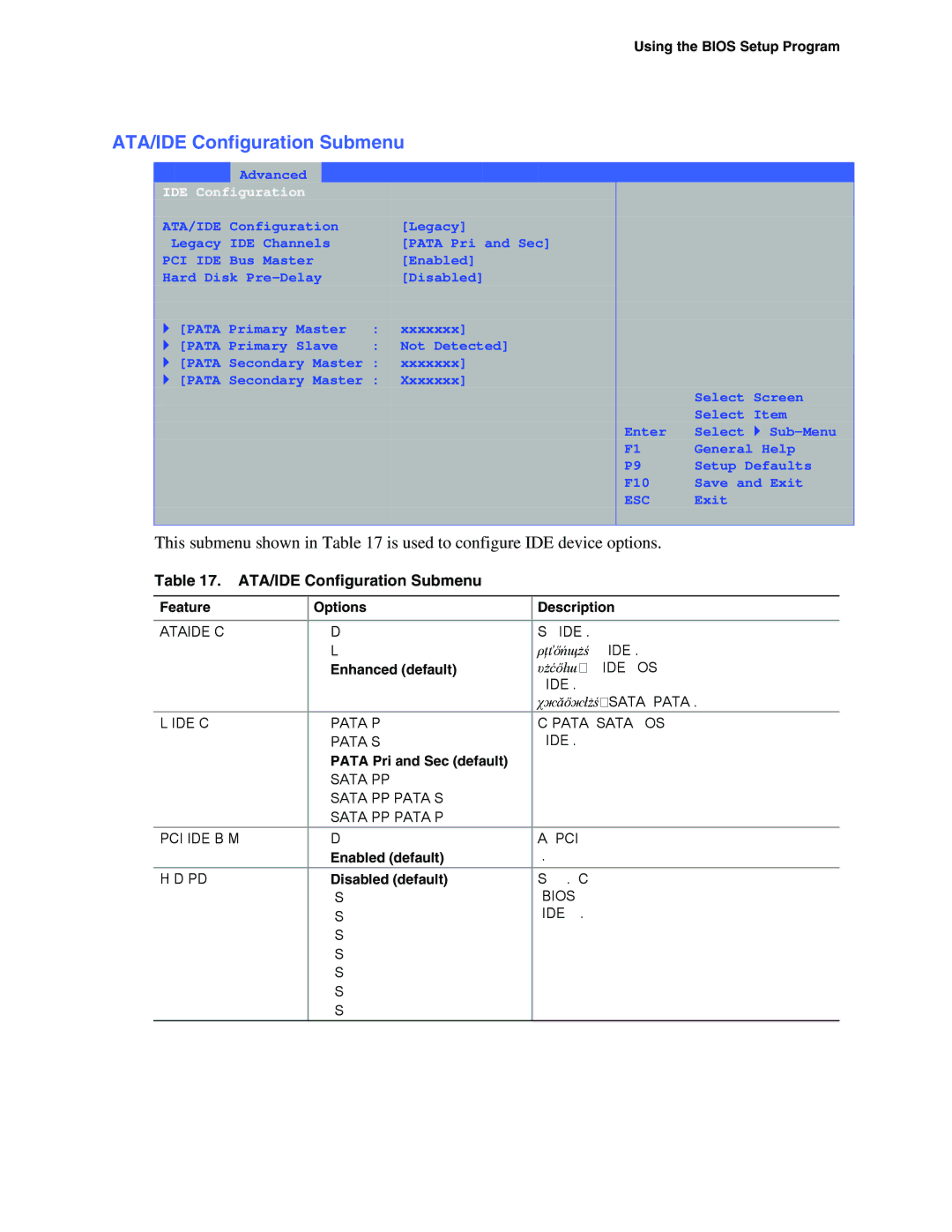
This submenu shown in Table 17 is used to configure IDE device options.
Table 17. ATA/IDE Configuration Submenu
Feature | Options | Description | |
|
|
|
|
ATA/IDE Configuration | • | Disabled | Specifies the integrated IDE controller. |
| • | Legacy | Disabled disables the integrated IDE controller. |
| • | Enhanced (default) | Legacy enables up to two IDE channels for OS |
|
|
| requiring legacy IDE operation. |
|
|
| Enhanced all SATA and PATA resources. |
Legacy IDE Channels | • | PATA Pri only | Configures PATA and SATA resources for OS |
| • | PATA Sec only | requiring legacy IDE operation. |
| • PATA Pri and Sec (default) |
| |
| • | SATA P0/P1 only |
|
| • SATA P0/P1, PATA Sec |
| |
| • SATA P0/P1, PATA Pri |
| |
|
|
|
|
PCI IDE Bus Master | • | Disabled | Allows a PCI device to initiate a transaction as |
| • | Enabled (default) | a master. |
Hard Disk | • | Disabled (default) | Specifies the hard disk drive |
| • | 3 Seconds | the BIOS to insert a delay before attempting to |
| • | 6 Seconds | detect IDE drives in the system. |
| • | 9 Seconds |
|
| • | 12 Seconds |
|
| • | 15 Seconds |
|
| • | 21 Seconds |
|
| • | 30 Seconds |
|
65