VX6100
ContentsContents
Using Phone Menus
102
Bilingual English and Spanish capabilities
Check Accessories
Important Information
FCC Part 15 Class B Compliance
Technical Details
Bodily Contact During Operation
FCC RF Exposure Information
Vehicle-Mounted External Antenna
Manner Mode Key
Phone Overview
Earpiece
Headset Jack
Menus Overview
Press Left Soft Key Menu. Press to Scroll
Turning the Phone On and Off
Battery
Press and hold until the display turns off
Screen Icons
Press to end the call
Receiving Calls
Correcting Dialing Mistakes
Manner Mode
Lock Mode
Volume Quick Adjustment
Mute Function
Voice Command Dialing
Call Waiting
Caller ID
Speed Dialing
Text Input
Using Abc Multi-tap Text Input
Using T9 Mode Text Input
Using the Next Key T9 Mode
Text Input Examples
Contacts Entries
Basics of Storing Contacts Entries
New Name / Existing
Options to Customize Your Contacts
Adding or Changing the Group
No Group / Family / Friends / Colleagues / Business School
Changing the Call Ringer
Changing the Secret Setting
Adding or Changing the Memo
Adding or Changing the Picture ID
Select
Editing Contacts Entries
Adding Speed Dial
Deleting a Speed Dial
Press Remove Speed Dial
Default Numbers
Press Set as Default #
Changing the Default Number
Editing Stored Phone Numbers
Deleting
Phone Numbers With Pauses
Searching Your Phone’s Memory
Adding a Pause to an Existing Number
Scrolling Through Your Contacts
Searching by Letter
Making a Call From Your Phone’s Memory
Voice Command Dialing
Single Digit Speed Dialing
Double Digit Speed Dialing
Prepending a Stored Number
Using Phone Menus
Menu Access
Camera Menu
Take PIX Menu
Contacts Menu
Gallery Menu
PIX Place Menu
Press Contacts
New Number Menu
New E-mail Menu
Groups Menu
Speed Dials Menu
Recent Calls Menu
Dialed Calls Menu
Received Calls Menu
Missed Calls Menu
Call Timer Menu
Messages Menu
KB Counter Menu
Received / Transmitted / Total
Msg Settings Selects messages setting
Press Messages
Voice Mail Menu
New TXT Msg Menu
Send
Priority
Normal / Urgent
Callback #
Custom / My VCard
New PIX Msg Menu
Preview / Send / Priority / Delivery Notice / Save Message
Inbox Menu
Outbox Menu
Msg Settings Menu
Saved Menu
Get It Now Menu
Erase All Menu
Press Erase All
Downloading Applications
Press Get It Now
Get It Now Menu
Get Information Menu
Add new applications and remove old ones at any time
Mobile Web Menu
Press Mobile Web Start Browser Web Messages Web Alerts
Start Browser Menu
Ending a MiniBrowser Session
Initiating a Phone Call From MiniBrowser
Media Menu
Web Messages Menu
Web Alerts Menu
Images Menu
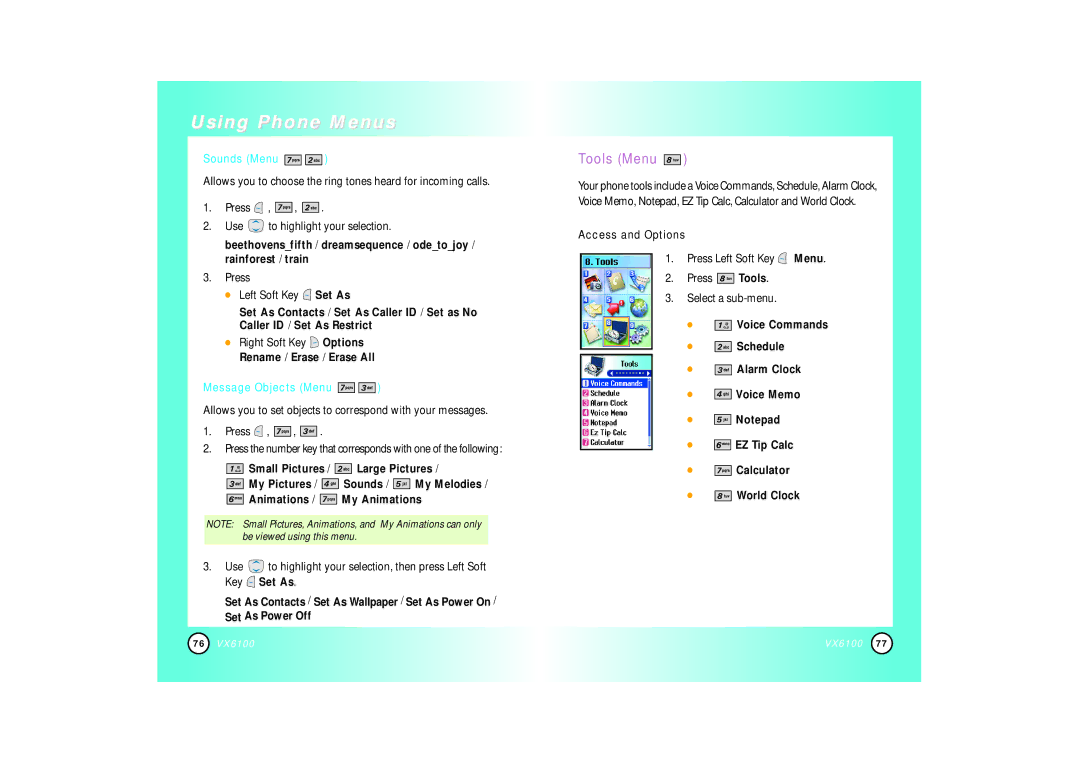
Tools Menu
Sounds Menu
Right Soft Key Options Rename / Erase / Erase All
Message Objects Menu
To Voice Dial a Name From Your Contacts List
Voice Commands Menu
To Voice Dial a Number
Alarm Clock Menu
Schedule Menu
Once / Daily / Mon-Fri /Weekends
Voice Memo Menu
Settings Menu
Press Settings
EZ Tip Calc Menu
Calculator Menu
Alerts you to the status of cellular service
Ringer / Earpiece / Key Beep / Speaker
LCD / Key Light Timer
Display Menu
50% / 60% / 70% / 80% / 90% / 100%
Always Off
Wallpaper / Power On / Power Off
Normal / Analog / Digital
10%/20%/30%/40%/50%/60%/70%/80%/90%/100%
Select Size or Color
System Menu
Options for specific system network settings
Text Editor Menu
Security Menu
Press Reset Default
Call Setup Menu
Press Erase Contacts
Off / Every 10 sec / Every 30 sec / Every 60 sec
Press Use to select a setting, then press . On / Off
Data Settings Menu
Voice Services Menu
Location Menu
Phone Info Menu
Allows you to view your phone number Press
Allows you to view all the icons and their meanings Press
Safety
TIA Safety Information
Charger and Adapter Safety
Battery Information and Care
Safety Information
Explosion, Shock, and Fire Hazards
FDA Consumer Update
General Warnings and Cautions
110
112
114
Driver Safety Tips
Consumer Information on SAR
Specific Absorption Rate
Accessories
Warranty Information
What this Warranty Covers
Index
126 VX6100
ContenidoContenido
Uso de los menús del teléfono
Eficiente
Compruebe sus accesorios
Información importante
Cumplimiento de clase B según el artículo 15 de la FCC
Detalles técnicos
Opcional, en caso de estar disponible
Contacto corporal durante el funcionamiento
Antena externa instalada en un vehículo
Precaución
Auricular
Enchufe del auricular
Descripción general de los menús
La batería
Encender y apagar el teléfono
Corrección de errores en la marcación
Oprima para terminar la llamada
Recibir llamadas
Iconos en pantalla
Ajuste rápido del volumen
Modo de cortesía
Modo de bloqueo
Función de silencio
Llamada en espera
ID de llamador
Marcado rápido
Marcado con comandos de voz
Introducción de texto
Ejemplos de introducción de texto
Uso de la entrada de texto Abc Multi toques
Uso de la entrada de texto en modo T9
Uso de la tecla SIG Modo T9
Entradas de contactos
Use para seleccionar una entrada nueva o existente y oprima
Nuevo Nombre / Existente
Use para resaltar la información que desea editar y oprima
Opciones para personalizar sus contactos
Agregar o cambiar el grupo
No Grupo / Familia / Amigos / Colegas / Negocio Escuela
Cambio del timbre de llamada
Agregar o cambiar memorándum
Cambio de la configuración secreta
Agregar o cambiar Id. de imagen
Agregar entradas de contactos
Agregar marcado rápido
Borrar un marcado rápido
Oprima Deshacer marcacion rapida
Edición de nombres almacenados
Números predeterminados
Cambio del número predeterminado
Borrar
Números de teléfono con pausas
Búsquedas en la memoria de su teléfono
Agregar una pausa a un número existente
Desplazarse por sus contactos
Búsqueda por letra
Hacer una llamada desde la memoria del teléfono
Marcado rápido de una cifra
Marcado rápido de dos cifras
Marcado con comandos de voz
Anexar al principio de un número almacenado
Acceso a los menús
Cámara Menú
Acceso rápido a la función de cámara
Acceso y opciones
Contactos Menú
Oprima o la tecla lateral de cámara para tomar una foto
Sorrartodos/Verinfodeimagen
Oprima Contactos
Nuevo Número Menú
Nuevo E-mail Menú
Grupos Menú
Marcaciones Rápidas Menú
Lista Llam Menú
Llam. saliente Menú
Llam. entrante Menú
Llam. fracasada Menú
Mensajes Menú
Tiempo de uso Menú
KB Contador Menú
Recibido / Transmitido / Total
Oprima Mensajes
Borrar todos borra todos los mensajes almacenados
Correo de voz Menú
Nuevos Msj Txto Menú
Devolución de llamada con su mensaje
Activado / Desactivado / Modific
Mejorado / Normal
Oprima Contactos o Lista Llam
Nuevos Msj Foto Menú
Entrada Menú
Reenviar
Borrar
Salida Menú
Enviado a
Configuraciones de mensaje Menú
Guardado Menú
Activado / Desactivado
Palabra T9 / Abc
Get It Now Menú
Borrar todos Menú
Oprima Borrar todos
Descarga de aplicaciones
Oprima Get It Now
Get It Now Menú
Obtenir Información Menú
Acceder a Get It Now
Mobile Web Menú
Iniciar Browser Menú
Terminar una sesión de Mininavegador
Uso del navegador
Teclas suaves
Introducción de texto, números o símbolos
Uso de favoritos
Inicio de una llamada telefónica desde el Mininavegador
Medios Menú
Mensajes de Web Menú
Alertas de Web Menú
Imagen Sonido Objetos de mensaje de texto
Aparato Menú
Sonido Menú
Oprima Tecla suave izquierda Fijar
Objectos de mensaje de texto Menú
Comandos de voz Menú
Para Marcar un Número Comandos de Voz
Alarma de reloj Menú
Oprima Seleccione la alarma que desea editar
Plan Menú
Una vez / Diario / Lun-Vie /Fines de semana
Ambiente Menú
Timbre / Audífono / Timbre tecla / Alravoz
Le alerta del estado del servicio celular
Cambiar de servicio Menú
Sonidos ERI Menú
LCD / Hora luz tecla
Mostrar Menú
30% / 40% / 50% / 60% / 70% / 80% / 90% / 100%
Normal / Analógico / Digital
Fondo / Activado / Desactivado
Dígitos de llamada Menú
Oprima Use para seleccionar un NAM y oprima . NAM1 / NAM2
Sistema Menú
Editor de texto Menú
Seguridad Menú
Oprima Cancelar para salir sin borrar
Oprima Borrar Contactos
Oprima Restablecer Implícito
Funciones Menú
Configuraciones de Datos Menú
TTY Llena / TTY+Charla / TTY+Oír / TTY Desactivado
Servicio de voz Menú
Flip Abierto
Habilitar / Inhabilitar
Lugar Menú
Info de tel Menú
Le permite ver su número de teléfono Oprima
Seguridad
Información de seguridad de la TIA
Seguridad del cargador y el adaptador
Información sobre la batería y su cuidado
Información de seguridad
Explosión, descargas y riesgo de incendio
Advertencias y precauciones generales
Actualización de la FDA para los consumidores
¿Qué tipos de teléfonos son el tema de esta actualización?
112
12. ¿Dónde puedo hallar información adicional?
Consejos de Seguridad para Conductores
Información al consumidor sobre la SAR
Tasa de absorción específica, Specific Absorption Rate
Accesorios
Información de la garantía
LO QUE Cubre Esta Garantía
Índice
126 VX6100

 )
 ,


 ,


 .
 to highlight your selection.
 Set As
 Options Rename / Erase / Erase All

 )
 ,


 ,


 .


 Small Pictures /


 Large Pictures /


 My Pictures /


 Sounds /


 My Melodies /


 Animations /


 My Animations
 to highlight your selection, then press Left Soft Key
 Set As.
 )
 Menu.


 Tools.


 Voice Commands


 Schedule


 Alarm Clock


 Voice Memo


 Notepad


 EZ Tip Calc


 Calculator


 World Clock