Page
122
515
114
125
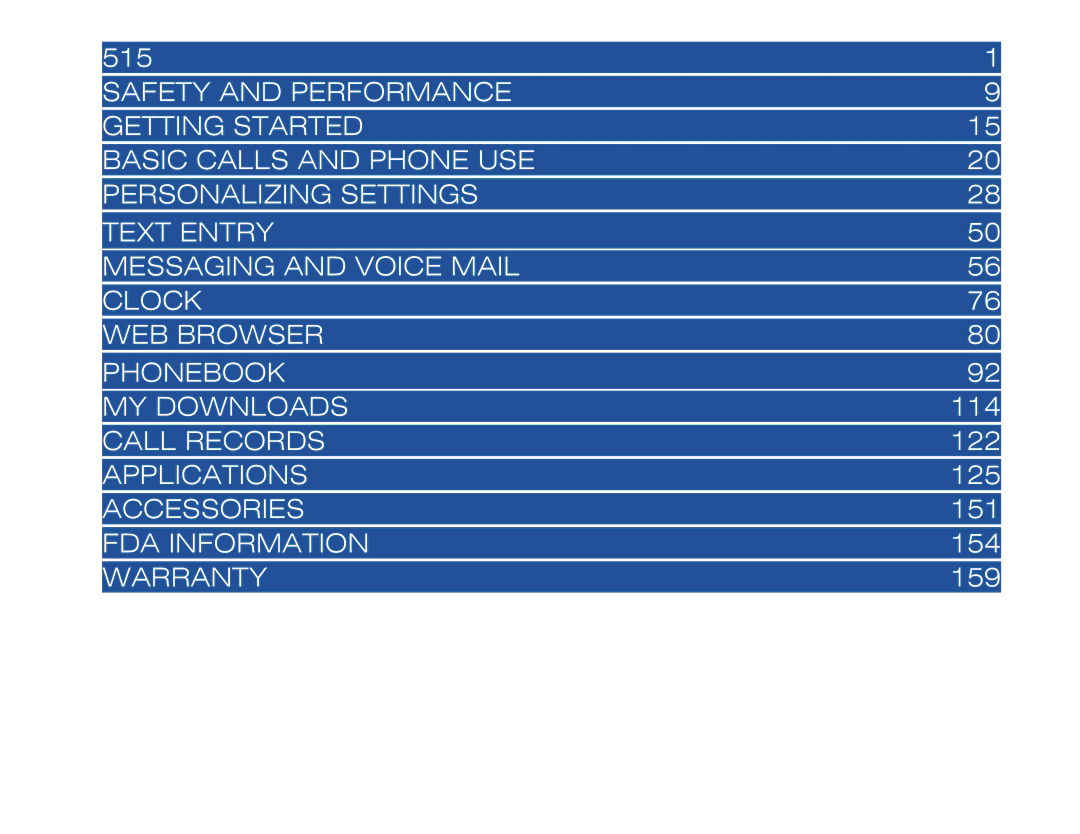
Contents
Personalizing Settings
Messaging and Voice Mail
Phonebook
Applications 125
Ctia
Wireless System Structure
User Guide Conventions
Phone Controls
Graphic Display Area
Alarm
Display Information
Status Icons
Phonebook See Flag
When an option list is displayed
Main Menu
Press Select to select the option
Menu Shortcut Selection
Keypad Shortcuts
Sub-Menu Options
Personalize your phone with down-loadable content
Main Phone Features
Internet Enabled IR/business card transfer
Contacts Scheduler/Calendar events To Do tasks
Display Icons
Status Bar Indicators
No icon shows for Normal mode
Dial Screen Icons
No icon shows for Normal priority
Line Item Icons
Full-size Pop-up Screen Icons
Alert Pop up Icons
User Caution
Safety and Performance
Emergency Services
See Flags for more emergency information
General Care
Safety
General Safety
Road Safety
Radio Frequency RF Signals
Aircraft Safety
Use hands-free operation, if available
Electromagnetic Interference
Blasting Areas
Battery Care and Disposal
Do not dispose of battery packs in a fire
Potentially Explosive Atmospheres
Performance
Getting Started
Service Activation
FDN is a network service provider dependent feature
Voice Mail and Text Messaging
Removing a SIM Card
SIM Card
Inserting a SIM Card
Checking the Battery
Preparing the Battery
Charging the Battery the First Time
Low Battery Indication
Charging the Battery
Changing the Battery
Frequency Bands
Powering-On the Phone
Language Display
Turning the Phone On
Ending Calls
Basic Calls and Phone Use
Dialing Calls
Receiving Calls
Unsuccessful Calls/Auto Redial
Using Features/Application During a Call
Receiving a Call While in an Application
Accepting a Call
Returning an Unanswered Phone Call
Call Features
Caller ID
Last Number Redial
Speed Dialing
Emergency Calls
Entering a Pause for Dtmf Dialing
Dialing a Number in Message Text
Volume Controls
Forwarding Calls
Voice Mail
Placing a Call On Hold
Call Timer and Call Charger
Using Call Features During a Call
Call Waiting
Conference Calls
Dtmf Tones
New Call
Private Conversation
Disconnecting a Party
IR Send/Receive
Recording a Call
Volume
Personalizing Settings
Phone Settings
Settings menu icon
Set Tones
Ring Volume
Setting Options
Ring Tune and New Message Tone
Phone Modes
Mode Selection
Answer Options
Activate Any Key Answer Option
Default Mode Settings
With the backlight always On, the battery life is reduced
Mode New Message Tone
Changing Mode Settings
Mode Ring Tune
Mode Ring Volume
Press 5 to display the Setting options list
Mode Backlight
Mode Settings Options
Phonebook
Screen Settings
Own Number
Wallpaper
Backlight
Color Theme
Contrast
Auto-hyphenation
Display Call Timer
Language
Display Call Charge
Creating OFF Profile
Call Settings
Call Forwarding
Adding and Editing Profiles
Vacation Always Forward Unchanged Never
Deleting a Profile
Setting Call Forwarding On
Setting Call Forwarding Off
Manual Call Forwarding
Manually Set Call Forwarding Off
Setting Call Waiting On/Off
Call Waiting
Check Call Forwarding Status
Auto Redial
Security Settings
Changing Pins
Send Own Number Caller ID
Changing Security Code
Locks
Changing PIN 2 Code
Forgot Your Security Code
Fixed Dialing
Phone Lock on
New Network Search
Network Settings
Network Search Type
SIM List
Moving a Network
Other Settings
Frequency Band
Adding a Network
Remote Server
Synchronization Settings
User id and password are case sensitive
Local Server
Factory Settings Connection
TTY Settings
Internet Settings
User Settings Connection
Certificates
Show Versions
Time Out
Erase Data
Reset Settings
Reset Factory Settings
Numbers
Text Entry
Normal Text ABC
Press 0 to create a space between words
Used by 9 fields
Symbol Mode
T9 Text Entry
Text editor options
Text Format
Text Entry Options Menu
Text Color
Text Alignment
Text Highlight
Text Paste
Continue with text entry
Text Object
Cannot preview Emoticons
Text Edit Settings
T9 Text Language
Message Center Overview
Accessing Messages
Messaging and Voice Mail
Message center menu icon
Message Center Folders
Message Center Icons
Broadcast
Message Center Options Menu
To display the message center Options menu
Message Settings
Email Settings
SMS/EMS Settings
MMS Settings
Broadcast Settings
Voice Mail Setting
To establish the settings for voice mail See Flag
Broadcast messages are from the network provider
To check if new messages are in the Message center See Flag
Checking New Messages
Receiving and Reading Messages
Making a Call to a Phone Number
Phone Number or Email in Message Text
Displaying Next/Previous Message
Adding Email to Blacklist
Message Folder List Options Menu
Launch Browser
Message View Options Menu
SIM card
Creating and Sending Messages
SMS and EMS
Slide/Screen Composition
After finished composing the slide or slide presentation
Email Message
Previewing Attachments
Attachments
Adding an Attachment
Deleting Attachments
New Message Options Menu
Editing Messages
Moving Messages to SIM
Message Memory Maintenance
Moving Messages to Another Folder
Deleting a Message
Deleting Messages Permanently
Adding Email to Blacklist
Deleting All Messages
Restoring Messages
Deleting a Blacklist Email
Editing a Blacklist Email
An Email address in the Blacklist may be edited
An Email address may be removed from the Blacklist
Clock
Setting Time
Setting the Time
Show Clock
Setting the Date
Network Time
Setting the Alarm Off
Setting the Alarm
Setting Auto On/Off
Formatting the Date and Time
Setting Time Zone
Setting Daylight Savings
Web Browser
Accessing the Internet
Accessing the Internet may be done by two methods
Connect to Bookmark
Connect to URL in Saved
Connect to Specific URL
Connect to Address History URL
Connect to Last Webpage
Screen with the load image setting Off
MMode Options Menu
Downloading Sounds
What Can I Download?
Downloading Apps and Games
Wbmp, and .png To download an image for viewing
Downloading Pictures
Pictures may be attached to MMS messages and Emails
Go to Bookmark
NEC Site Bookmarks
Adding a Bookmark
Bookmark Folder Options Menu
Bookmark List Options Menu
To delete all bookmarks in a selected folder
Deleting Bookmarks
To delete a specific bookmark
To delete all folders See Flag
Viewing a Saved
Saved Pages
Saving a
Save Pages Options Menu
Deleting Saved Pages
Protecting a Saved
To protect or un-protect a saved
To delete a specific saved
Setting Load Files
Settings
Setting Scroll
Setting Tables and Wrap Text
To check the Common settings
Setting Cookies
Check Settings
To check the Browser settings
Phonebook Types
FDN and SDN are network provider dependent features
Phonebook
Phonebook menu icon
Number Pre-loaded Entry Screen
Number Entry Screens
Blank Entry Screen
Press End to exit the message screen
Choose Location
Storing Numbers and Names in Phonebook
Adding a New Name/Number
Full Phonebook
Phone Number Type
Location Number in Use
Ungroup a detail entry
Editing or Personalizing Numbers
Phonebook Entry Edit
Phonebook Field Icons
Allocate a Voice Tag
Allocate a Group
To remove a phone entry from all Groups
Allocate LED Color
Saving the Changes
Allocate a Phonebook Picture
Allocate a Ring Tune
100
Accessing the Edit Function
SIM Edit
101
Phonebook Options Menu
Entry Details Option Menu
Copying Entries Between Phonebooks
102
Memory Availability
Copying/Moving a Phonebook Entry
103
Within Same Phonebook
Overwrite Location
104
To Another Phonebook
From Phonebook
Delete a Single Entry
105
From Entry Details
106
Delete All Phone Entries
Groups
Displaying All Groups and Group Entries
107
Adding/Moving to a Group
108
Remove Entry from Group
Alphanumeric
Sorting and Recall Stored Numbers
109
To change from the location sort to the alphanumeric sort
Voice Tag
110
Go To Location
Calling Stored Numbers
Sending an Email
Phonebook Availability Summary
111
Refer to page 69 for Email Message instructions
Displaying Voice Tag List
Voice Tags
112
Playing a Voice Tag
Sending IR from Phonebook
113
114
My Downloads
Apps and Games
Run an Application or Game
Application Settings
115
Software Settings
116
CA Certificate
117
Software list menu 2/2 includes the options
Layer and the CA Certificate displays
Music
118
Delete All
119
Delete Current
Edit Name
120
Using Pictures Options Menu
Pictures
Selecting and Displaying an Image
121
This option allows you to change the name of the picture
Total Calls
Call Records
Last Call
Call Logs
Calling From Call Record Details
123
Calling from a Call Record
Copying Call Record to Phonebook
Viewing Call Record Details
124
Deleting Call Records
Applications menu icon
Applications
125
Send key performs no function
Calculator
126
Viewing Calendars and Daily Events
Scheduler
127
Refer to page 129 to add an event
Accessing Add New and Edit Screens
Reminder
129
Adding/Editing an Event
130
Copying an Event
131
Deleting Events
Go To Date
Go To Date default is the current date
132
Go To URL
Viewing Summary
To send your schedule to another 515 wireless phone
133
IR Sending
134
To access and view task details
To Do List
Viewing To Do Tasks and Task Details
Accessing To Do Add New and Edit Screens
135
Due Date
136
Adding/Editing a Task
137
Deleting Tasks
Filtering
138
To delete only Public tasks or Private tasks
Sorting
Changing Task Detail Status
139
Viewing To Do Summary
Adding and Editing Notes
140
Viewing Notes
Deleting Notes
141
To edit a note from the Notepad list screen
Sending as SMS/EMS
142
Sending as Email
Currency Converter
Setting the Currency Converter Fields
Resetting Currency Converter Fields
143
144
Accessing Voice Memo
Voice Memo
Adding a Memo
Playing Memos
145
Labeling a Memo
Deleting Memos
146
Setup for Synchronization
Synchronization
Remote Server
Synchronization Process
Synchronization Errors
147
Full Synchronization
Tasks Listed
Synchronizing Scheduler
149
Synchronizing Phonebook Entries
Synchronizing To Do Task Entries
IR Receive
150
151
Accessories
Authorized Accessories
Part Number
AC Adapter and Charger Unit
Vehicle Power Adapter
152
Hands-free Headset
USB Connector Cable
153
FDA’s Consumer Update
154
155
What are the results of the research done already?
156
What about children using wireless phones?
157
Where can I find additional information?
158
Limited Warranty
Warranty and Service
Wireless Phone
159
160
NEC Authorized Accessories
161
NEC Customer Service Support
162
Index
Color LED
164
Wherever wireless phone service is available
165