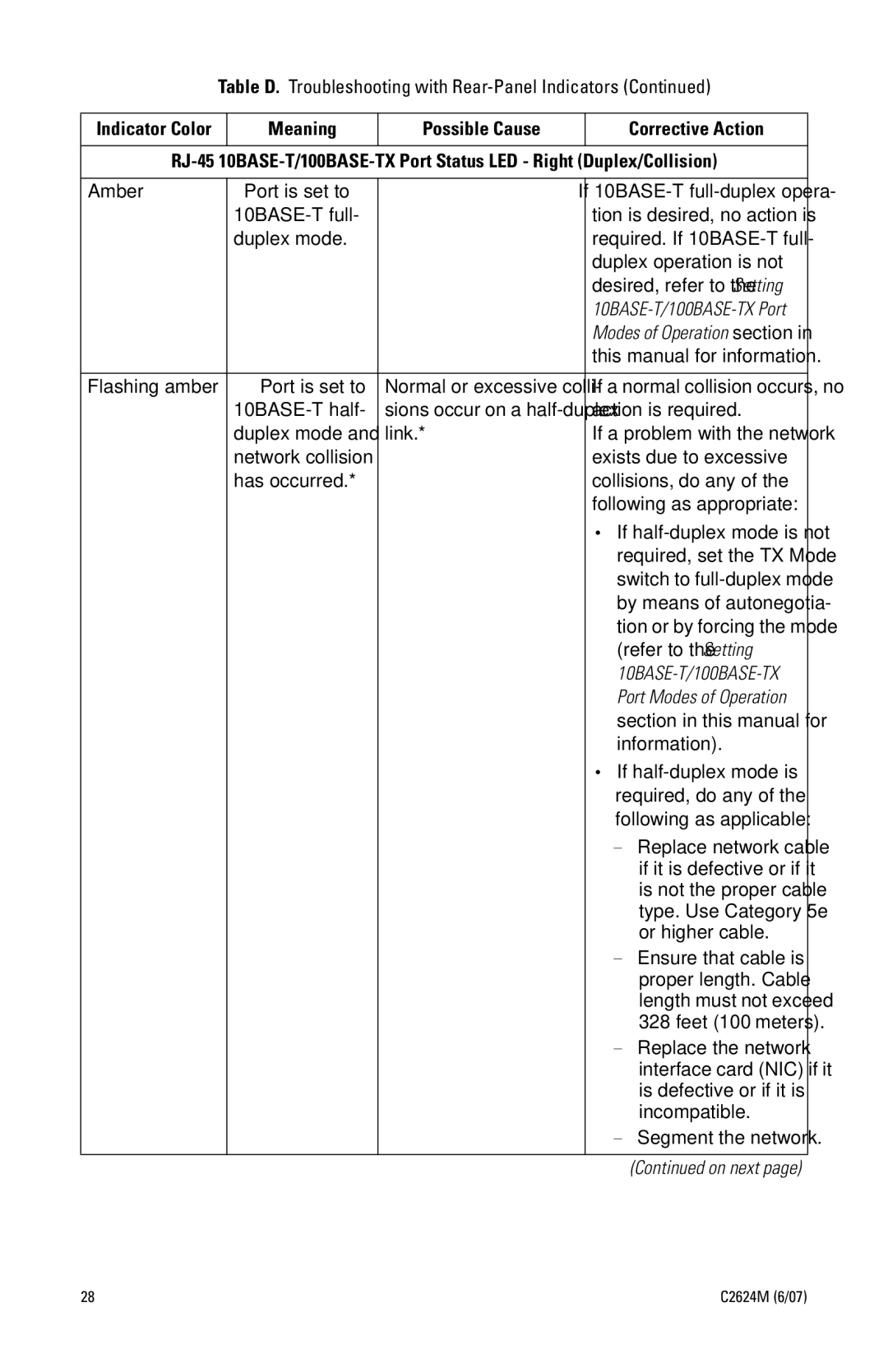
Table D. Troubleshooting with Rear-Panel Indicators (Continued)
Indicator Color | Meaning | Possible Cause |
| Corrective Action |
|
|
|
| |
|
|
|
| |
Amber | Port is set to | — | If | |
|
| tion is desired, no action is | ||
| duplex mode. |
| required. If | |
|
|
| duplex operation is not | |
|
|
| desired, refer to the Setting | |
|
|
| ||
|
|
| Modes of Operation section in | |
|
|
| this manual for information. | |
|
|
|
| |
Flashing amber | Port is set to | Normal or excessive colli- | If a normal collision occurs, no | |
|
| sions occur on a | action is required. | |
| duplex mode and | link.* | If a problem with the network | |
| network collision |
| exists due to excessive | |
| has occurred.* |
| collisions, do any of the | |
|
|
| following as appropriate: | |
|
|
| • If | |
|
|
| required, set the TX Mode | |
|
|
| switch to | |
|
|
| by means of autonegotia- | |
|
|
| tion or by forcing the mode | |
|
|
| (refer to the Setting | |
|
|
| ||
|
|
| Port Modes of Operation | |
|
|
| section in this manual for | |
|
|
| information). | |
|
|
| • If | |
|
|
| required, do any of the | |
|
|
| following as applicable: | |
|
|
| – | Replace network cable |
|
|
|
| if it is defective or if it |
|
|
|
| is not the proper cable |
|
|
|
| type. Use Category 5e |
|
|
|
| or higher cable. |
|
|
| – Ensure that cable is | |
|
|
|
| proper length. Cable |
|
|
|
| length must not exceed |
|
|
|
| 328 feet (100 meters). |
|
|
| – | Replace the network |
|
|
|
| interface card (NIC) if it |
|
|
|
| is defective or if it is |
|
|
|
| incompatible. |
|
|
| – | Segment the network. |
(Continued on next page)
28 | C2624M (6/07) |