Iolan DS Family DS1 User’s Guide
EN 55022 1998, Class A, Note
Table of Contents
Installation
Using the WebManager
Accessing the Menu Menu Conventions
DHCP/BOOTP
Using the DeviceManager
Command Line Interface
Server Commands
Line Commands
Appendix a Troubleshooting
115
Preface
About This Book
Intended Audience
Documentation
Typeface Conventions
Online Help
Contacting Technical Support
Making a Technical Support Query
Repair Procedure
Feedback on this Manual
Device Server Features
Introduction
About the Iolan Device Server
Hardware
Supported Products/Versions
Software
Security
Web Browsers
Managing/Accessing devices attached to the Device Server
Typical Applications Summary
Managing the Device Server
Network Security
Typical Applications Summary
Introduction
Installation
Iolan Device Server Components
Powering Up the Device Server
Setting Jumpers
Using DeviceManager
Setting an Initial IP Address
ARP-Ping to assign a pinging it
Using a Direct Connection
Using DHCP/BOOTP
Using ARP-Ping
LED Guide
IPv6 Network
Link/10/100
Pinouts
Pin
Terminal DB25 Connector
EIA-232 Cabling Diagrams
Modem DB25 Connector
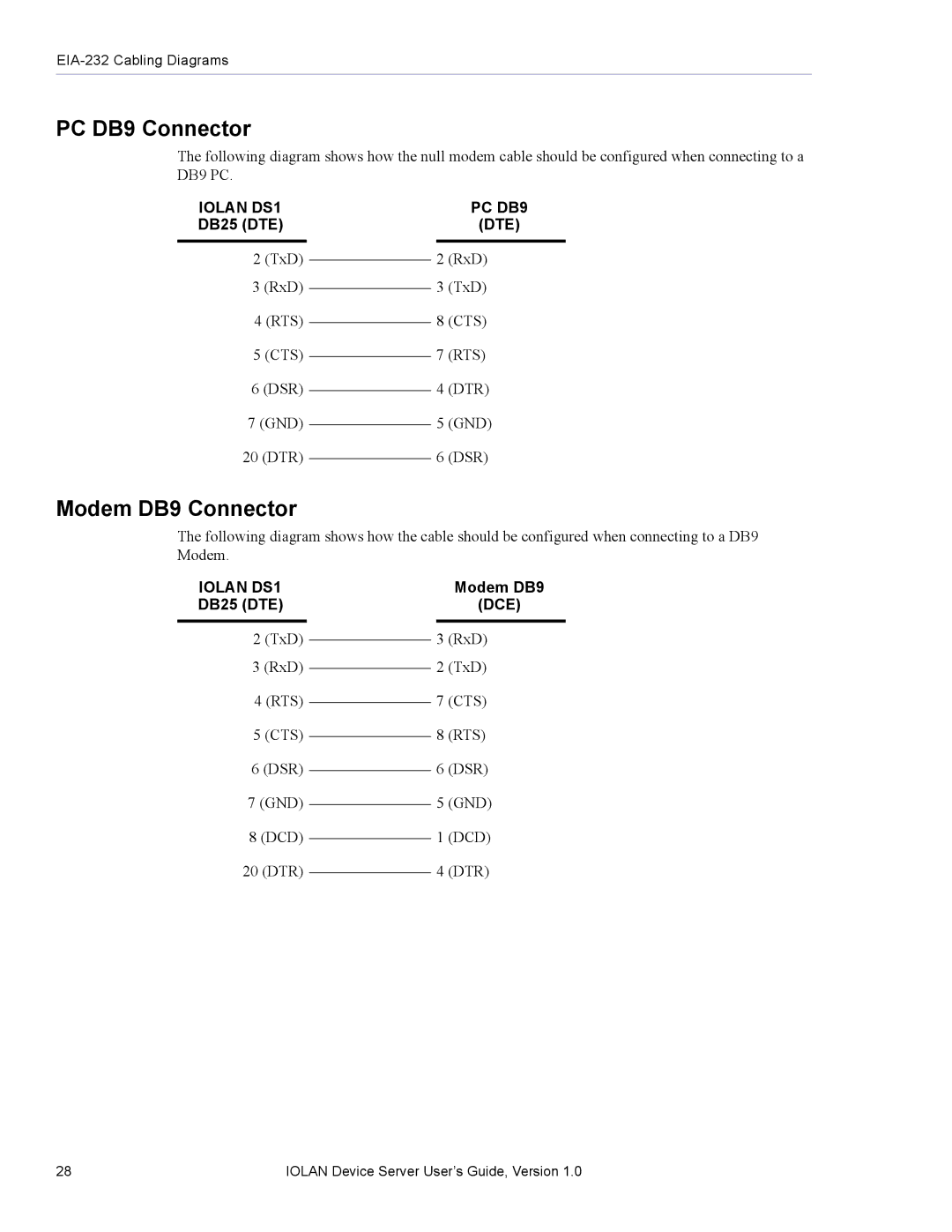
PC DB9 Connector
Modem DB9 Connector
Configuration Methods Chapter
DeviceManager
Using the WebManager
Accessing the Menu
WebManager
Menu
DHCP/BOOTP
Menu Conventions
Snmp
Configuring the Device Server
Configuring the Device Server
General Device Server Configuration
Console Mode vs. Serial Mode
Hardware Configuration
Device Server Services
Trueport
Machine To Machine Connections
Users Connecting to the LAN
Users Connecting to Serial Devices
Connecting To the Device Server
Setting Up Lines
Direct/Silent/Reverse Connections
Virtual Modems
Bidir
User Accounts
Setting Up Users
User Levels
Configuring Network Options
Sessions
Users From LAN to Device Server to Serial Device
Hosts
Configuring Time
Language support
Syslog
Loading a Supplied Language
Software Upgrades and Language Files
Translation Guidance
Downloading Terminal Definitions
Creating Terminal Definition Files
Tftp Configuration
For example
Lost Admin Password
Resetting Configuration Parameters
DHCP/BOOTP Parameters
192.101.34.211 /accounting/german.txt
Using
Starting a New Session
Populating the Device Server List
Manage Device Server Tab
Assigning a Temporary IP Address to a New Device Server
Configuration Tab
Adding/Deleting Static Device Servers
Connecting to a Device Server
Creating/Editing Configuration Files
Working With the Device Server Configuration
Managing a Device Server
Configuring the Server
Working With a Local Configuration File
OEM Login Line Menu String
Server
Services
Configuring Trueport Baud
Configuring the Hardware
DHCP/BOOTP client process in the Device Server
Syslog Syslog client process in the Device Server
Configuring Lines
Service Line Name Serial Interface Speed
Duplex
TX Driver Control Echo Suppression
Dumb WYSE60 VT100 Ansi TVI925 IBM3151TE
Term1, Term2, Term3 user defined terminals
Break Hotkey Prefix Flowin Flowout Reset Keep Alive
Lock
Line Services
Raw Settings
Idle Timer Session Timer
Host Name Name of the target host Port
Telnet Settings
Erase Echo Escape
UDP Settings
Bidir Settings
Start IP Address End IP Address Port
Direction
VModem Settings
Host Name Port Success Failure Suppress Style
Configuring Users
Configuring Modems
Level Hotkey Prefix Idle Timer Session Timer
Language Service Host IP TCP Port
Configuring Line Access
Line Access
Configuring the Default User
Configuring Sessions
Session Auto
Configuring the Network
Configuring Hosts
Configuring Snmp
Configuring Tftp
Configuring Gateways
Configuring Syslog
Emergency Alert Critical Error Info Debug
Subnet/Prefix Bits
Gateway List
Configuring Bootup Files
Configuring Administration Tasks
Configuring the Motd File
Saving a Configuration To File
Getting a Configuration File
Configuring Multiple Device Servers
Statistics
Downloading Device Server Firmware
Server Name Password Reboot Server
IP Address
Setting the Device Server’s Date and Time
Rebooting the Device Server
Resetting the Device Server to Factory Defaults
Resetting a Line
Setting DeviceManager Options
Downloading a Language File
Tools
Interface
Command Syntax
CLI Conventions
Command Shortcuts
Command Options
Server Commands
Server Commands
Set Server
Set Service
Hardware Commands
Show Server
Set Ethernet
Show Hardware
Trueport Baud Commands
User Commands
Logged Into the Device Server Commands
Logout
Ping
Resume
Screen
Set User
Set User Session
Show Line Users
Syslog Console
Show Sessions
Show Termtype
Telnet
Tcpport
Configuring Users
Set Default User
Version
Add User
Idle-timer
Line-access
Ip-host
Phone-number
Sess-timer
Idle-timer
Show Default User
User Level Admin Syntax
Options configureduser
Show User
Line Commands
Line Commands
Set Line
Rev-sess-security
Sess-time
Break
Hotkey-prefix
Reset
Keepalive
Motd
Stop-bits
Set Line Interface
Set Line Service
Confighost
Serverport
Hostport
Show Line
Line Service Commands
Set Telnet-Client
Set UDP
Bothinoutnone
Outboundport
Startipaddress
Set Vmodem
Show Interface
Show Telnet-Client
Show UDP
Modem Commands
Show Vmodem
Add Modem
Delete Modem
Network Commands
Snmp Commands
Add Community
Add Trap
Tftp Commands
Delete Trap
Set Snmp
Show Snmp
Hosts Commands
Add Host
Delete Host
Set Host
Add Gateway
Gateway Commands
Delete Gateway
Set Gateway
Options configgatewayhost
Show Gateways
Time Commands
Logging Commands
Time/Date Setting Commands
Administration Commands
Bootup Commands
Tftp File Transfer Commands
Show Bootup
Show ARP
Netload
Motd Commands
Netsave
Set Motd
Show Motd
Configuration Statistics
Statistic Commands
Run-Time Statistics
Show Serial
User Level Admin Syntax uptime
Uptime
110 Iolan Device Server User’s Guide, Version
Hardware Problems Communication Issues
Troubleshooting
General communication checks and practices are as follows
Login Problems
Host Problems
Problems with Terminals
DHCP/BOOTP Problems
Unknown IP Address
Long Reboot Cycle
Language Problems
Rebooting the Device Server takes a long time
Utilities
Trueport
Trueport
Glossary
118 Iolan Device Server User’s Guide, Version
Bootp
Index
Tftp
User levels User parameters 61 user sessions 40 utility
Index W