e
•Return to previous menu.
•Stop searching.
•Disable screen saver.
fScreen
g
• Unlock the front panel.
hUSB socket
iExternal equipment
jR/L, 6
•Select preset station no. 6.
•Select audio channel.
k5, P/N
•Select preset station no. 5
•Select video output format.
lSHUF, 4
•Turn random play on or off.
•Select preset station no. 4
m3, REP
•Select repeat play mode.
•Select preset station no. 3
nINTRO, 2
•Turn scan play on or off.
•Select preset station no. 2
o1, 

•Start play.
•Pause or resume play.
•Select preset station no. 1
pTA/AF
• Enable TA/AF function.
qSEARCH
•Select tuner band.
•Store radio station automatically.
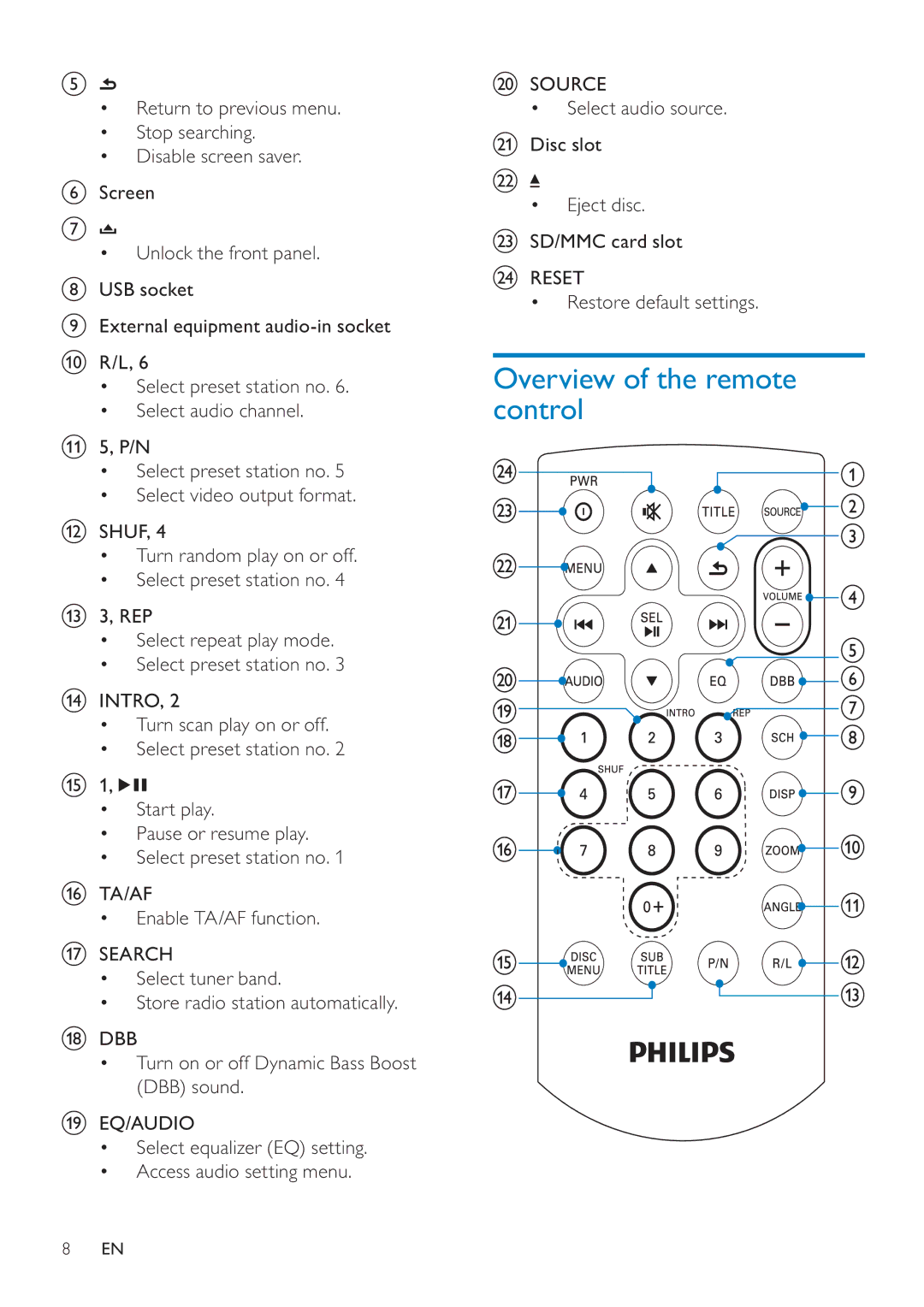
rDBB
•Turn on or off Dynamic Bass Boost (DBB) sound.
sEQ/AUDIO
•Select equalizer (EQ) setting.
•Access audio setting menu.
tSOURCE
• Select audio source.
uDisc slot
v
•Eject disc.
wSD/MMC card slot
xRESET
• Restore default settings.
Overview of the remote control
8EN