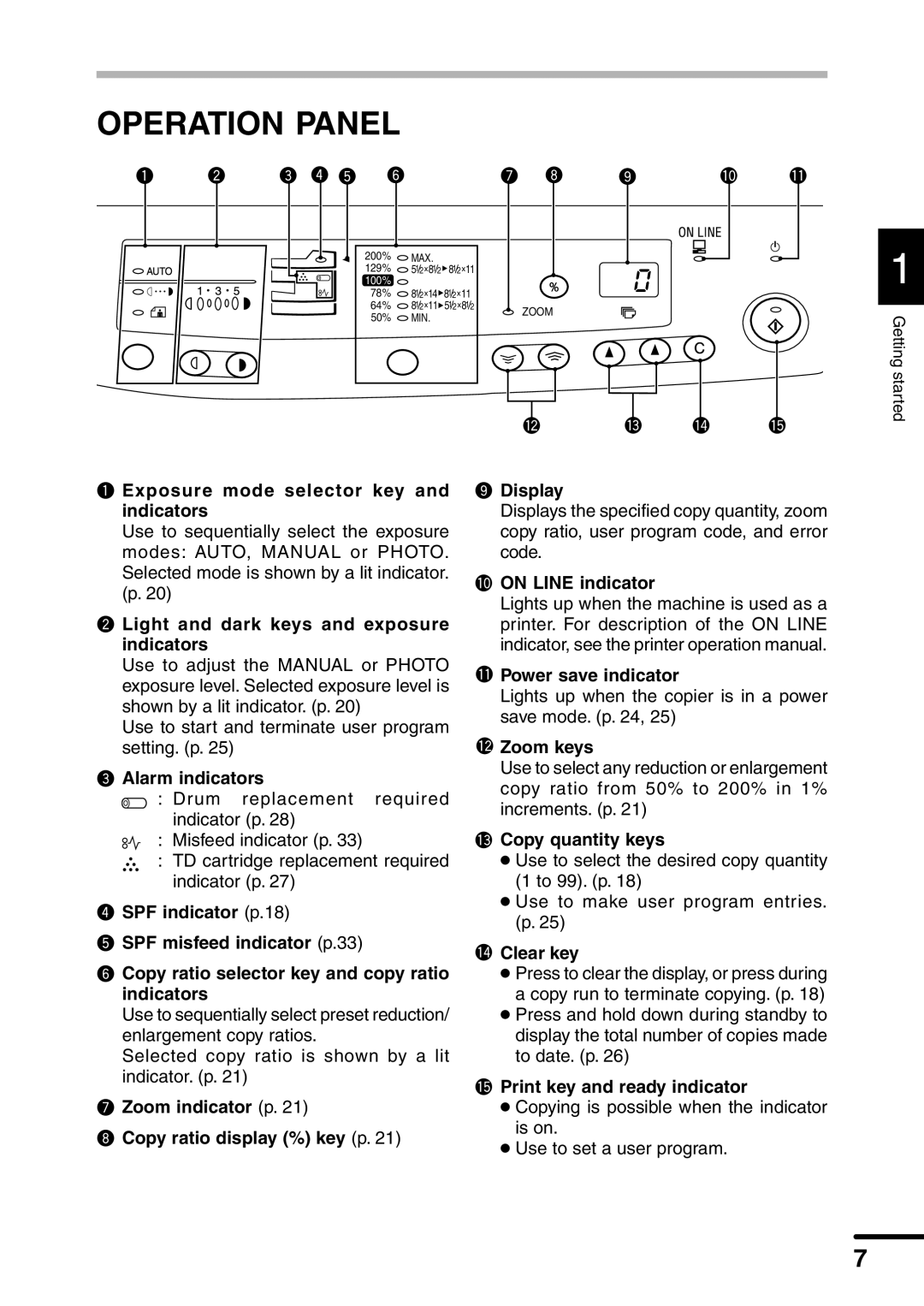
OPERATION PANEL
|
|
|
|
|
200% | MAX. |
|
|
|
129% | 51/2x81/2 81/2x11 |
|
|
|
100% | 100% |
|
|
|
78% | 81/2x14 81/2x11 |
|
|
|
64% | 81/2x11 51/2x81/2 |
| ZOOM | |
50% | MIN. |
| ||
|
|
| ||
|
|
|
|
|
|
|
|
|
|
|
|
|
|
|
|
|
|
|
|
1
Getting started
Exposure mode selector key and indicators
Use to sequentially select the exposure modes: AUTO, MANUAL or PHOTO. Selected mode is shown by a lit indicator. (p. 20)
 Light and dark keys and exposure indicators
Use to adjust the MANUAL or PHOTO exposure level. Selected exposure level is shown by a lit indicator. (p. 20)
Use to start and terminate user program setting. (p. 25)
 Alarm indicators
: Drum replacement required indicator (p. 28)
:Misfeed indicator (p. 33)
:TD cartridge replacement required indicator (p. 27)
 SPF indicator (p.18)
 SPF misfeed indicator (p.33)
 Copy ratio selector key and copy ratio indicators
Use to sequentially select preset reduction/ enlargement copy ratios.
Selected copy ratio is shown by a lit indicator. (p. 21)
 Zoom indicator (p. 21)
 Copy ratio display (%) key (p. 21)
 Display
Displays the specified copy quantity, zoom copy ratio, user program code, and error code.
 ON LINE indicator
Lights up when the machine is used as a printer. For description of the ON LINE indicator, see the printer operation manual.
 Power save indicator
Lights up when the copier is in a power save mode. (p. 24, 25)
 Zoom keys
Use to select any reduction or enlargement copy ratio from 50% to 200% in 1% increments. (p. 21)
 Copy quantity keys
●Use to select the desired copy quantity (1 to 99). (p. 18)
●Use to make user program entries. (p. 25)
 Clear key
●Press to clear the display, or press during a copy run to terminate copying. (p. 18)
●Press and hold down during standby to display the total number of copies made to date. (p. 26)
 Print key and ready indicator
●Copying is possible when the indicator is on.
●Use to set a user program.
7