Operating with the Remote Control
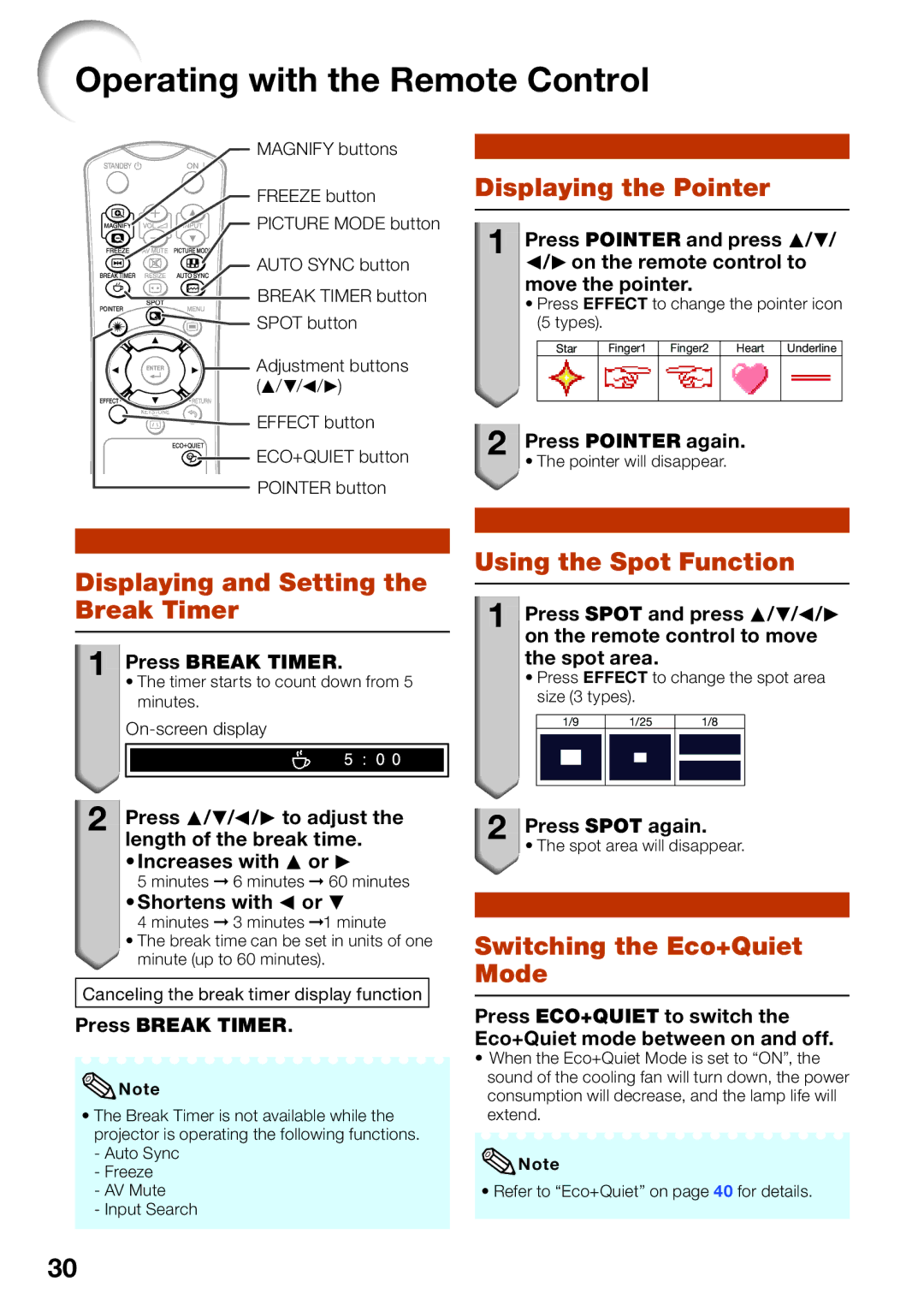
MAGNIFY buttons
FREEZE button
PICTURE MODE button
AUTO SYNC button


 BREAK TIMER button

 SPOT button

 Adjustment buttons (P/R/O/Q)


 EFFECT button
 ECO+QUIET button POINTER button
Displaying and Setting the Break Timer
1
 Press BREAK TIMER.
•The timer starts to count down from 5 minutes.
2
 Press P/R/O/Q to adjust the length of the break time.
• Increases with P or Q
5 minutes ➞ 6 minutes ➞ 60 minutes
• Shortens with O or R
4 minutes ➞ 3 minutes ➞1 minute
•The break time can be set in units of one  minute (up to 60 minutes).
Canceling the break timer display function
Displaying the Pointer
1
 Press POINTER and press P/R/ O/Qon the remote control to move the pointer.
•Press EFFECT to change the pointer icon (5 types).
Star Finger1 Finger2 Heart Underline
2
 Press POINTER again.
• The pointer will disappear.
Using the Spot Function
1
 Press SPOT and press P/R/O/Q on the remote control to move the spot area.
•Press EFFECT to change the spot area size (3 types).
1/9 | 1/25 | 1/8 |
|
|
|
2
 Press SPOT again.
• The spot area will disappear.
Switching the Eco+Quiet Mode
Press BREAK TIMER.
 Note
Note
•The Break Timer is not available while the projector is operating the following functions.
-Auto Sync
-Freeze
-AV Mute
-Input Search
Press ECO+QUIET to switch the Eco+Quiet mode between on and off.
•When the Eco+Quiet Mode is set to “ON”, the sound of the cooling fan will turn down, the power consumption will decrease, and the lamp life will extend.
 Note
Note
• Refer to “Eco+Quiet” on page 40 for details.
30