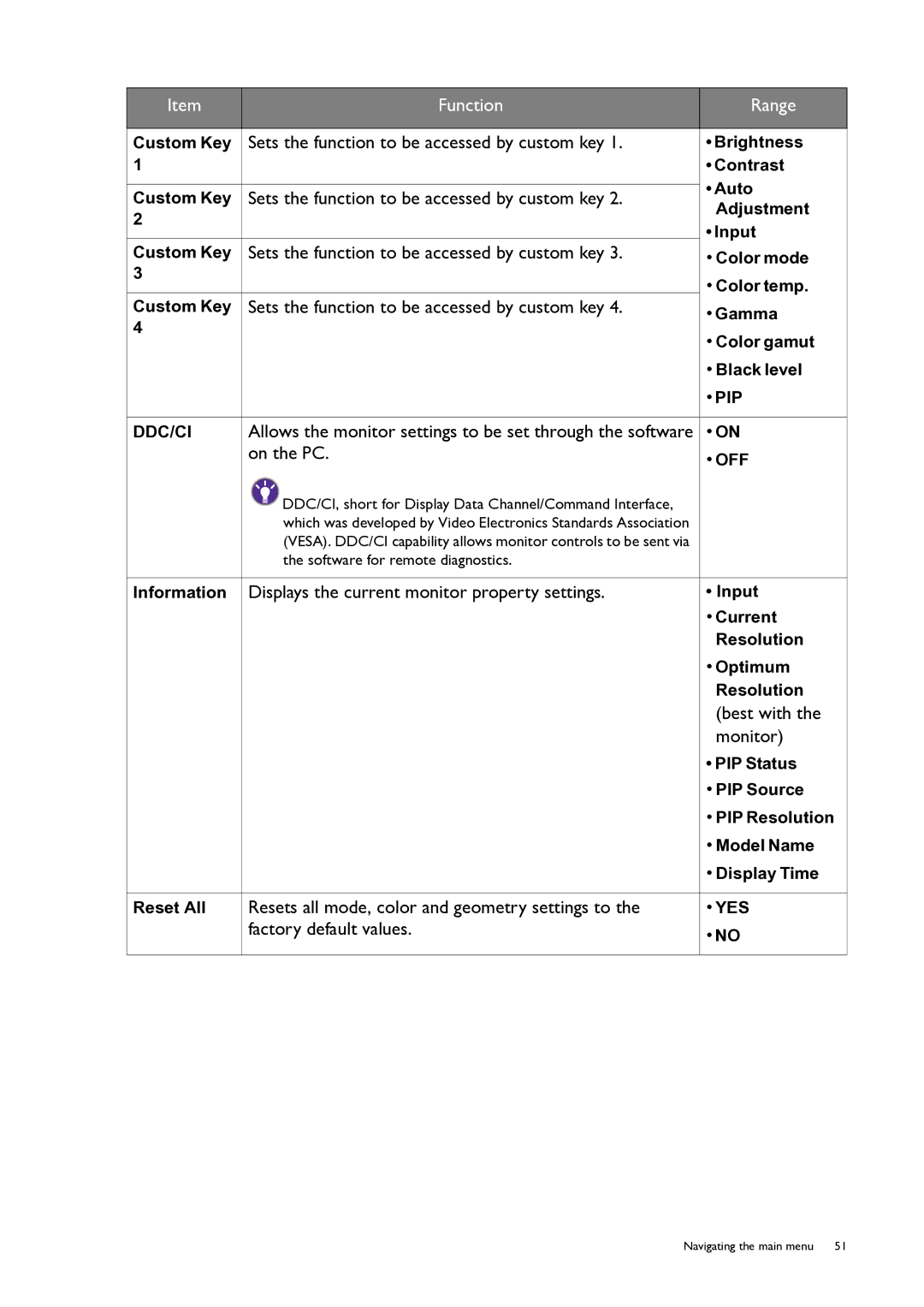
Item | Function | Range | |
|
|
| |
Custom Key | Sets the function to be accessed by custom key 1. | • Brightness | |
1 |
| • Contrast | |
|
| • Auto | |
Custom Key | Sets the function to be accessed by custom key 2. | ||
Adjustment | |||
2 |
| ||
| • Input | ||
|
| ||
Custom Key | Sets the function to be accessed by custom key 3. | • Color mode | |
3 |
| • Color temp. | |
|
| ||
Custom Key | Sets the function to be accessed by custom key 4. | • Gamma | |
4 |
| ||
| • Color gamut | ||
|
| ||
|
| • Black level | |
|
| • PIP | |
|
|
| |
DDC/CI | Allows the monitor settings to be set through the software | • ON | |
| on the PC. | • OFF | |
|
| ||
| DDC/CI, short for Display Data Channel/Command Interface, |
| |
| which was developed by Video Electronics Standards Association |
| |
| (VESA). DDC/CI capability allows monitor controls to be sent via |
| |
| the software for remote diagnostics. |
| |
|
|
| |
Information | Displays the current monitor property settings. | • Input | |
|
| • Current | |
|
| Resolution | |
|
| • Optimum | |
|
| Resolution | |
|
| (best with the | |
|
| monitor) | |
|
| • PIP Status | |
|
| • PIP Source | |
|
| • PIP Resolution | |
|
| • Model Name | |
|
| • Display Time | |
|
|
| |
Reset All | Resets all mode, color and geometry settings to the | • YES | |
| factory default values. | • NO | |
|
| ||
|
|
|
Navigating the main menu | 51 |