Display the Picture in Picture ( PIP )
■This function is available only with the remote control.
■You can watch another device's image in the PIP while watching the TV, PC or in VIDEO the main image.
ENGLISH
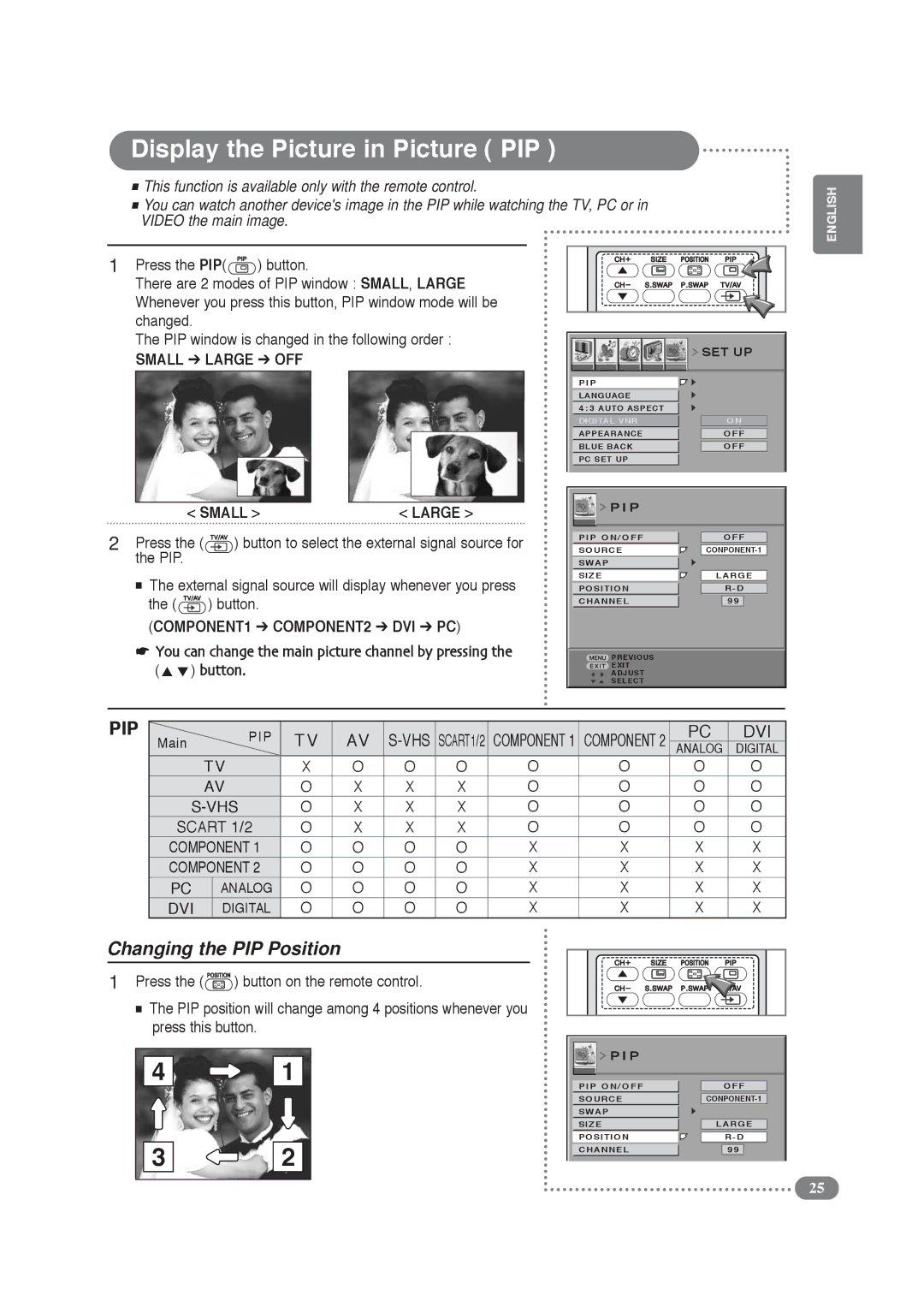
1Press the PIP( ) button.
There are 2 modes of PIP window : SMALL, LARGE Whenever you press this button, PIP window mode will be changed.
The PIP window is changed in the following order :
SMALL ➔ LARGE ➔ OFF
< SMALL > | < LARGE > |
| SET UP | |
|
|
|
P I P |
|
|
LANGUAGE |
|
|
4 : 3 AUTO ASPECT |
|
|
|
| |
DIGITAL VNR | ON |
|
|
|
|
APPEARANCE | OFF |
|
|
|
|
BLUE BACK | OFF |
|
PC SET UP |
|
|
 P I P
P I P
2Press the (  ) button to select the external signal source for the PIP.
■The external signal source will display whenever you press the ( ) button.
(COMPONENT1 ➔ COMPONENT2 ➔ DVI ➔ PC)
☛You can change the main picture channel by pressing the ( ) button.
PIP ON/OFF
SOURCE
SWAP
SIZE
POSITION
CHANNEL
 PREVIOUS
 EXIT
EXIT
ADJUST SELECT
OFF
LARGE
R - D
99
PIP | PIP | TV | AV | COMPONENT 2 | PC | DVI | |||
Main |
| ANALOG | DIGITAL | ||||||
| TV | X | O | O | O | O | O | O | O |
| AV | O | X | X | X | O | O | O | O |
O | X | X | X | O | O | O | O | ||
SCART 1/2 | O | X | X | X | O | O | O | O | |
COMPONENT 1 | O | O | O | O | X | X | X | X | |
COMPONENT 2 | O | O | O | O | X | X | X | X | |
PC | ANALOG | O | O | O | O | X | X | X | X |
DVI | DIGITAL | O | O | O | O | X | X | X | X |
Changing the PIP Position |
|
|
|
|
|
|
| ||
1 Press the ( | ) button on the remote control. |
|
|
|
|
| |||
■The PIP position will change among 4 positions whenever you press this button.
4
3
1
2
 P I P
P I P
PIP ON/OFF |
| OFF | |
|
|
|
|
SOURCE | |||
SWAP |
|
|
|
|
| ||
SIZE | LARGE | ||
|
|
|
|
POSITION |
| R - D | |
|
|
|
|
CHANNEL |
| 99 |
|
25