Stylus Color Service Mhnual
Adjustments
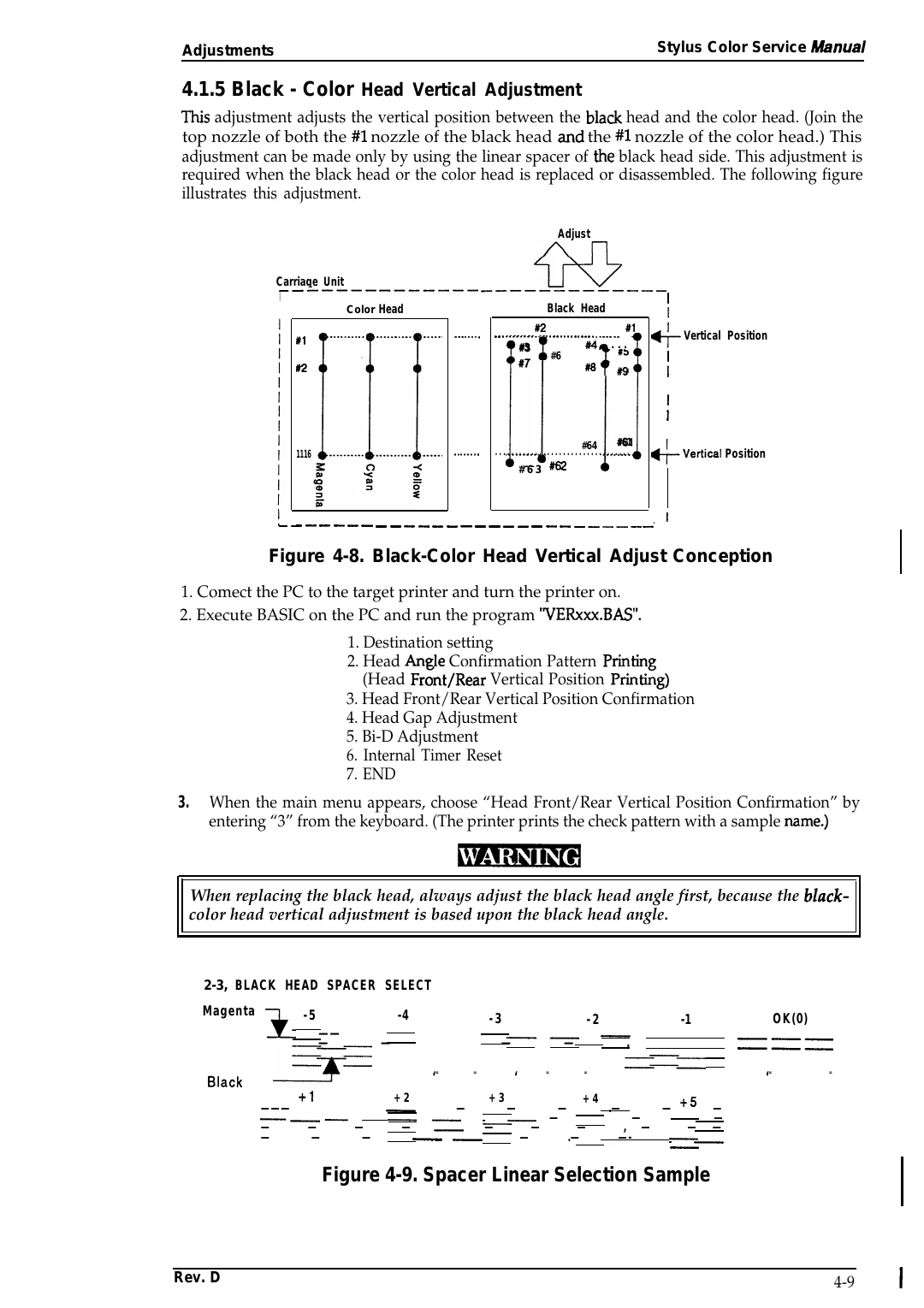
4.1.5 Black - Color Head Vertical Adjustment
TMS adjustment adjusts the vertical position between the black head and the color head. (Join the
top nozzle of both the #l nozzle of the black head ~d the #l nozzle of the color head.) This
adjustment can be made only by using the linear spacer of the black head side. This adjustment is
required when the black head or the color head is replaced or disassembled. The following figure
illustrates this adjustment.
Adjust
Carriage
Unit
6’0
——~————
——————— —————————————
I
Black Head
Color Head
. . . . . . . .
#1
#2
#2
#1
. . . . . . . . . . . . . . . . . . . . . . . . . . . . . . . . . . .
w a . . .
#3
w) ;
4
#6
..-
8[
#6#g
IZ
I
%- !
Vertical Position
I
I
. . . . . . . .
1116
#61
#64
. . . . . . . . . . . . . . . . . . . . . . . . . . . . . . . . . .
1!
/1 +Vertical Position
#63 =
- — — — — — — — — — — — — — — — — — — — — — — — —
—’
I
Figure 4-8. Black-Color Head Vertical Adjust Conception
1. Comect the PC to the target printer and turn the printer on.
2. Execute BASIC on the PC and run the program ‘VERXXX.BAS”.
1. Destination setting
2. Head Arwle Confirmation Pattern PMting
(Head Fr&t/Rear Vertical Position Print&g)
3. Head Front/Rear Vertical Position Confirmation
4. Head Gap Adjustment
5. Bi-D Adjustment
6. Internal Timer Reset
7. END
3.
When the main menu appears, choose “Head Front/Rear Vertical Position Confirmation” by
entering “3” from the keyboard. (The printer prints the check pattern with a sample mme.)
When replacing the black head, always adjust the black head angle first, because the black-
color head vertical adjustment is based upon the black head angle.
2-3, BLACK HEAD SPACER SELECT
Magenta
-5
,,,,,
-4
——
—
*
=–=
+1
———
———
—
—
—
—
—
—
-3
-2
.——,
—
—
—
‘ =
=
‘
=
-1
—
,
=
‘==
OK(0)
———
———
‘ =
=
+2
+3
+4
—
—
—
—
.—
— +5 —
——
—
—
—
——
—
—
—
—
—
, —
— —
— —
—
.—
—-
——
Figure 4-9. Spacer Linear Selection Sample
Rev. D
4-9