Adjustments
7.
8.
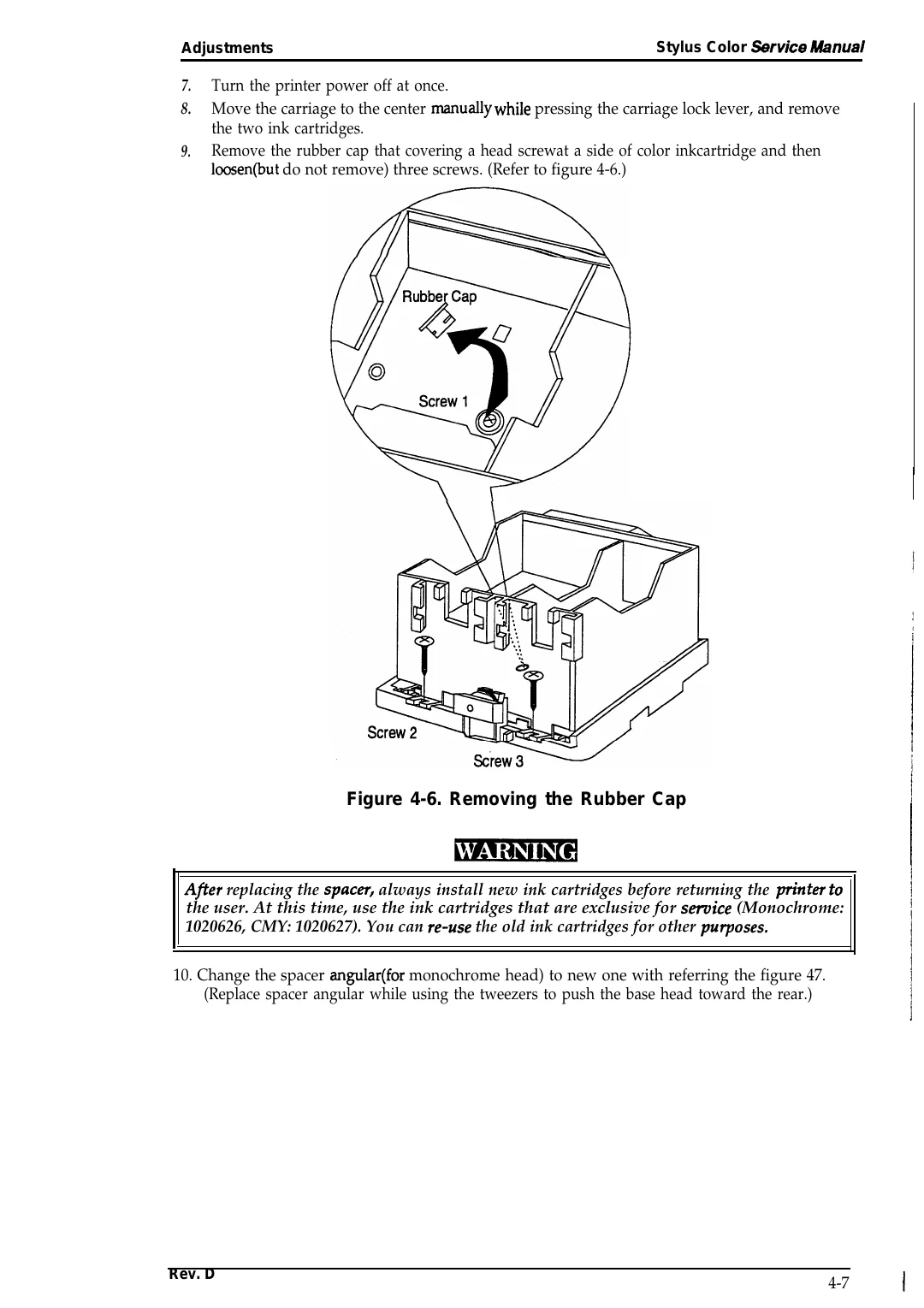
9.
Stylus Color *rvice R&nual
Turn the printer power off at once.
Move the carriage to the center manually while pressing the carriage lock lever, and remove
the two ink cartridges.
Remove the rubber cap that covering a head screwat a side of color inkcartridge and then
loosen(but do not remove) three screws. (Refer to figure 4-6.)
Figure 4-6. Removing the Rubber Cap
Afier replacing the spacw, always install new ink cartridges before returning the pn”nter to
the user. At this time, use the ink cartridges that are exclusive for semice (Monochrome:
1020626, CMY: 1020627). You can re-use the old ink cartridges for other pu~oses.
10. Change the spacer angular(for monochrome head) to new one with referring the figure 47.
(Replace spacer angular while using the tweezers to push the base head toward the rear.)
Rev. D
4-7