Disassembly and Assembly
Stylus Color service Manual
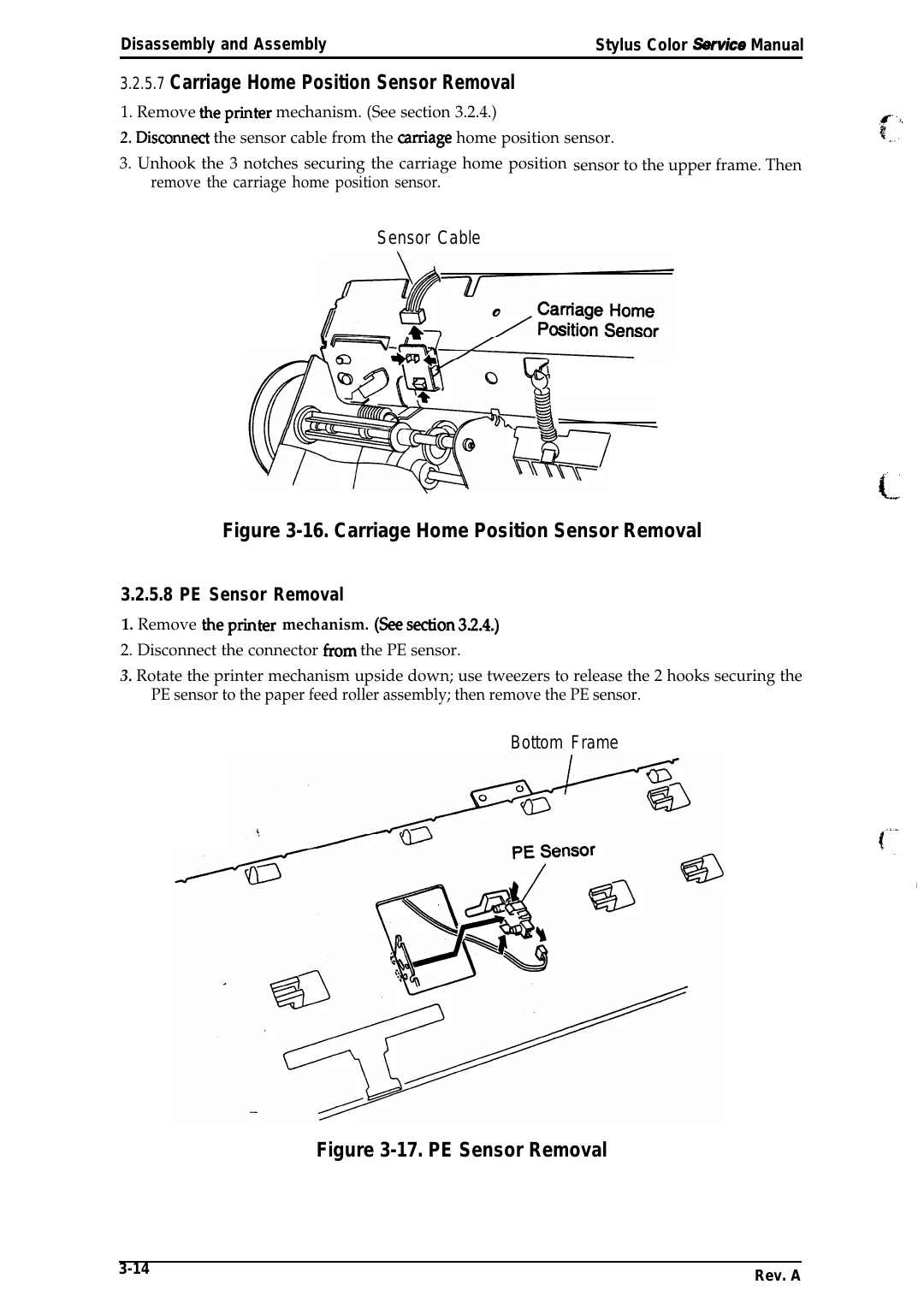
3.2.5.7 Carriage Home Position Sensor Removal
1. Remove theprinter mechanism. (See section 3.2.4.)
2. Discomect the sensor cable from the arriage home position sensor.
3. Unhook the 3 notches securing the carriage home position sensor to the upper frame. Then
remove the carriage home position sensor.
Sensor Cable
. .
k.
Figure 3-16. Carriage Home Position Sensor Removal
3.2.5.8 PE Sensor Removal
1. Remove theprinter mechanism. (Seesection32.4.)
2. Disconnect the connector horn the PE sensor.
3. Rotate the printer mechanism upside down; use tweezers to release the 2 hooks securing the
PE sensor to the paper feed roller assembly; then remove the PE sensor.
Bottom Frame
I
Figure 3-17. PE Sensor Removal
3-14
Rev. A