Instructions Safety Instructions
Using the oven controls.
(on models with number pads only)
Oven Control, Clock and Timer Features and Settings
Troubleshooting Tips Installation Instructions Operating
Customer Service
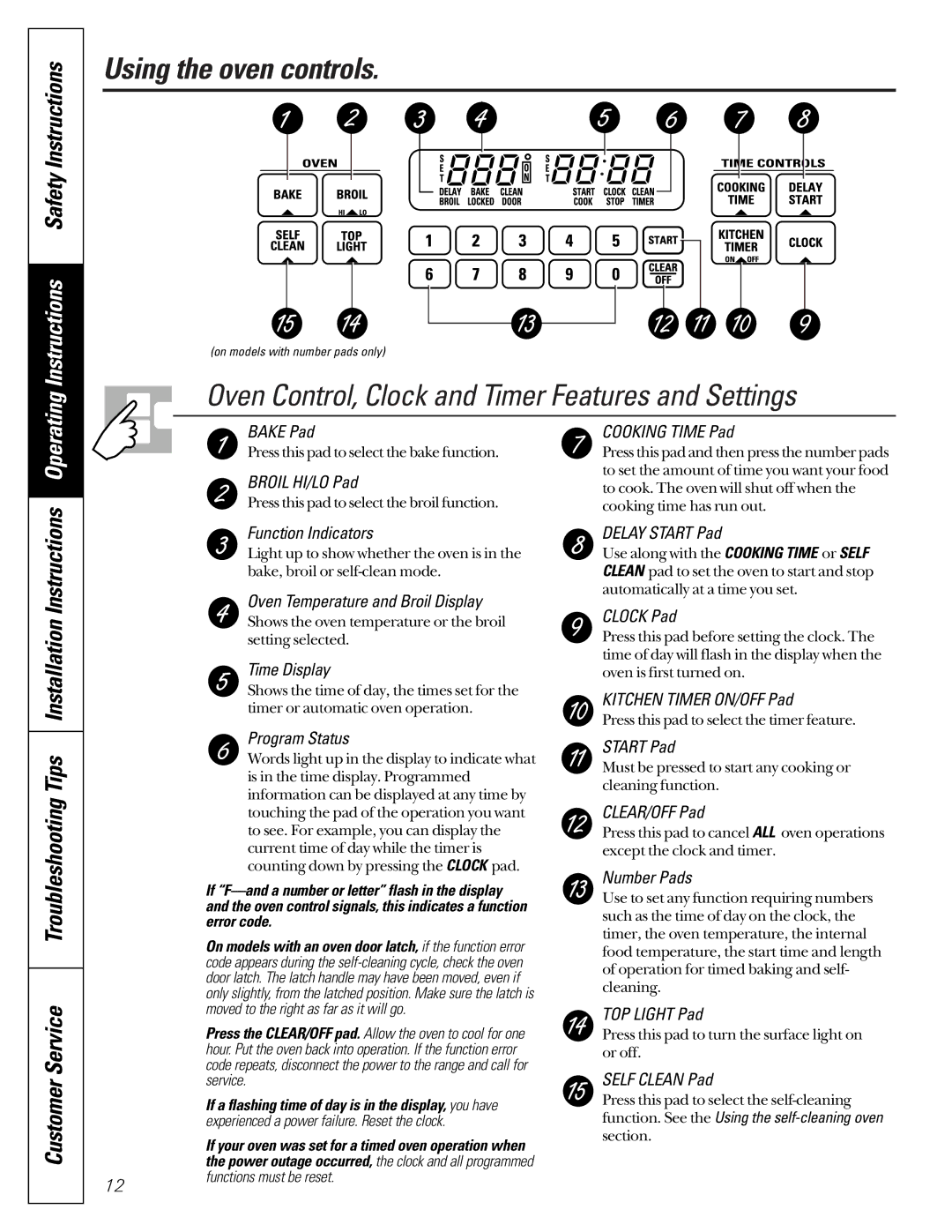
BAKE Pad
Press this pad to select the bake function.
BROIL HI/LO Pad
Press this pad to select the broil function.
Function Indicators
Light up to show whether the oven is in the bake, broil or
Oven Temperature and Broil Display Shows the oven temperature or the broil setting selected.
Time Display
Shows the time of day, the times set for the timer or automatic oven operation.
Program Status
Words light up in the display to indicate what is in the time display. Programmed information can be displayed at any time by touching the pad of the operation you want to see. For example, you can display the current time of day while the timer is counting down by pressing the CLOCK pad.
If
On models with an oven door latch, if the function error code appears during the
Press the CLEAR/OFF pad. Allow the oven to cool for one hour. Put the oven back into operation. If the function error code repeats, disconnect the power to the range and call for service.
If a flashing time of day is in the display, you have experienced a power failure. Reset the clock.
| If your oven was set for a timed oven operation when |
| the power outage occurred, the clock and all programmed |
12 | functions must be reset. |
|
COOKING TIME Pad
Press this pad and then press the number pads to set the amount of time you want your food to cook. The oven will shut off when the cooking time has run out.
DELAY START Pad
Use along with the COOKING TIME or SELF CLEAN pad to set the oven to start and stop automatically at a time you set.
CLOCK Pad
Press this pad before setting the clock. The time of day will flash in the display when the oven is first turned on.
KITCHEN TIMER ON/OFF Pad
Press this pad to select the timer feature.
START Pad
Must be pressed to start any cooking or cleaning function.
CLEAR/OFF Pad
Press this pad to cancel ALL oven operations except the clock and timer.
Number Pads
Use to set any function requiring numbers such as the time of day on the clock, the timer, the oven temperature, the internal food temperature, the start time and length of operation for timed baking and self- cleaning.
TOP LIGHT Pad
Press this pad to turn the surface light on or off.
SELF CLEAN Pad
Press this pad to select the