LG AN510
Page
Important Safety Precautions
Do not use a hand-held phone while driving
Important Safety Precautions
Do not disassemble the phone
Store the battery out of reach of children
Table of Contents
Information
Using Phone Menus
Entering and Editing
Contacts in Your Phone’s Memory
Table of Contents
Ringtones Volume Answer Options Auto Retry
Wallpaper Banner LCD Settings
Name Match for Dialing Call Settings
Power Save Backlight Brightness
Troubleshooting 102
Safety
Statement 137
Accessories 136
Limited Warranty
Index 141
Welcome
Technical Details
Technical Details
Important Information
Cellular and PCS Cdma
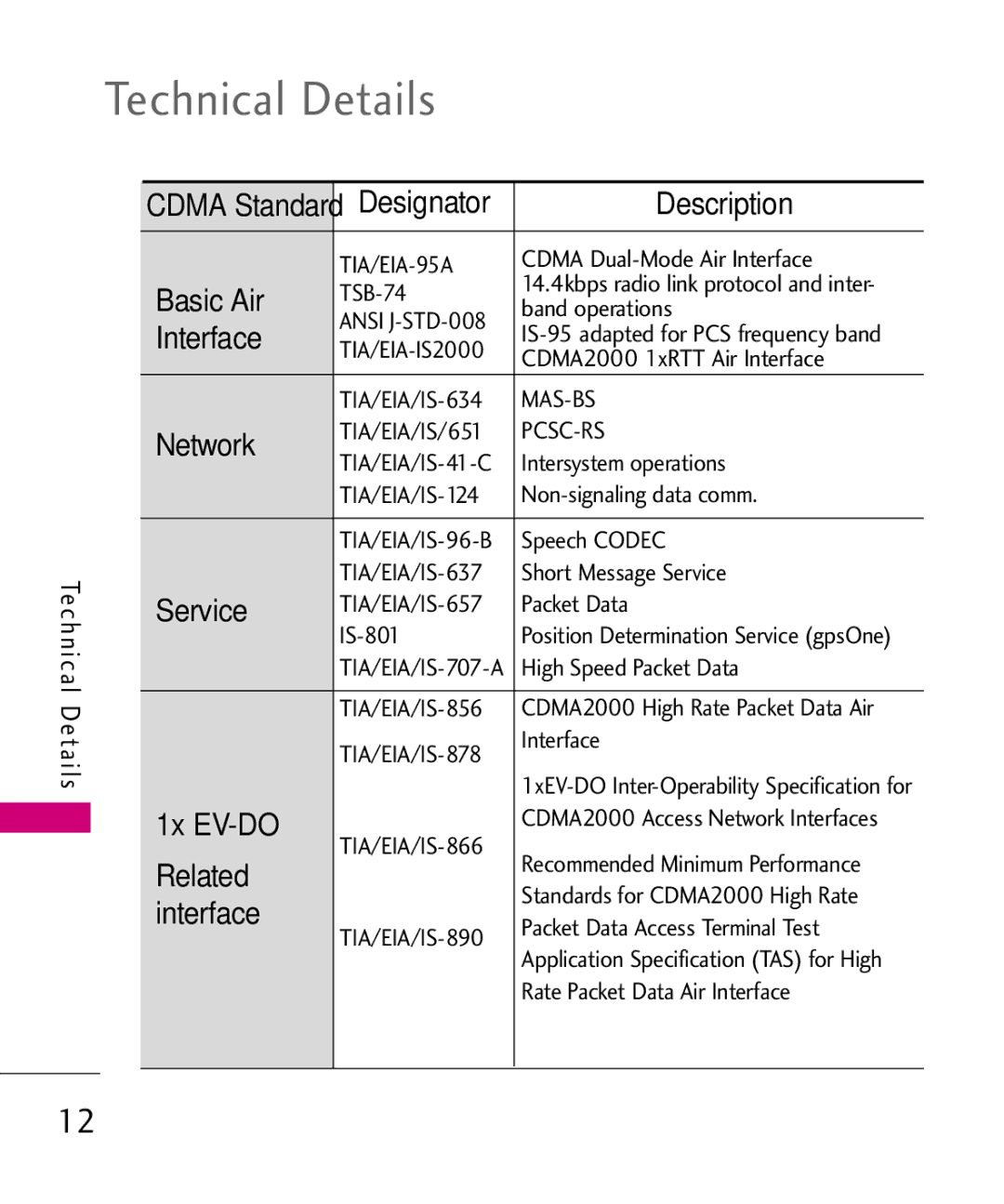
Technical Details
Table on the previous page lists some major Cdma standards
Vehicle-Mounted External Antenna
Optional, if available
Part 15.19 statement
Part 15.21 statement
Part 15.105 statement
Your hearing aid or cochlear
That it uses
Aids
Any interfering noise
Phone Overview
Status Light Alerts you of new NotifEarpiececations
Camera Key Use for quick access to the Camera
Phone Overview
To turn on the touchscreen and access the Quick Keys
Quick Keys
Homescreens
Main Shortcut Contact
Multimedia
Menus Overview
Record Voice Music
Calculator Alarm Clock World Clock Drawing Panel
Take Photo Gallery Record Video My Stuff
My Playlists
Call Settings
Sound Settings
Display Settings
Touch Settings
Storage
Bluetooth
System
Removing the Battery
Battery
Installing the Battery
Getting Started with Your Phone
Attached to the phone so it
Slot cover stays
Doesnt become misplaced
Label side facing upwards
Turning the Phone On and Off
Battery Charge Level
Getting Started with Your Phone
Unlocking the Phone
Screen Icons
Signal Strength
Phone Settings
Making Calls
Redialing Calls
Receiving Calls
Correcting Dialing Mistakes
Call Waiting
Lock Mode
Speakerphone Function
Auto
Quick Access to Convenient Features
Caller ID
Entering and Editing Information
Text Input
Touch Save
Phone Numbers With Pauses
Touch
Existing on the pop-up screen
Edit
Contacts
Adding a Pause to an Existing Number
Searching Your Phone’s Memory
Accessing Options
Contacts in Your Phone’s Memory
Making a Call From Your Phone’s Memory
Speed Dialing
Call History
Using Phone Menus
Communicate
Missed Calls
Touch Call History Touch Dialed Calls
Dialed Calls
All Calls
Touch Call History Touch All Calls
Data Counter
Call Timer
Speed Dials
Touch Call History
Touch Browser
Browser
Start Browser
Ending an Web Session
Menu Bar icons
Using the Browser Menu
Browser Menu Settings
Forward
Homepage Allows you to set your Homepage
Settings
History Displays a list of visited web pages
Menu
Touch Settings, then Display
Move to where you
Want to go on the Web
Entering/Deleting Text Numbers or Symbols
Reading a saved RSS Feed
Fit To Width
Before Fit To Width
Refer to page 29 for more infomation
Dialer
Message Icon Reference
AN510 can store up to
New Text Message
New Text Message
Basics of Sending a Text Message
Text Message Options Messaging
Name & Number
New Picture Message
Text Options
Inbox
Slide/ Subject
Audio
Viewing Your Inbox
Image
Not
Outbox
Messaging Outbox
Touch an Outbox message
Drafts
Templates
Voicemail
Web Alerts
Delete All
Text Messages
Message Settings
All Messages
Descriptions
Auto Delete ON/ OFF
Picture Messages
Auto Play ON/ OFF
Callback Number On/ Off/ Edit
Contact List
Contacts
New Contact
Touch Contacts Touch New Contact
Touch Contacts Touch Speed Dials
Speed Dials
Groups
Touch Contacts
Touch My vCard
New Contact
My vCard
Touch Take Photo
Entertainment
Take Photo
Shutter Sound
Night Mode
Reset
Auto Save
Picture Editing
Gallery
Touch Gallery
Touch an image to view it
Record Videos
Touch Record Video
Memoryore Storage
Ringtones
My Stuff
My Stuff
Incoming Calls
Touch Record Voice
Record Voice
Music
PlayedNow Playing/ Recently
All Songs
Artists
Touch All Songs
My Playlists
Albums
Genres
Touch My Playlists
Shuffle Songs
Settings
Repeat
Background Music
Utilities
Voice Command
Start Command
My Playlists
Messages
Voicemail
Missed Calls
Time & Date
Command Mode
Announce Alert
Help
Best Match
Tools
Train Word
EZ Tip Calculator
Touch EZ Tip Calculator
Unit Converter
Stopwatch
Touch Unit Converter
Date Finder
Organizer
Calendar
Touch Date Finder
Alarm Clock
Calculator
Touch Calculator
Once/ Daily/ Mon Fri Weekends
World Clock
Drawing Panel
Clock
Touch Notepad
Touch Drawing Panel
Options for a Drawing Pad Entry
Viewing a Notepad Entry
Volume
Settings
Sound Settings
Ringtones
Alert Type
Touch My Ringtones/ Default Ringtones
Message Alerts
Ring & Vibrate
Service Alerts
Power On/Off Tone
Wallpaper
Display Settings
LCD Settings
Banner
Power Save
Backlight Brightness
Clocks & Calendar
Font Settings
Normal/Touch settingLarge
Dial Font Size
Name Match for Dialing
Call Settings
Themes
Answer Options
Touch Call Settings and Answer Options
Auto Volume
Touch Call Settings
Auto Retry
Airplane Mode
Airplane Mode
TTY Mode
On/ Off
Touchscreen Calibration
Touch Settings
Touchscreen Effect
Auto Screen Lock
Phone Settings
Security
Auto Device Lock
Touch Auto Device Lock
Touch a Restrictions submenu, then the setting
Restrictions
Touch Restrictions
Incoming Calls Allow All
Emergency Numbers
Change Lock Code
Memory
Reset Default
Touch Reset Default
Touch Change Lock Code
Phone Info
Brew Access Prompt on
Brew & Web
My Number
Serving System
Meid SW/HW Version
Icon Glossary
System Select
System
Network
Set NAM
Location
Bluetooth
Bluetooth QD ID B016018
AN510
Or off Touch Touch Bluetooth
Power
Pairing a new Bluetooth device
Touch Touch Bluetooth
My Visibility
Bluetooth
Paired Devices
Your
Supported Profiles
My Bluetooth Info
Device Name
100
Found Devices
Bluetooth Yes
USB Mass Storage
Delete All
Troubleshooting
102
To the phone. Check the battery
103
104
Safety
TIA Safety Information
Exposure to Radio Frequency
Phone Operation
105
Antenna Care
Driving
Persons with pacemakers
Safety
Pacemakers
Hearing Aids
107
108
Battery Information and Care
Including either installed or
Such as gasoline stations
Safety Information
109
Charger and Adapter Safety
110
111
General Notice
112
Explosion, Shock, and Fire Hazards
113
Do not paint your phone
Avoiding hearing damage
Using your phone safely
114
Do wireless phones pose a health hazard?
FDA Consumer Update
Using headsets safely
115
116
117
118
119
Find out more about
Wireless phone RF?
120
121
What has the FDA done to
Energy coming from wireless
122
Measure the Radio Frequency
What about children using wireless phones?
123
124
Equipment?
Where can I find additional information?
125
Following tips
Driver Safety Tips
126
Offer, including automatic
127
Paying attention to the road or nearby vehicles
Accident, road hazard, or
128
Case of fire, traffic
Phone
Consumer Information on SAR
129
130
131
132
133
134
Wireless Phones and Hearing Aid Accessibility
135
Accessories
136
Transferable to any subsequent purchaser/end user
Limited Warranty Statement
137
Limited Warranty Statement
138
11Consumables such as fuses
Damage resulting from use of non-LG approved accessories
139
140
Tel -800-793-8896 or Fax
141
Index
123
Index
142
143
Screen Icons
144
Memo
Memo