User’s Manual
Trademark Information
AVC Patent Portfolio License
Page
Do not disassemble
For Your Safety
Turn off in the event of malfunction
Handle the camera strap with care
Iii
For Your Safety
Observe caution when handling the battery
Handle moving parts with care
Observe caution when using the flash
Use appropriate cables
CD-ROMs
Modifications
Federal Communications
Interference Statement
Interface Cables
Symbol for Separate Collection in European Countries
Table of Contents
Table of Contents
Viii
Table of Contents
100
103
About This Manual
Life-Long Learning
Information and Precautions
Use Only Nikon Brand Electronic Accessories
Before Taking Important Pictures
Information and Precautions
Disposing of Data Storage Devices
Parts of the Camera
Camera Body
11 10
Parts of the Camera
Attach them at two places
Attaching the Camera Strap and Lens Cap
Lens Cap
Raising and Lowering the Flash
Monitor
Shooting
131
Playback
Current frame number
CPlayback Button
AShooting mode Button
Basic Operations
EMovie-record Button
For Playback
Multi Selector
For Shooting
For the Menu Screen
Press the multi selector Hor
Using Camera Menus
When setting is finished, press the dbutton
To choose an item, and then press Kor the kbutton
About the Shutter-release Button
Press the multi selector Ess the multi selector
Turning On and Off the Camera
Inserting the Batteries
Applicable Batteries
Alternative Power Sources
Additional Precautions Regarding Batteries
Battery Type
Power Saving Function Auto Off
Press Hor Ito choose Yes and press the k button
Setting Display Language, Date and Time
Press the power switch to turn on the camera
Daylight Saving Time
Press the kbutton or K
When Easy auto mode is displayed, press the kbutton
Press Hor Ito choose the date format,
Press H, J, I, or Kto set the date and press the kbutton
Insert the memory card
Inserting Memory Cards
Removing Memory Cards
Inserting Memory Cards
Formatting Memory Cards
Write Protect Switch
Inserting Memory Cards
Exposures remaining
Check the battery level and number
Battery level indicator
Number of Exposures Remaining
Functions Available in Easy Auto Mode
Indicators Displayed in GEasy auto Mode
Turn the Camera On and Select GEasy Auto Mode
4320×3240
Frame the picture
Frame a Picture
Ready the camera
Frame a Picture
Using the Zoom
Digital Zoom
Digital Zoom and Interpolation
Press the shutter-release button halfway
When a face is detected
Focus and Shoot
Press the shutter-release button the rest of the way down
Autofocus
Focus and Shoot
During Saving
Flash
Press the cbutton
Viewing Images Playback Mode
Viewing and Deleting Images
Button
Deleting Unwanted Images
Monitor
Operating the Erase Selected Images Screen
Auto Flash fires automatically when lighting is poor
Using the Flash
Selecting a Flash Mode
Flash mode menu is displayed
Press mflash mode on the multi selector
Using the Flash
Press the mflash pop-up button
Flash Lamp
Shooting When Lighting Is Poor and the Flash Is Disabled W
Flash Mode Setting
Red-eye Reduction
Press the shutter-release button
Taking Pictures with the Self-timer
Press nself-timer on the multi selector
Press the shutter-release button to shoot
Adjusting the Brightness Exposure Compensation
Press oexposure compensation on the multi selector
Exposure Compensation Value
Press the multi selector Hor Ito select a shooting mode
Selecting Shooting Mode
Press the Abutton in shooting Mode
Following shooting modes can be selected
Easy Auto Mode
Automatic Scene Selection
Mode and press the multi selector Hor Ito select scene mode
Shooting Suited for the Scene Scene Mode
Selecting a Scene Mode
Press the Abutton in shooting
Off
Shooting Suited for the Scene Scene Mode
Landscape Use this mode for vivid landscapes and cityscapes
ENight portrait
Off2
HSunset
IDusk/dawn
Set to a position where Fand the zoom indicator glow
JNight landscape
Museum
MFireworks show
Shooting Suited for the Scene Scene Mode
Off2
One third of the image will be displayed as translucent
Shooting for a Panorama
Take the next picture
Combining Images to Make a Panorama Panorama Maker
Press the kbutton when shooting is completed
Panorama Assist
More Information
Shutter is automatically released
Exit this shooting mode
Camera enters smart portrait mode
Self-Timer Lamp Flashing
Capturing Smiling Faces Automatically Smart Portrait Mode
Auto Off Standby Mode When Using Smart Portrait Mode
Functions Available in Smart Portrait Mode
Functions Available with Sport Continuous
Camera enters sport continuous mode
Frame the subject and shoot
Shooting Continuously at High Speed Sport Continuous
Image mode Image mode a 54 can be set
M2048×1536, N1024×768 default setting, O640×480, m1920×1080
Press the multi selector Hor Ito choose a Press the kbutton
Auto Mode
Press the Abutton
Focus Lock
Auto Mode
Macro Mode
Press p macro mode on the multi selector
Macro Mode Setting
Displaying the Shooting Menu
Changing AAuto Mode Settings Shooting Menu
Camera Settings That Cannot Be Applied at the Same Time
Image Mode Image Quality/Image Size
Image Mode for Sport Continuous Mode
Number of Exposures Remaining
White Balance Adjusting Hue
Aauto M dShooting menu M White balance
Select Measure
Preset Manual
Press the kbutton to measure a value for preset manual
Camera zooms in to the position for measuring white balance
Aauto M dShooting menu M Continuous
Change settings to Continuous or BSS best shot selector
Continuous
Limage size 2560 × 1920 pixels Digital zoom cannot be used
ISO 3200 and ISO
Auto default setting
ISO Sensitivity
Aauto M dShooting menu M ISO sensitivity
Aauto M dShooting menu M Color options
Color Options
Make colors more vivid or save images in monochrome
Camera Settings that Cannot Be Set at the Same Time
Full-frame Operation
Changing the Orientation Vertical/Horizontal of Images
Viewing Multiple Images Thumbnail Playback
Viewing Multiple Images Thumbnail Playback
Thumbnail Playback Mode Display
Calendar Display
Following operations are available in calendar display
Taking a Closer Look Playback Zoom
More on Playback
Displaying the Playback Menu
Following options are available in playback mode
Playback Menu
Choose Select images and press the k
Press the dbutton in playback mode
APrint Order
Playback Menu
Press the multi selector J or K to choose the desired
Choose the images up to 99 and number
Copies up to nine of each
Deleting All Print Orders
Print Date
Slide show begins
Button Playback mode M dPlayback menu M bSlide show
BSlide Show
Choose End or Restart
Button Playback mode M dPlayback menu M dProtect
Protect
Selecting Multiple Images
Rotate Counterclockwise
Button Playback mode M dPlayback menu M fRotate image
FRotate Image
Choose the copy option and press the k button
Select an option from the copy screen using
Multi selector and press the kbutton
Copy images between the internal memory and a memory card
Original Images and Edited Copies
Image Editing Function
Restrictions on Image Editing
Choose OK and press the kbutton
Editing Images
ID-Lighting Enhancing Brightness and Contrast
Editing Images
GSmall Picture Decreasing Image Size
Choose Yes and press the kbutton
New, smaller copy is created
About the size of the original image
OCrop Creating a Cropped Copy
Refine copy composition
Rotate image option a 74 to rotate the image so
Lower the flash A7
Turn the camera on and display the shooting mode screen
Recording Movies
Press the bemovie-record Button to start recording
While the Camera Is Saving Movies
Camera Temperature
Recording Movies
Recording Movies
Functions Available in Movie Mode
Displaying the Movie Menu
Changing Movie Recording Settings
Following options can be adjusted from the movie menu
Display the shooting screen and press the dbutton
Press Hor Ito select the Dtab
Press K or the kbutton
Movie Options and Maximum Movie Length
Movie Options
Select the type of movies that are recorded
Option Description NHD 720p 1280×720
Electronic VR
Autofocus Mode
Choose how the camera focuses in movie mode
Option Description Auto
Enhanced Resolution
Off Enhanced resolution is disabled
Results may not be achieved
Movie Playback
Deleting Movies
Press Hor Ito choose Nchoose end
Editing Movies
Press Hor Ito choose the Mcontrol choose start point
Point
Editing Movies
Tune the television to the video channel
Connecting to a TV
Turn off the camera Connect the camera to the TV
Hold down the cbutton to turn on the camera
Connecting to a TV
If the Images Are Not Displayed on the Television
Compatible Operating Systems
Using ViewNX
Installing ViewNX
Windows
Using ViewNX
Start the installer
Remove the ViewNX 2 Installer CD-ROM from the CD-ROM drive
Follow the on-screen instructions to install the software
Import File using Nikon Transfer 2 and click OK
Connecting the USB Cable
When using Windows
Transferring Images to the Computer
Terminate the connection
Viewing Images
Transfer images to the computer
Start ViewNX
Print multiple images A100
Connecting to a Printer
Printing Images
Turn camera off and disconnect USB cable
Check printer settings
Connecting the Camera and Printer
Connecting to a Printer
Turn off the camera Turn on the printer
Choose Paper size and press the kbutton
Printing Images One at a Time
Choose Copies and press the kbutton
Choose the desired paper size and press the kbutton
Printing starts
Printing Multiple Images
Choose Start print and press the kbutton
Use the multi selector to choose Paper size
101
Button to return to the print menu
102
Paper Size
Sound settings 115 Specify sound settings Auto off 116
Setup Menu
Setup menu contains the following options
103
104
Displaying the Setup Menu
Setup Menu
105
Dbutton M zSetup menu A104 M Welcome screen
Welcome Screen
106
Dbutton M zSetup menu A104 M Time zone and date
Time Zone and Date
Set the camera clock
Press K
Setting Travel Destination Time Zone
Choose xTravel destination and press the kbutton
107
WHome Time Zone
Clock Battery
108
Imprinting the Date on Images
109
Time Zones
Dbutton M zSetup menu A104 M Monitor settings
Monitor Settings
Following settings are available
110
Photo Info
111
Print Date and Print Order
Dbutton M zSetup menu A104 M Print date
Print Date
Vibration Reduction
Using Vibration Reduction with Movies
When Continuous is set to Single
113
Motion Detection
Dbutton M zSetup menu A104 M Motion detection
When using Multi-shot 16 a
114
Dbutton M zSetup menu A104 M Sound settings
Sound Settings
Specify sound settings
115
Auto Off
Dbutton M zSetup menu A104 M Auto off
Auto Off
Formatting a Memory Card
Format Memory/Format Card
Formatting internal memory
117
118
Dbutton M zSetup menu A104 M Language
Language
119
TV Settings
Blink Warning
Portrait a 36 or Night portrait a 37 scene modes
Operating the Did someone blink? Screen
120
Reset All
121
122
Setup Menu
Preset manual in the White balance menu a
Movie Menu
123
Battery Type
Dbutton M zSetup menu A104 M Battery type
Hydride batteries
124
Dbutton M zSetup menu A104 M Firmware version
Firmware Version
View the current camera firmware version
Caring for the Camera
125
Caring for the Camera
Battery
126
Do not use alcohol, thinner, or other volatile chemicals
Cleaning
127
Storage
129
Optional Accessories
Battery charger
Ni-MH batteries
130
Optional Accessories
Approved Memory Cards
Images and movies are assigned file names as follows
File and Folder Names
131
DSCN0001 . JPG
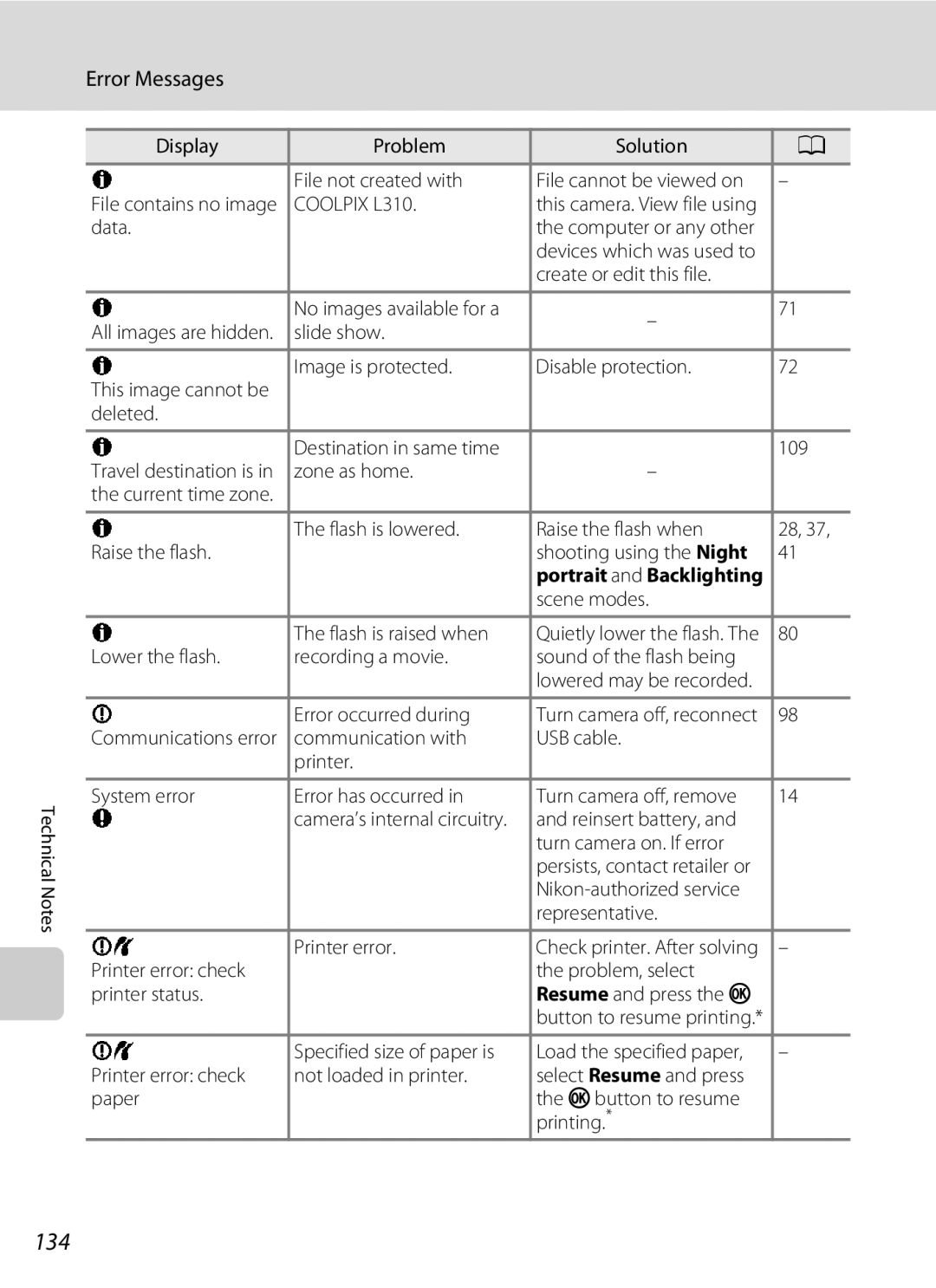
Error Messages
132
P4224×2376 or M1920×1080
Error Messages
133
134
135
136
Troubleshooting
Display, Settings and Power Supply
Hide info is selected for Photo info
Electronically Controlled Cameras
Troubleshooting
137
Continuous
When Portrait, Night portrait, or Pet
138