Convertible Camera
AW-E860L
English Version
Contents
Preface
Features
Special notes on operation
DON’TS
Precautions
DOS
Major operating controls and their functions
Front view
Side view
Lens fixing ring knob
Lens mount
Mounting hole
Cooling fan
ITEM/AWC switch ITEM/AWC/S
Menu switch MENU/A
YES/ABC switch YES/ABC/+
NO/BAR switch NO/BAR
= Power indicator
Remote connector I/F Remote
DC 12 V input connector DC 12V
@ G/L input connector G/L
Mounting
Camera cable Lens fixing ring knob To iris connector
Lens mounting
12 E
Camera mounting
13 E
Mounting adapter
Flange back adjustment For zoom lens
Turn the iris selection switch to Position a 14 E
Focus ring Flange back adjust ring Flange back lock knob
Iris gain control in a lens
Automatic iris power zoom lens
15 E
Iris gain control G, S
$ Connection of device with a composite input connector
Connections
16 E
$ Connection of a remote control unit RCU
17 E
RCU cable AW-CA50A26 15 m Set to Multi
$ Connection of a remote control box RCB
RCB cable AW-CA50T10 3 m Video signal
18 E
An example of connection for VBS/BB input Colour lock mode
$ Connection with multiple cameras Colour lock mode
External sync signal BB Camera for external sync
19 E
$ Connection of devices with camera pan/tilt control system
$ Connection of computer
20 E
RS-232C Computer AC adapter AW-PS505A
Adjustment by Camera
Adjustment
Adjustment with the RCU RCB, hybrid control panel
$ Automatic white balance control AWC
$ Automatic tracking white balance setting ATW
$ Manual white balance setting
Adjustment with the RCU RCB
22 E
$ Black balance adjustment
$ Reset to 3200K or 5600K white balance
YES/ABC switch
23 E
Adjustment with RCU RCB, hybrid control panel
$ Total pedestal level adjustment
NO/BAR switch
24 E
Horizontal phase control
$ Gen-lock adjustment
Horizontal phase control
25 E
Colour phase adjustment
When horizontal phase adjustment is required using RCU
Select SC Fine on the sub menu. Perform fine
Colour bar of camera Sprit line
Use mode setting
$ Use Mode Setting
$ Setting by camera
Scene File switch
$ Setting by RCU RCB or hybrid control panel
Hybrid control panel
28 E
$ Menu item setting
Menu item setting
Use mode Blinking
Main Menu screen
From the camera alone
$ Setting
From RCU RCB
Camera alone
2Colour Set Display 4Sharpness DTL Set Display
$ Sub Menu Halogen Mode, Fluorescent Mode, Outdoor Mode
Brightness Set Display
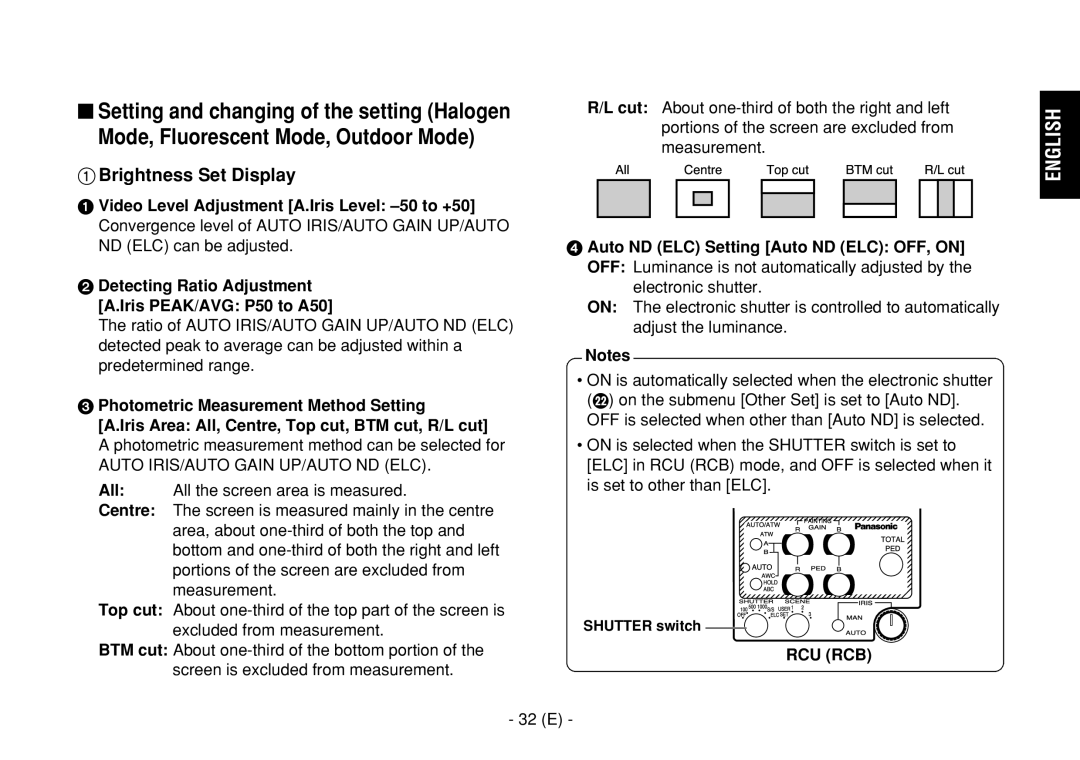
Auto ND ELC Setting Auto ND ELC OFF, on
Portions of the screen are excluded from
Measurement
AGC switch
Auto Gain Up Control Setting Auto Gain Up OFF, on
DB 0 dB should be selected in normal cases
Eye L Night Eye L
Manual Gain switch
Colour Set Display
34 E
? Subcarrier Phase Fine Adjustment SC Fine -511 to +511
L Adjustment Set Display
Noise Suppress Level Setting Noise Suppress OFF, Low, High
Detail Level Setting Level OFF, Low, High
DTL switch
Sharpness DTL Set Display
OFF Electronic shutter is turned off
Other Set Display
CCD Read Out Mode Setting V Resolution Normal, Fine
Component Output Setting Signal Select RGB, Y/Pr/Pb, Y/C
38 E
39 E
$ Sub menu User Mode
40 E
Colour Matrix Set Display Other Set Display
$ Setting and changing of the setting items User Mode
Iris control Iris switch
Iris, Shutter, Gain Set Display
42 E
Gain Setting Gain Auto, 0 dB to 30 dB, N/Eye L, N/Eye H
Manual Gain switch AGC switch
43 E
44 E
Pedestal, B Pedestal
45 E
Gain control Pedestal control
Detail Band Setting Detail Band 1 to
\ Subcarrier Phase Fine Adjustment SC Fine -511 to +511
Detail Set Display
46 E
Noise Suppress Level Setting Noise Suppress 1 to
Level Dependent Level Setting Level Dependent 0% to 25%
Dark Detail Level Setting Dark Detail 0 to
Colour Matrix Set Display
Other Set Display
Optional Card Setting Sub Menu
Setting and changing the optional cards
Zebra Indicator Setting Zebra OFF, on
Zebra Level Setting Level 70% to 110%
$ Setting to initial set
Setting to initial set
Halogen mode
Halogen, Fluorescent, Outdoor Mode
Outdoor mode
52 E
User Mode
User mode
53 E
54 E
Appearance
Unit mm
55 E
Source voltage Power consumption
Specifications
Indicator
Input/Output connectors Video OUT BNC connector
Allowable temperature ranges
Dimensions W!H!D
Rubber sheet Screw Mounting adapter Mounting spacer
Standard accessories
For business users in the European Union
58 E
Deutsche Ausgabe
Inhalt
Hinweis
Vorwort
Merkmale
Anzeige des vollen Farbbalkens auf dem Monitorbildschirm
Seitenverhältnis wählbar zwischen 169 und
Besondere Hinweise für den Betrieb
Nein
Vorsichtsmassnahmen
Vorsichtsmassnahmen
Wichtige Bedienungselemente und ihre Funktionen
Vorderansicht
Seitenansicht
Knopf des Objektivbefestigungsrings
Objektivfassung
Befestigungsbohrung
Kühlgebläse
Posten/AWC-Schalter ITEM/AWC/S
Menüschalter MENU/A
Ja/ABC-Schalter YES/ABC/+
Nein/BAR-Schalter NO/BAR
= Stromanzeige
Schnittstellen-Fernbedienungs-Steckverbinder I/F Remote
Gleichstrom-Eingangssteckverbinder DC 12V
? Kabelbride
Anbringen des Objektives
Einbau
12 G
Steuerkabel
Anbringen der Kamera
Kamera-Einbauhalterung WV-831 Einbauadapter
Verhütung von Herunterfallen oder Lösen der Kamera
Rückflanscheinstellung für Zoom objektiv
14 G
Entfernungsring
An der Vorderseite eines Objektives befindet sich
Blendengewinnsteuerung in einem Objektiv
Motorbetriebenes Zoomobjektiv mit Blendenautomatik
15 G
Anschlüsse
Vorsicht
16 G
Hinweise
$ Anschluss einer Fernbedienungseinheit RCU
17 G
RCU-Kabel AW-CA50A26 15 m Auf Multi stellen
$ Anschluss eines Fernbedienungskastens RCB
RCB-Kabel AW-CA50T10 3 m Videosignal Fernbedienungskasten
18 G
Wechselstrom-Adapter AW-PS505A Fernbedienungskasten
Kamera
$ Anschluss mit Mehreren Kameras Farbverriegelungsmodus
Kamera für externe
Video-Verteiler
20 G
$ Anschluss eines Computers
Kabel für PC-Steuerung AW-CA50T9 10m
Ø6,5-mm-Stecker RS-232C Computer Wechselstrom-Adapter
$ Automatische Weissbalance-Regelung AWC
Einstellung
Einstellung an der Kamera
Kamera
$ Automatische Tracking Weissbalanceeinstellung ATW
$ Manuelle Weissbalanceeinstellung
22 G
Wellenform für Weißbalance Einstelldiagramm
$ Schwarzbalanceeinstellung
Schalter Auto LED-Warnanzeige AUTO-Einstellschalter
$ Gesamte Schwarzwertimpulspegel Einstellung
24 G
NO/BAR-Schalter
$ Taktsynchronisierungseinstellung
Horizontalphasenregelung
Einstellung mit Fernbedienungseinheit
Fernbedienungskasten, Hybrid-Steuertafel
Farbphaseneinstellung
Einstellen des Betriebsmodus
$ Einstellen des Betriebsmodus
$ Einstellungen mittels Kamera
28 G
Hybrid-Steuertafel
Kamera Fernbedienungseinheit Fernbedienungskasten
Schalter
$ Einstellen der Menüposten
Einstellen der Menüposten
Hinweise Hauptmenüanzeige
Betriebsmodus Blinkt
Von der Kamera alleine aus
$ Einstellung
Von der Fernbedienungseinheit dem Fernbedienungskasten aus
Kamera alleine
$ Hilfsmenü Halogenmodus, Fluoreszenzmodus, Außenmodus
2Seite Farbeinstellung
4Seite Konturen-DTL-Einstellung
Automatische ND ELC-Einstellung
Seite Helligkeitseinstellung
Auto ND ELC OFF, on
32 G
Auto Gain Up OFF, on 12dB, 18dB, 24dB, N/Eye L, N/Eye H
AGC-Maximalverstärkung AGC Max Gain 6dB
Einstellung des manuellen Gewinnerhöhungsreglers
Manu Gain Up 0 dB bis 30 dB, N/Eye L, N/Eye H
Einstellung des Chromapegels Chroma Level -3 bis +3
Seite Farbeinstellung
34 G
Manueller GAIN-Schalter
= Einstellung der Horizontalphase H Phase -206 bis +49
Grobeinstellung der Hilfsträgerphase SC Coarse 1, 2, 3
Seite G/L-Einstellung
Seite Konturen-DTL-Einstellung
36 G
DTL-Schalter
Seite Sonstige Einstellungen
Kontrasteinstellung Contrast Gamma Low, Mid, High
OFF Der elektronische Verschluß ist ausgeschaltet
38 G
Einstellung des CCD-Auslesemodus V Resolution Normal, Fine
39 G
$ Hilfsmenü Anwendermodus
40 G
Seite Farbmatrixeinstellung Seite Sonstige Einstellungen
$ Einstellen und Ändern der
Einstellposten Anwendermodus
6Seite Blenden-, Verschluss-, Verstärkungseinstellung
Deutsch
42 G
Manueller GAIN-Schalter AGC-Schalter
43 G
44 G
Gewinnregler Wertregler
45 G
Einstellung der Horizontalphase H Phase -206 bis +49
Seite Detaileinstellung
46 G
Einstellen der Menüposten
Seite Farbmatrixeinstellung
Einstellung des Gammakorrekturpegels
Clean DNR-Einstellung Clean DNR OFF, Low, High
Gamma 0.35 bis
Dynamic
Einstellung der Sicherheitszone Safety Zone OFF, 1, 2, 3, 4
Einstellen und Auswechseln der Zusatzkarten
Untermenü für Zusatzkarten-Einstellung
$ Rückstellen auf die anfänglichen Einstellungen
Rückstellen auf die Anfänglichen Einstellungen
52 G
Halogen-, Fluoreszenz-, Außenmodus
Posten Halogenmodus
Außenmodus
Anwendermodus
53 G
Posten
54 G
Aussehen
Einheit mm
55 G
Versorgungsspannung 12V Gleichspannung Leistungsaufnahme
Technische Daten
Codiersystem
Farbsättigungsregelung
Verstärkungswahl
Farbbalken
Gummifolie Schraube Einbauadapter Montage-Abstandshalter
Normalzubehör
Für Geschäftskunden in der Europäischen Union
58 G
Confier toute réparation à un personnel qualifié
$ Ne pas dévisser le couvercle
Table DES Matières
Remarque
Préface
Caractéristiques dominantes
Remarques particulières relatives au fonctionnement
CE QU’IL NE Faut PAS Faire
Mesures de précaution
CE QU’IL Faut Faire
Principaux organes de réglage et fonctions
Vue de face
Vue latérale
Monture d’objectif
Emplacement de carte d’extension
Molette de fixation d’objectif
Embase filetée
Sélecteur d’option/AWC ITEM/AWC/S
Commutateur de menu MENU/A
Sélecteur YES/ABC YES/ABC/+
Sélecteur NO/BAR NO/BAR
= Témoin d’alimentation
Connecteur de commande à distance I/F I/F Remote
? Attache de câble
@ Connecteur d’entrée G/L G/L
Installation de l’objectif
Installation
Câble de commande Câble de caméra vidéo
12 F
Fixer solidement 13 F
Installation de la caméra vidéo
Avec la bague de réglage de mise au point
Réglage de foyer arrière d’objectif pour objectif zoom
14 F
Bague de réglage De mise au point
Commande de réglage de gain de diaphragme G, S
Commande de gain de diaphragme en objectif
Objectif zoom électronique motorisé Diaphragme automatique
15 F
16 F
Branchements
Câble coaxial 75 Ω
Connecteur
Remarques
$ Branchement d’une unité de commande à distance RCU
17 F
Câbles RCU AW-CA50A26 15 m Placer sur Multi
$ Branchement d’un boîtier de commande à disitance RCB
18 F
Distance
19 F
Signal de synchronisation
Extérieur BB
Caméra vidéo de synchronisation
20 F
$ Raccordement d’un ordinateur
$ Calage automatique de la balance des
Réglages
Blancs AWC
Caméra vidéo
$ Calage manuel de la balance des blancs
22 F
Remarques
$ Calage de la balance du noir
23 F
Réglage réalisé avec la caméra vidéo
Réglage réalisé avec la caméra vidéo
$ Réglage de décollement de niveau du noir
Fermer l’objectif
24 F
Calage de la phase horizontale
$ Réglage de verrouillage de synchronisation
25 F
26 F
Calage de phase de la couleur
$ Réglages de mode de fonctionnement
Réglages de mode de fonctionnement
$ Réglage effectués par la caméra vidéo
27 F
Panneau de commande hybride
Boîtier de commande à distance
28 F
Sélecteur
Sélection des options de menu
$ Sélection des options de menu
Page-écran de menu principal
$ Réglages
Seulement la caméra vidéo
30 F
4Ecran de réglage de la netteté DTL
2Ecran de réglage de la couleur
Ecran de réglage de la luminosité
Commutateur AGC
Réglage du niveau de chrominance Chroma Level -3 à +3
Ecran de réglage de la couleur
Réglage de teinte chair Flesh Tone -3 à +3
34 F
Ecran de réglage de l’ajustement G/L
Réglage global de phase de sous-porteuse SC Coarse 1, 2, 3
36 F
Ecran de réglage de la netteté DTL
Réglage de contraste Contrast Gamma Low, Mid, High
Ecran des autres réglages
OFF L’obturateur électronique est arrêté
37 F
Resolution Normal, Fine
Réglage de mode de lecture CCD
Sélection du rapport longueur-largeur
Aspect Ratio 169
De l’obturateur et du gain
$ Menu secondaire Mode utilisateur
7Ecran de réglage de la couleur
6Ecran de réglage du diaphragme
40 F
Mode utilisateur
$ Réglage et modification des paramètres
6Ecran de réglage du diaphragme, de l’obturateur et du gain
Scan Synchro Scan
42 F
43 F
Réglage du gain Gain Auto, 0 dB à 30 dB, N/Eye L, N/Eye H
44 F
45 F
Unité de commande à distance boîtier de commande à distance
Ecran de réglage du détail
Réglage de niveau de bande de détail Detail Band 1 à
46 F
Sélection des options de menu
Ecran de réglage de la matrice de couleur
49 F
Réglage de niveau de correction de gamma Gamma 0,35 à 0,55
Réglage de niveau d’écrêtage du blanc White Clip 95% à 110%
Menu auxiliaire de réglage de carte en option
Réglage et remplacement des cartes en option
Retour sur les réglage initiaux
$ Retour sur les réglages initiaux
51 F
52 F
Modes éclairage halogène, éclairage fluorescent, extérieur
Mode utilisateur
Paramètre de réglage Mode Utilisateur
53 F
Paramètre de réglage
54 F
Aspect extérieur
Unité mm
55 F
Caractéristiques techniques
Tension
Consommation 15,4 W
Sélection du gain
Dimensions L!H!P
Sélection de lecture du capteur CCD Trame, image1, image2
Mire de couleur
Accessoires standard
Utilisateurs professionnels de l’Union européenne
58 F
Versione Italiana
Sommario
Nota
Prefazione
Caratteristiche
Page
Cose DA NON Fare
Precauzioni
Cose DA Fare
Veduta parte frontale
Comandi principali e loro funzioni
Veduta parte laterale
Veduta parte superiore
Ghiera di fissaggio obiettivo
Montatura obiettivo
Foro di montaggio
Ventola di raffreddamento
Interruttore della voce/AWC ITEM/AWC/S
Interruttore del menu MENU/A
Interruttore sì/ABC YES/ABC/+
Interruttore no/barra NO/BAR
Connettore di comando a distanza interfaccia I/F Remote
= Indicatore di alimentazione
Connettore di ingresso corrente continua 12 V DC 12V
? Morsetto cavo
Montaggio dell’obiettivo
Montaggio
Cavo di controllo
Al connecttore
Adattatore di montaggio
Montaggio della videocamera
Deve essere sulla posizione M
Regolazione del dorso flangia per obiettivo zoom
Anello di messa a
Fuoco Focus
Controllo di guadagno diaframma ad iride sull’obiettivo
Obiettivo zoom motorizzato a diaframma automatico
Controllo di guadagno diaframma G, S
Connessioni
Precauzione
Cavo coassiale 75 Ω
Cavo RCU AW-CA50A26 15 m Posizionare su Multi
$ Collegamento di una unita’di comando a distanza RCU
$ Collegamento di una scatola di comando a distanza RCB
AW-CA50B10 e WV-CA10B02 2 m WV-CA10B25 25 m WV-CA10B50 50 m
Cavo RCB AW-CA50T10 3 m
Esterno BB
Videocamera
Videocamera per il sincronismo
Esterno o generatore di effetti Speciali
Connettore di
$ Collegamento del computer
Uscita video
Cavo di controllo AW-CA50T9 10m
$ Controllo automatico di bilanciamento del bianco AWC
Regolazioni
Regolazione con la videocamera
Videocamera
Regolazione con la RCU RCB
$ Regolazione manuale del bilanciamento del bianco
$ Ritorno del bilanciamento del bianco a 3200K o 5600K
$ Regolazione del bilanciamento del nero
Regolazione con la RCU RCB, pannello di controllo ibrido
Secondi.- 23
Chiudere l’obiettivo
$ Regolazione del livello del piedistallo totale
Interruttore NO/BAR
Controllo Total PED
Controllo di fase orizzontale
$ Regolazione gen-lock
Regolazlione con la videocamera
Segnale video Regolare la fase orizzontale
Barre di colore della videocamera Linea di scissione
Regolazione della fase del colore
Regolazione del modo operativo
$ Regolazione del modo operativo
$ Regolazione con la videocamera
Interruttore Scene File
Pannello di controllo ibrido
$ Regolazione delle voci dei menu
Regolazione delle voci dei menu
Schermo del menu principale
Modo Utente Lampeggia
Dalla sola videocamera
$ Regolazione
Mantenere premuto l’interruttore Menu per 5 secondi o più
Dalla RCU RCB
2Display di impostazione colore
$ Menu secondario Modo Alogeno, Fluorescente, Esterno
Regolazione ND ELC automatico Auto ND ELC OFF, on
All Viene misurata l’intera area dello schermo
Interruttore AGC
Interruttore Gain manuale
Display di impostazione colore
? Regolazione fine fase sottoportante SC Fine -511 +511
Display di impostazione regolazione G/L
Display di impostazione nitidezza DTL
Display di altre impostazioni
Aumento del contrasto Contrast Gamma Low, Mid, High
OFF L’otturatore elettronico è disattivato
Selezione del rapporto di formato Aspect Ratio 169
Si può selezionare il rapporto di formato 169 o
Regolazione della ventola Fan SW OFF, Auto
6Display di impostazione 8Display di impostazione
$ Menu secondario Modo Utente
Regolazione G/L
Diaframma, otturatore, guadagno
R----- s----- t
Display di impostazione diaframma, otturatore, guadagno
Regolazione del modo otturatore elettronico
Shutter Mode Step, S/Scan, ELC
Regolazione del passo/scansione sincronizzata
Hz 15.63kHz Synchro Scan
Gain manuale
Display di impostazione colore
Controllo di guadagno R/B Controllo di piedistallo R/B
Regolazione della fase orizzontale H Phase -206 +49
Display di impostazione dettaglio
\ Regolazione fine fase sottoportante SC Fine -511 +511
Regolazione delle voci dei menu
Display di impostazione matrice colore
Phase Varia la tonalità del magenta
Il verde e il ciano
Il ciano e il blu
Regolazione del livello di taglio bianco White Clip 95% 110%
Regolazione del livello di correzione contrasto Gamma 0.35
Impostazione e cambiamento delle schede opzionali
Sottomenu di impostazione scheda opzionale
Zebra non viene visualizzata sul mirino
$ Ritorno alle regolazioni iniziali
Ritorno alle regolazioni iniziali
Modo Alogeno, Fluorescente, Esterno
Voce Modo Alogeno
Modo Esterno
Voce Modo Utente
Modo Utente
Voce
Unità mm
Aspetto
Dati tecnici
Dimensioni L!A!P
Indicatore
Variabilità entità colore
Sistema di codifica
Per gli utenti aziendali nell’Unione Europea
Accessori standard
Versión Española
Accesorios estándar
Índice
Prefacio
Características
Notas especiales acerca del funcionamiento
Precauciones
Precauciones
Controles de las operaciones principales y sus funciones
Vista delantera
Vista lateral
Perilla del anillo de fijación del objetivo
Montura del objetivo
Agujero de montaje
Ventilador
Conmutador ITEM/AWC ITEM/AWC/S
Conmutador Menu MENU/A
Conmutador YES/ABC YES/ABC/+
Conmutador NO/BAR NO/BAR
= Indicador de la alimentación
Conector de mando a distancia I/F I/F Remote
Conector de entrada de CC 12 V DC 12V
? Abrazadera de cable
Montaje del objetivo
12 S
Cable de control
Montaje de la cámara
Montaje
13 S
Adaptador de montaje
14 S
Ajuste de Flange Back Para objetivo zoom
Objetivo zoom motorizado de iris automático
Control de ganancia de iris en un objetivo
15 S
Control de ganancia del iris G, S
Precaución
Conexiones
16 S
Cable coaxial de 75 Ω
Notas
$ Conexión de una unidad de mando a distancia RCU
17 S
Cable RCU AW-CA50A26 15 m Póngalo en Multi
$ Conexión de una caja de mando a distancia RCB
18 S
Cable RCB AW-CA50T10 3 m
$ Conexión con múltiples cámaras modo de bloqueo del color
$ Conexión de una computadora
20 S
RS-232C Computadora Adaptador de CA AW-PS505A
$ Control automático del equilibrio del blanco AWC
Ajuste
Ajuste mediante Cámara
Cámara
$ Ajuste manual del equilibrio del blanco
Ajuste con la RCU RCB
22 S
$ Ajuste del balance del negro
$ Reposición del equilibrio del blanco a 3200K ó 5600K
23 S
Ajuste mediante Cámara
$ Ajuste de nivel de pedestal total
24 S
Conmutador NO/BAR
Control de fase horizontal
$ Ajuste de intersincronizador
25 S
Señal de vídeo Ajuste de la fase horizontal
Ajuste de fase cromática
Ajuste mediante la Cámara
26 S
$ Ajuste del modo de utilización
Ajuste del modo de utilización
$ Ajuste mediante cámara
27 S
Panel de control híbrido
$ Ajuste mediante la RCU RCB o el panel de control híbrido
28 S
Conmutador Scene File
$ Ajuste de elementos de menú
Ajuste de elementos de menú
Pantalla del menú principal
Menú principal del modo Halogen Fluorescent u Outdoor
Cámara solamente
$ Ajuste
Desde la cámara solamente Cámara
Desde la RCU RCB
$ Menú secundario Modos Halogen, Fluorescent y Outdoor
2Visualización de Colour Set
4Visualización de Sharpness DTL Set
Visualización de Brightness Set
Ajuste automático ND ELC Auto ND ELC OFF, on
32 S
Conmutador AGC
33 S
Visualización de Colour Set
34 S
Conmutador Gain manual
= Ajuste de fase horizontal H Phase -206 a +49
Visualización de G/L Adjustment Set
Ajuste aproximado de fase de subportadora SC Coarse 1, 2, 3
? Ajuste fino de fase de subportadora SC Fine -511 a +511
Visualización de Sharpness DTL Set
36 S
Conmutad or DTL
Visualización de Other Set
Ajuste de contraste Contrast Gamma Low, Mid, High
OFF El obturador electrónico está apagado
Selección de relación de aspecto Aspect Ratio 169
Ajuste del modo de lectura de CCD V Resolution Normal, Fine
Se puede seleccionar la relación de aspecto de 169 ó
Ajuste de ventilador Fan SW OFF, Auto
39 S
$ Menú secundario Modo del usuario
40 S
Visualización de Iris, Shutter, Gain Set
$ Ajuste y cambio de elementos de ajuste Modo del usuario
Ajuste de nivel de vídeo A.Iris Level -50 a +50
Se puede ajustar el nivel de convergencia de Auto Iris
42 S
Gain manual
43 S
44 S
Ajuste de nivel de croma Chroma Level -3 a +3
Control de ganancia R/B Control de pedestal R/B
45 S
Visualización de Detail Set
Ajuste de fase horizontal H Phase -206 a +49
\ Ajuste fino de fase de subportadora SC Fine -511 a +511
46 S
Ajuste de elementos de menú
Visualización de Colour Matrix Set
49 S
Ajuste y cambio de tarjetas opcionales
Ajuste de la zona de seguridad Safety Zone OFF, 1, 2, 3, 4
Menú secundario de ajuste de tarjeta opcional
Ajuste del indicador cebra Zebra OFF, on
Ajuste de estado inicial
$ Ajuste de estado inicial
51 S
Modos Halogen, Fluorescente, Outdoor
52 S
Elemento Modo Halogen
Modo User
53 S
Elemento Modo User
Elemento
54 S
Apariencia
Unidad mm
55 S
Alimentación CC 12 Consumo
Especificaciones
Sistema de codificación
Dimensiones An!Al!Prof
Selección de ganancia
Velocidades del obturador electrónico
Accesorios estándar
Para empresas de la Unión Europea
58 S
Web Site http//www . panasonic . co . jp/global