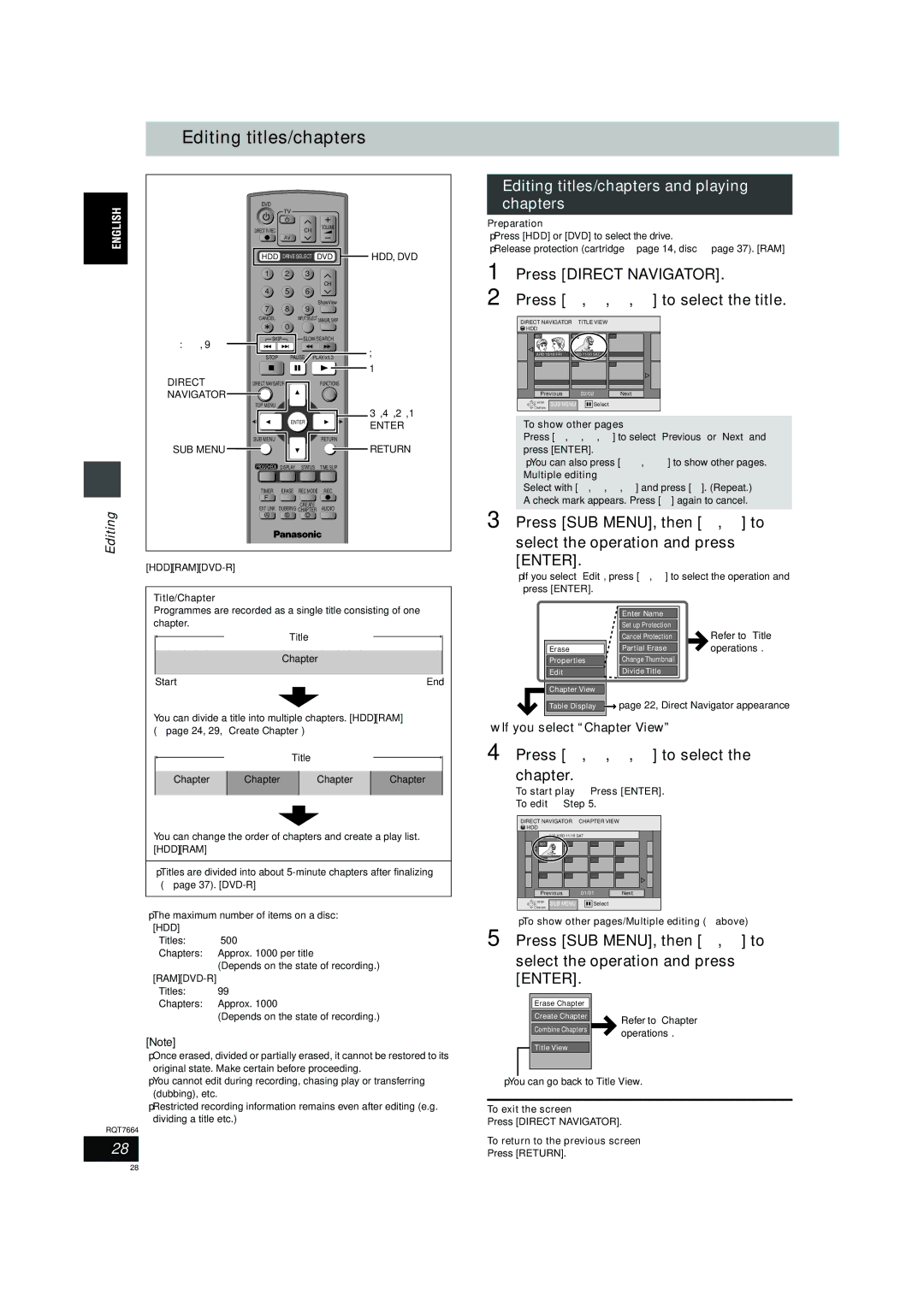
Editing titles/chapters
DVD
| TV |
|
|
DIRECT TV REC | CH | VOLUME |
|
|
| ||
| AV |
|
|
HDD DRIVE SELECT DVD | HDD, DVD | ||
| 1 | 2 |
| 3 |
|
|
|
|
| CH |
|
| 4 | 5 |
| 6 |
|
|
|
|
| ShowView |
|
| 7 | 8 |
| 9 |
|
| CANCEL | 0 | INPUT SELECT MANUAL SKIP |
| |
|
|
|
|
| |
:, 9 | SKIP |
| SLOW/SEARCH |
| |
|
|
|
| ; | |
| STOP |
| PAUSE | PLAY/x1.3 | |
|
|
| |||
|
|
|
|
| 1 |
DIRECT | DIRECT NAVIGATOR |
|
| FUNCTIONS |
|
NAVIGATOR |
|
|
|
|
|
| TOP MENU |
|
| 3,4,2,1 |
|
| ENTER | ||
|
| ENTER | ||
|
|
|
| |
| SUB MENU |
|
| RETURN |
| SUB MENU |
|
| RETURN |
| PROG/CHECK DISPLAY | STATUS | TIME SLIP | |
| TIMER | ERASE | REC MODE | REC |
| F |
|
|
|
| EXT LINK |
| CREATE | AUDIO |
Editing | DUBBING CHAPTER | |||
A | B | C |
| |
[HDD] [RAM] [DVD-R]
Title/Chapter
Programmes are recorded as a single title consisting of one chapter.
Title
Chapter
Start | End |
You can divide a title into multiple chapters. [HDD] [RAM] (➡page 24, 29, “Create Chapter”)
Title
Chapter | Chapter | Chapter | Chapter |
|
|
|
|
You can change the order of chapters and create a play list.
[HDD] [RAM]
≥Titles are divided into about
≥The maximum number of items on a disc: [HDD]
500 | |
Approx. 1000 per title | |
| (Depends on the state of recording.) |
[RAM] |
|
99 | |
Approx. 1000 | |
| (Depends on the state of recording.) |
[Note]
≥Once erased, divided or partially erased, it cannot be restored to its original state. Make certain before proceeding.
≥You cannot edit during recording, chasing play or transferring (dubbing), etc.
≥Restricted recording information remains even after editing (e.g. dividing a title etc.)
RQT7664
28
Editing titles/chapters and playing chapters
Preparation
≥Press [HDD] or [DVD] to select the drive.
≥Release protection (cartridge ➡page 14, disc ➡page 37). [RAM]
1 Press [DIRECT NAVIGATOR].
2 Press [3, 4, 2, 1] to select the title.
DIRECT NAVIGATOR |
| TITLE VIEW |
| |
HDD |
|
|
|
|
007 |
| 008 |
| - - - |
ARD 10/10 FRI | ARD 11/10 SAT |
| ||
- - - |
| - - - |
| - - - |
Previous |
| 02/02 | Next | |
ENTER | SUB MENU | Select |
| |
RETURN |
| |||
|
|
|
| |
To show other pages
Press [3, 4, 2, 1] to select “Previous” or “Next” and press [ENTER].
≥You can also press [:, 9] to show other pages.
Multiple editing
Select with [3, 4, 2, 1] and press [;]. (Repeat.) A check mark appears. Press [;] again to cancel.
3 Press [SUB MENU], then [3, 4] to
select the operation and press [ENTER].
≥If you select “Edit”, press [3, 4] to select the operation and press [ENTER].
|
|
| Enter Name |
|
|
|
|
|
| Set up Protection |
|
|
|
|
|
| Cancel Protection |
|
| Refer to “Title |
|
|
| Partial Erase |
|
| operations”. |
| Erase |
|
|
| ||
|
| Change Thumbnail |
|
|
| |
| Properties |
|
|
|
| |
|
|
| Divide Title |
|
|
|
| Edit |
|
|
|
| |
|
|
|
|
|
|
|

 Chapter View
Table Display  page 22, Direct Navigator appearance
∫If you select “Chapter View”
4 Press [3, 4, 2, 1] to select the chapter.
To start play ➡ Press [ENTER].
To edit ➡ Step 5.
DIRECT NAVIGATOR CHAPTER VIEW
 HDD
HDD
008 ARD 11/10 SAT
001 |
Previous | 01/01 | Next | |
ENTER | SUB MENU | Select |
|
RETURN |
| ||
|
|
| |
≥To show other pages/Multiple editing (➡above)
5 Press [SUB MENU], then [3, 4] to
select the operation and press [ENTER].
|
|
|
|
| Erase Chapter |
|
|
| Create Chapter |
| Refer to “Chapter |
| Combine Chapters |
| operations”. |
|
| ||
|
|
|
|
| Title View |
|
|
|
|
|
|
|
|
|
|
≥You can go back to Title View.
To exit the screen
Press [DIRECT NAVIGATOR].
To return to the previous screen
Press [RETURN].
28