Thecus N7700
About This Manual
Limited Warranty
Copyright and Trademark Notice
Safety Warnings
Table of Contents
Storage Management
System Settings
Network Management
User and Group Management
File Backup
Overview Login Using WebDisk Photo Server
Overview FTP Server ITunes Server Media Server
Printer Server
104
Problems with Time and Date Settings 102
107
108
Product Highlights
Introduction
Overview
Package Contents
Front Panel
Front Panel
Description
Solid green network link
Rear Panel
Hard Disk Trays
Hard Disk Trays
HDD
Back Panel
Before You Begin
Hardware Installation
Hard Disk Installation
Cable Connections
System Trouble
Checking System Status
System Status Normal
Thecus Setup Wizard
First Time Setup
Page
Display Mode
Display Mode
LCD Operation
LCD Controls
Management Mode
Typical Setup Procedure
Management Mode
USB Copy
Create Local Users or Setup Authentication
Network Setup
Create Folders and Set Up ACLs
Start Services
Page
System Management
Web Administration Interface
Menu Bar
Menu Bar
Product Information
Language Selection
Status Menu
Service Status
System/Service Status
System Information
Product Information
Printer Status
UPS Settings
System Information
Printer Status
Enable Schedule Power On/Off checkbox
Power Management
UPS Settings
Wake-up On Lan Configuration
Disks Information
Storage Management
Example Monday On 800 Off
Example Monday On
A.R.T. Information
A.R.T. Information
Failed
Configuration screen
RAID Configuration
RAID Information
RAID Information
RAID Configurations
RAID Configuration
RAID Level
RAID Levels
Creating a RAID
Press Apply to build the RAID storage volume
Migrating a RAID
Expanding a RAID
Under the Volume Allocation List, click iSCSI Target
Allocating Space for iSCSI Volume
Volume Allocation List
Space Allocation
Create iSCSI Volume
Create iSCSI Volume screen appears
RAID ID
IQN
Snapshot
Stackable NAS
Adding Folders
Folder Management
Folder
ACL
Deleting Folders
Editing Folders
Add Folder
Edit Folder
NFS Share
Snap Snapshot configuration
NFS Share
Snapshot
Clicking on Snap then screen appears as following
Access Control List
Folder Access Control List ACL
File System Check
Page
Advance Option
File Access Cache
ISCSI Block Size
Samba Anonymous Login Authentication
Samba Recycle Bin
WAN Configuration
WAN Configuration
Network Management
ISCSI CRC/Checksum
N7700 only
LAN Configuration
LAN Configuration
Wlan Configuration
Dhcp Configuration
Dhcp Configuration
Wlan Configuration
Wlan Dhcp Configuration
Web Services Configuration
WAN LAN Exchange
WEP KEY
NFS Setup
AFP Apple Network Setup
Web Service
Apple Network Configuration
NFS Server Setting
Local User Configuration
Local User Configuration
User and Group Management
Local Groups Configuration
Local Groups Configuration
Modifying Users
Deleting Users
Batch User and Group Creation
Local Group Setting screen appears Enter a Group Name
Adding Groups
Modifying Groups
ADS/NT Support
ADS/NT Configuration
Notification Configuration
System Settings
System Notifications
AD Domain Example Information
System Logs
Error
System Logs
Info
System Configuration Backup and Restore
Time and Date Settings
System Configuration Download/Upload
Time
Module Management
Reset to Factory Default Settings
Module Management
Firmware Upgrade screen appears
Change Administrator Password
Change Administrator Password
Upgrading System Firmware
Logout
Reboot and Shutdown System
FTP Server
Additional Feature Setup
Selections include Unlimited, 1, 2, 4, 8, 16 and 32 MB/s
MB/s
Media Server
ITunes Configuration
ITunes Server
Media Manager Settings
Connecting DMAs to the Media Server
Adding Media Share Folders
Go to My Media
Click on File Add Printer
Printer Server
Windows XP SP2
Windows Vista
Select or install a printer and then press OK
Page
Completed / Total download size
Download Manager
Download Tasks
Adding an Http Task
Page
Page
Adding an FTP Task
Page
Page
Page
Adding a BT Task
Page
Page
Scheduling Downloads
Deleting Tasks
Download Schedule
ItemDescription
Under Download Schedule, set Scheduler to Enable
Login
Using the N7700
Using WebDisk
User and Group Management Local User Configuration
Windows XP Publishing Wizard
Photo Server
Folder Page Buttons
Button Description
Page
Page
Page
Page
Page
Managing Albums and Photos
Password Protecting Albums
Creating Albums
Photo
Slide Shows
Uploading Pictures to Albums
Exif Information
Apple OS
Mapping a Client PC to the N7700
Windows
Windows 2000/XP
Mapping the N7700 as an iSCSI Drive
Page
Page
Page
Page
Nsync
File Backup
Adding an Nsync Task
Nsync
Setting Up an Nsync Target on an Nsync Device
Thecus Backup Utility
Setting Up an Nsync Target on Another Device
Nsync Target Server Setting
Add New Task
Apple OS X Backup Utilities
Windows XP Data Backup
Tips and Tricks
Remote Administration
USB and eSATA Storage Expansion
Adding a Spare Disk
Part I Setup a DynDNS Account
Firewall Software Configuration
Part II Enable Ddns on the Router
Part III Setting up Virtual Servers Https
Hard Drive Damage
Replacing Damaged Hard Drives
Replacing a Hard Drive
RAID Auto-Rebuild
Restoring Factory Defaults
Troubleshooting
Problems with Time and Date Settings
Forgot My Network IP Address
Page
Hardware Specifications
Appendix a Product Specifications
Software Specifications
Product Model N7700
LCD
Appendix B Customer Support
Thank you for choosing Thecus
Benefits
Appendix C RAID Basics
RAID Levels
Improved Performance
Jbod
Stripe Size
RAID Level Percentage Used
Disk Usage
ADS Benefits
What is Active Directory?
Appendix D Active Directory Basics
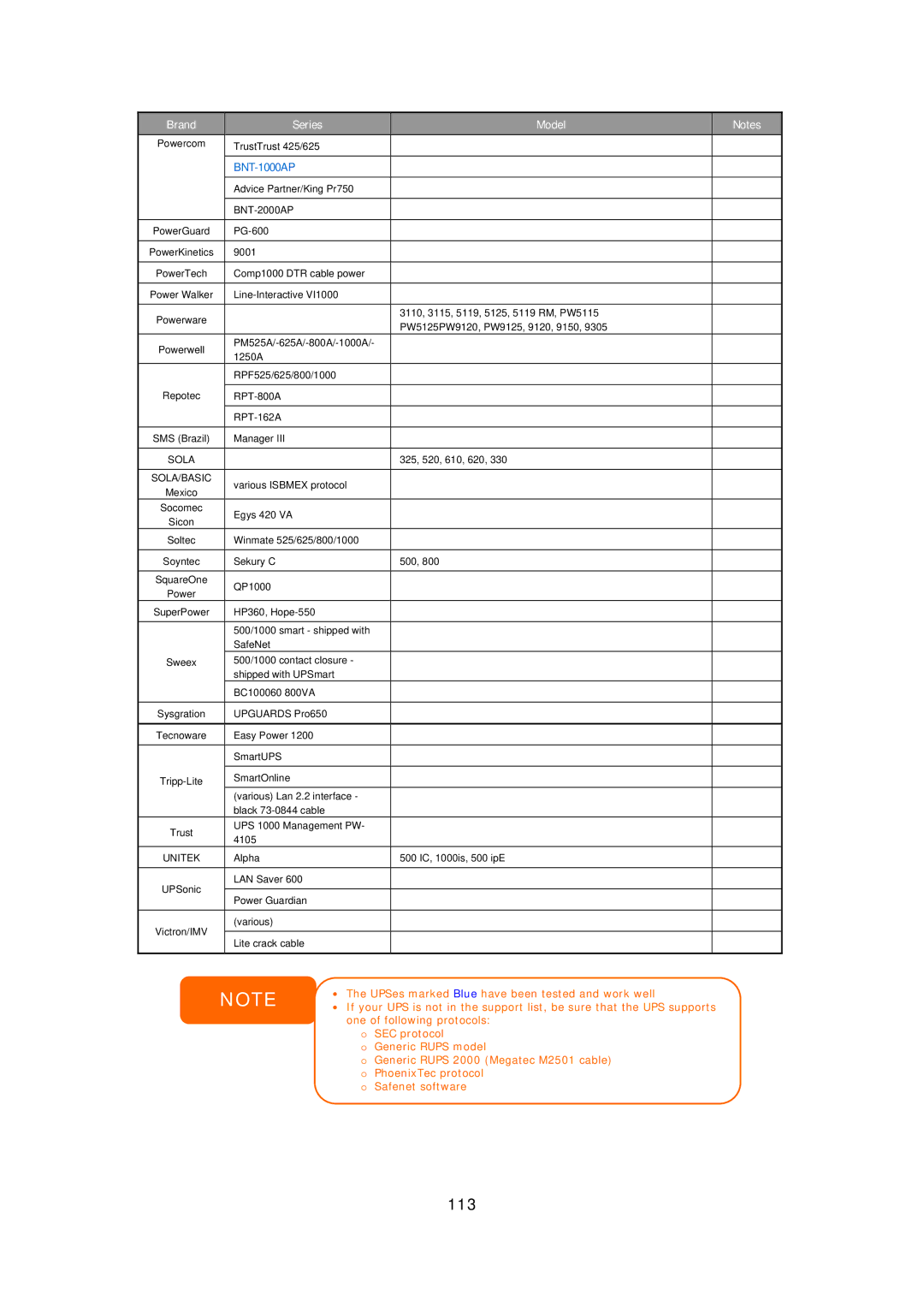
Brand Series Model
Appendix E UPS Compatibility List
112
113
Copyrights
Appendix F Licensing Information
Source Code Availability
GNU General Public License
Cgic License Terms
Page
Page
Page
119