W . d e l l . c o m s u p p o r t . d e l l . c o m
Dell Inspiron
Abbreviations and Acronyms
Contents
Microsoft Windows Logo Key Functions
Configuring Power Management Settings
What You Need to Establish a Wlan Connection
Program stops responding or crashes repeatedly
Ensuring Sufficient Power for Your Computer
If you hear an unfamiliar scraping or grinding sound
Resolving Software and Hardware Incompatibilities
Using Microsoft Windows XP System Restore
If only part of the display is readable
108
103
104
107
Glossary Index
Contents
Support.dell.com
Warranty information
Finding Information
Setup Diagram
Follow the instructions on the screen
Click the topic that describes your problem
What Are You Looking For? Find It Here
Click the arrow icon
Frequently asked questions
Microsoft Windows System Restore Microsoft
Service call status and support history
Top technical issues for my computer
About Your Computer
Determining Your Computer’s Configuration
About Your Computer
Front View
V I C E S T a T U S L I G H T S
About Your Computer
Y B O a R D a N D W I R E L E S S S T a T U S L I G H T S
Left Side View
Right Side View
Back View
Connects an external VGA-compatible monitor
Bottom View
Setting Up Your Computer
Setting Up Your Computer
Connecting to the Internet
Setting Up Your Internet Connection
Transferring Information to a New Computer
Click Finish and restart the new computer
Click Finished and restart the new computer
Printer Cable
Setting Up a Printer
Connecting a USB Printer
Surge Protectors
Power Protection Devices
Line Conditioners
Uninterruptible Power Supplies
Setting Up Your Computer
Setting Display Resolution
Using the Display
Adjusting Brightness
Switching the Video Image
Using the Display
Numeric Keypad
Using the Keyboard and Touch Pad
Using the Keyboard and Touch Pad
Key Combinations
Opens the Search Results-Computer dialog box
Adjusting Keyboard Settings
Speaker Functions
Microsoft Windows Logo Key Functions
Customizing the Touch Pad
Touch Pad
Using a Battery
Using a Battery
Battery Performance
Check the Battery Health
Checking the Battery Charge
Microsoft Windows Power Meter
Check the Battery Charge
Standby Mode
Conserving Battery Power
Low-Battery Warning
Power Management Modes
Hibernate Mode
Configuring Power Management Settings
Replacing the Battery
Charging the Battery
Storing a Battery
Playing a CD or DVD
Using Multimedia
Using Multimedia
Copying CDs and DVDs
Adjusting the Volume
Adjusting the Picture
Using Blank CDs and DVDs
How to Copy a CD or DVD
Media Type Read Write Rewritable
Helpful Tips
ExpressCards
Using Cards
Installing an ExpressCard
Using Cards
Removing an ExpressCard or Blank
101
Install the replacement Mini-Card
Adding and Replacing Parts
103
Coin-Cell Battery
Display
105
Lift the display up and away from the computer
106
107
Traveling With Your Computer
Identifying Your Computer
Packing the Computer
Traveling by Air
Travel Tips
Contacting Dell
Contacting Dell
109
110
111
112
113
114
115
116
117
118
119
120
121
122
123
Website support.ap.dell.com
124
Called from within Singapore or Malaysia only
125
126
127
128
Printers, and Projectors for Relationship
129
130
131
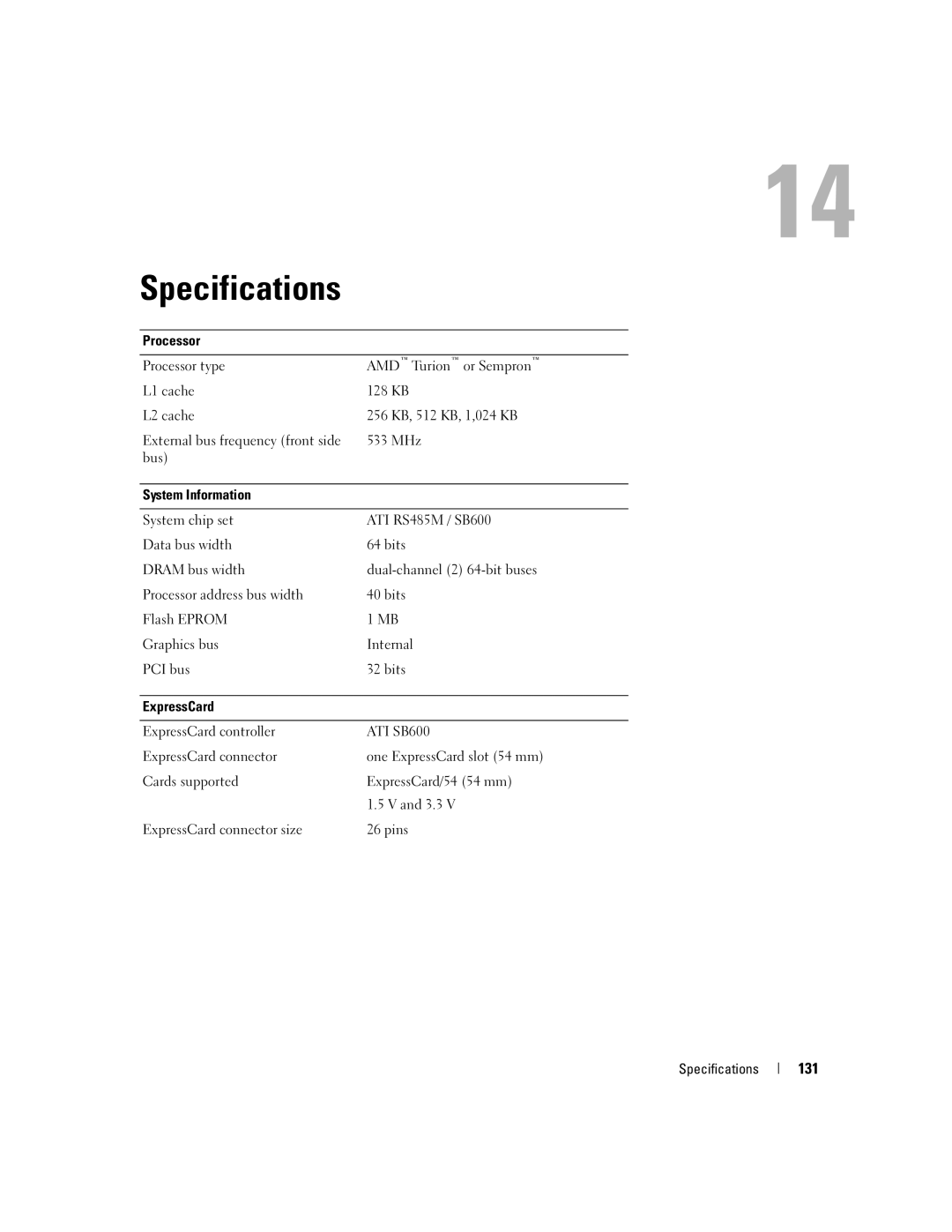
Specifications
Memory
Ports and Connectors
132
In-1 Media Memory Card Reader
Audio
133
Communications
Video
Display
134
Touch Pad
Battery
135
Keyboard
AC Adapter
136
Environmental
137
Physical
138
139
Using the System Setup Program
Entering System Setup
Appendix
140
Changing the Boot Sequence
Commonly Used Options
141
Performing a One-Time Boot
Floppy Drive
Cleaning Your Computer
Computer, Keyboard, and Display
Touch Pad
143
Definition of Dell-Installed Software and Peripherals
Dell Technical Support Policy U.S. Only
CDs and DVDs
144
FCC Notice U.S. Only
Definition of Third-Party Software and Peripherals
FCC Class B
PP23LA
145
146
Glossary
Glossary
147
148
Docking device See APR
149
Device driver See driver
150
151
152
NIC See network adapter
153
154
System tray See notification area
155
156
Video resolution See resolution
157
158
Index
Index
159
160
See also hard drive See also optical drive
161
162
Problems programs and Windows
163
164