Look Inside For
Luxembourg
Japan Australia
Austria
Malaysia
United States Government Restricted Rights
Page
Contents
Using Your Printer in Photo Mode
Receiving a Fax Using Fax Console or Fax Service
Cleaning the Ink Cartridge Nozzles
Using the Dell Printer Solution Center
104
Contacting Dell
Page
W . d e l l . c o m s u p p o r t . d e l l . c o m
Number Part Description
Understanding the Printer Parts
Memory Card Manager on
Setting Up Your Printer
Replacing the Operator Panel
Accessing Your User’s Guide
Getting Started
Button Description
Using the Operator Panel
Operator Panel Functionality
Viewing Ink Levels
Preview
Memory Cards
Memory Card Manager
PictBridge
Operator Panel Menus
Menu Sub-menu item Settings
Menu Sub-menu item Settings
Order online
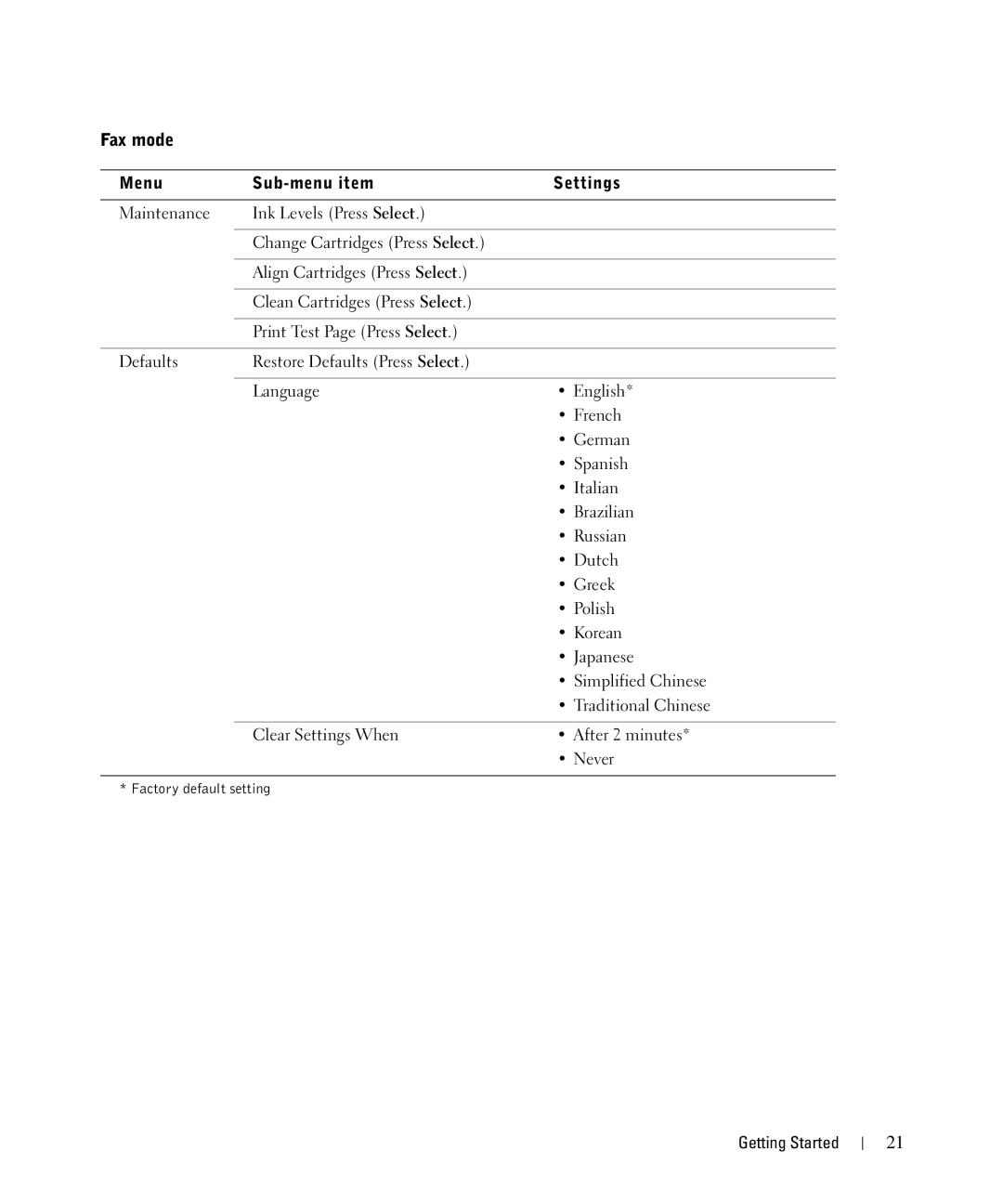
Fax mode
Copy mode
Menu Sub-menu item Settings
Order online
Scan mode
Load up to Make sure
Print Media Guidelines
Load up to Make sure
Loading Paper
Normal Photo 1200 dpi
Understanding the Automatic Paper Type Sensor
Transparency
Glossy/photo
Printing Preferences screen appears
Placing Your Document on the Scanner Glass
Close
Printing
Printing a Document
Printing Photos
Printing Borderless Photos
Printing Other Projects
Copying
Copying Documents Without a Computer
On the Print Layout tab, click Borderless
Click See More Copy Settings to
Copying Documents Using Your Computer
Copying Photos Without a Computer
Copying Photos Using Your Computer
Enlarging Images Using Your Operator Panel
Enlarging Images Using Your Computer
Enlarging or Reducing Images or Documents
Click this tab
Changing Copy Settings
Scanning Documents
Scanning
Scanning Photos
Dell All-In-One Center appears Click Preview Now
Scanning Multiple Pages or Images
Scan section, click See More Scan Settings
Saving an Image on Your Computer
Editing Scanned Text Using Optical Character Recognition OCR
Mailing a Scanned Image or Document
Faxing
Add or Remove Programs dialog box, click Close
Installing Microsoft Fax Console in Windows XP
Faxing a Paper Document
Receiving a Fax Using Fax Console or Fax Service Management
Faxing Electronic Documents
Dell All-In-One Center you can either
Changing the Fax Configuration
Using Memory Cards
Using Your Printer in Photo Mode
Memory card orientation
Using a PictBridge-Enabled Digital Camera
Viewing or Printing Photos
Working With Digital Photos
Saving Photos to Your Computer
Viewing a Slide Show
Printing All Photos on Media Card
Using the Printer
Understanding the Printer Software
Using the Dell Printer Solution Center
How To tab
Maintenance tab
Contact Information tab
Advanced tab
Using the Dell All-In-One Center
This section You can
Preview
To access Printing Preferences
Using Printing Preferences
From this tab You can change these settings
Using Dell Picture Studio
Printing Preferences Tabs
Single print job Collated, Normal, or Print Last Page First
Using the Memory Card Manager
Ink Management
Understanding the Printer Software
Understanding the Printer Software
Replacing Ink Cartridges
Follow the Caution Safety Instructions on
Photo or black cartridge
Photo or black cartridge
Aligning Ink Cartridges
Cleaning the Ink Cartridge Nozzles
Click Clean to fix horizontal streaks
Click Align to fix blurry edges
Ink Cartridge Maintenance
Setup Problems
Computer Problems
Windows XP, click Start→ My Computer
Click Start→ Programs or All
Removing and Reinstalling Software
Windows XP, click Start→ My Computer
Printer Problems
General Problems
Fax Problems
Paper Problems
Using your printer and your computer
Error Message What it indicates Solution
Error Messages and Lights
Improving Print Quality
Troubleshooting
Technical Assistance
Automated Order-Status Service
Contacting Dell
Business
A. Austin, Texas
Antigua and Barbuda
Anguilla
Argentina Buenos Aires
Aruba
Bermuda
Belgium Brussels Website support.euro.dell.com
Bolivia
Brazil
China Xiamen
Chile Santiago
Colombia
Costa Rica
Denmark Copenhagen Website support.euro.dell.com
Czech Republic Prague Website support.euro.dell.com
Dominica
Dominican Republic
France Paris Montpellier Website support.euro.dell.com
Finland Helsinki Website support.euro.dell.com
Home and Small Business
Corporate
Greece Website support.euro.dell.com
Germany Langen Website support.euro.dell.com
Grenada
Guatemala
Ireland Cherrywood Website support.euro.dell.com
India
Italy Milan Website support.euro.dell.com
Jamaica
Korea Seoul
Japan Kawasaki Website support.jp.dell.com
Latin America
Luxembourg Website support.euro.dell.com
Mexico
Malaysia Penang
Montserrat
Netherlands Antilles
Netherlands Amsterdam Website support.euro.dell.com
New Zealand
Nicaragua
Panama
Norway Lysaker Website support.euro.dell.com
Peru
Poland Warsaw Website support.euro.dell.com
St. Vincent and the Grenadines
St. Lucia
Singapore Singapore
South Africa Johannesburg Website support.euro.dell.com
Switzerland Geneva Website support.euro.dell.com
Sweden Upplands Vasby Website support.euro.dell.com
Taiwan
Thailand
Bracknell Website support.euro.dell.com
Turks and Caicos Islands
Uruguay
Virgin Islands
Contacting Dell
What is covered by this limited warranty?
Limited Warranty for Dell-Branded Hardware Products
What is not covered by this limited warranty?
Limited Warranties and Return Policy
How long does this limited warranty last?
What will Dell do?
What do I do if I need warranty service?
What if I purchased a service contract?
May I transfer the limited warranty?
Total Satisfaction Return Policy
How will you fix my product?
How to Return