Manual
Sonnenweg
ELSA, Inc
Aachen
Germany
Introducing the Elsa MicroLink Cable
Thank you for placing your trust in this Elsa product
Page
Elsa Cable Modem
Content
VI Content
Setup/SNMP-module
Viii Content
Elsa MicroLink Cable
What does the unit look like?
Introducing the Elsa MicroLink Cable
Sync
Meanings of the specific blink codes
These LEDs show the corresponding network controller status
BC D E F G
Node or hub?
Highlights of the Elsa MicroLink Cable
Fast Internet
Cable network
Internet at all times-always online
Regional content
More than just Internet
Backbone
Proxy servers
CE and FCC
CE conformity and FCC radiation standard
Introducing the Elsa MicroLink Cable
Elsa MicroLink Cable
Installation and configuration
First Steps
Configuring the Elsa MicroLink Cable
Preparations
Quick Start Quick configurations
Configuration as a bridge
LAN
Off you go into the Web with a whole new sensation of speed
Configuration as a router
On the Router tab, enable the IP Router option
Obtain IP addresses automatically use Dhcp
TCP/IP installation
Configuring fixed IP addresses not using Dhcp
Checking the IP configuration
User-friendly method inband
Requirements for inband configuration
Configuration modes
Start up inband configuration using telnet
Starting inband configuration using Elsa LANconfig
This command Means this For instance
Configuration commands
Set/se/snmp/admin The Administrator
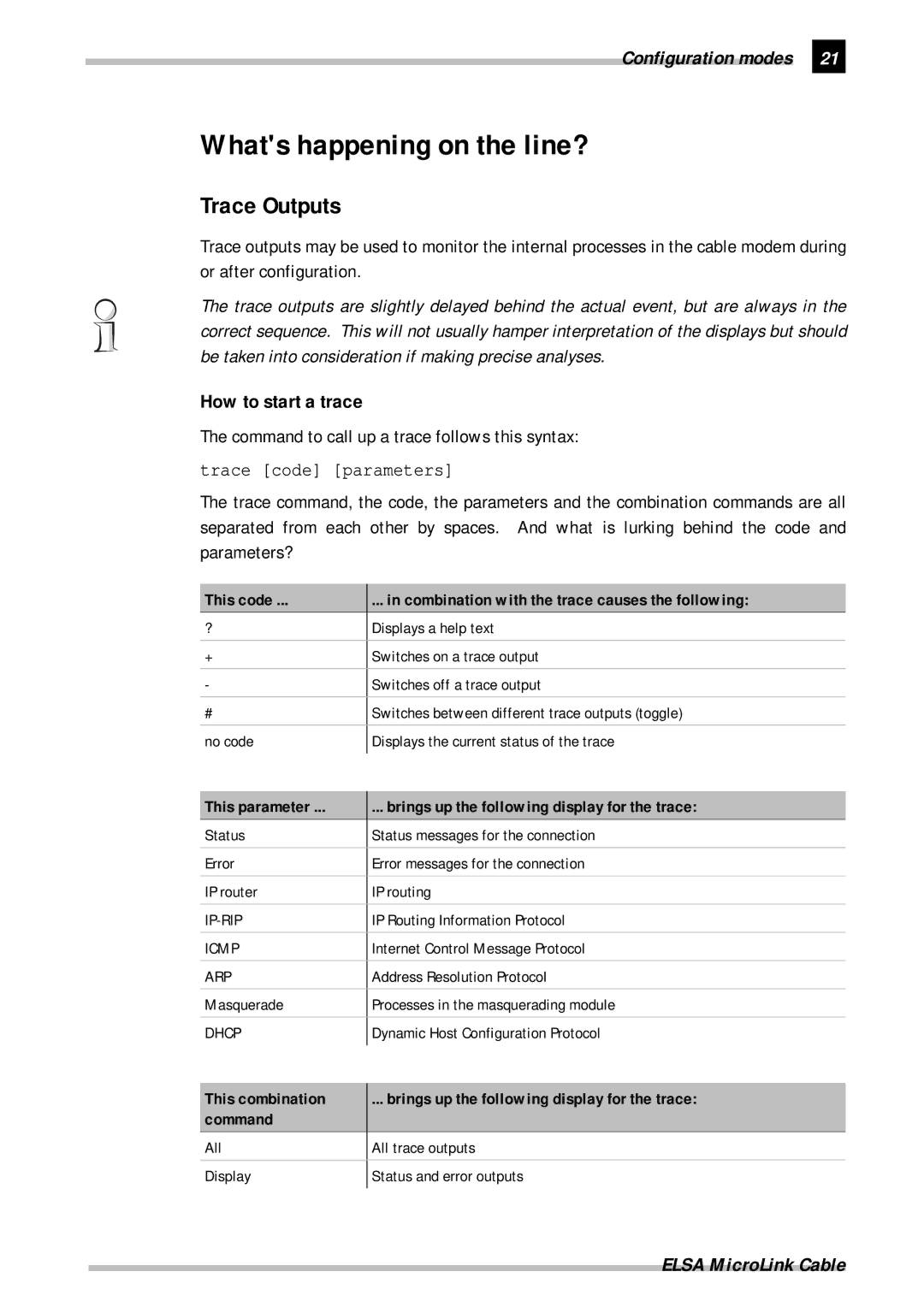
Command to call up a trace follows this syntax
How to start a trace
Whats happening on the line?
Trace Outputs
Examples
New firmware with FirmSafe
This is how FirmSafe works
Elsa LANconfig
How to load new software
Tftp
Configuration using Snmp General
Command Target/Source Function
Accessing tables and parameters using Snmp
Access protection in Snmp
IP address IP-netmask Router name Distance
Deleting rows in tables using Snmp
Appending rows to tables using Snmp
Management Information Base MIB
Error messages via Snmp trap
Configuration modes
Password protection
Security for your configuration
Login barring
Operating modes and functions
Globally to
Access control via TCP/IP
Security for your LAN
Hiding place-IP masquerading NAT, PAT
Encryption
TCP/IP packet filters
IP address IP netmask Router Dis Tance
IP routing
IP routing table
192.168.130.0 255.255.255.0
IP address IP netmask Router name Dist This is what happens
What information is propagated by IP/RIP?
Dynamic routing with IP/RIP
What do the entries mean?
IP address IP netmask Time Distance Router
Interaction of static and dynamic tables
Local routing
Two addresses for the router
IP masquerading NAT, PAT
Simple and inverse masquerading
How does IP masquerading work?
Cable TV net
Work
Only small difference is that
Which protocols can be transmitted using IP masquerading?
DNS forwarding
Rator
Bridging
What are the filter options?
Automatic address administration with Dhcp
Dhcp server
Dhcp client
Cable modem really belongs to two LANs
IP address Network mask Broadcast address
Dhcp on, off or auto?
Default state is auto
How are the addresses assigned?
IP address assignment
Network mask assignment
Default gateway assignment
Broadcast address assignment
DNS server assignment
Priority for a workstation-overwriting an assignment
Priority for the Dhcp server Request assignment
Operating modes and functions
Operating modes and functions Elsa MicroLink Cable
Two standards get around this problem
Access
Cable modem technology
Standards
Operator Work
Registration in the cable network
Network of the cable network Cable TV net
Registration
Connection modes
Network technology
Network and its components
Host
Kinds of networks
IP addressing
This address Bytes Looks like this in bits
Examples
Same IP address, this time with another netmask
10.0.0.0 255.0.0.0
IP address Netmask Remark
IP routing and hierarchical IP addressing
There are two considerations when using these IP addresses
Host Smith External host Marketing Example
Expansion through local networks
80-C7-6D-A4-6E
Why a LAN is called multiprotocol-capable
Easy as possible
That is processed by all computers in the LAN
LAN as easy as possible
Data transfer within the LAN
Interface only understands MAC addresses
Host Smith
LAN coupling on MAC basis
Data transfer from the LAN onto the Internet
Technical basics Elsa MicroLink Cable
Appendix
Technical data
Service
Package contents
Warranty coverage
Warranty conditions
Warranty period
Warranty procedure
Additional regulations
Operating mistakes
Typenbezeichnung
Declaration of conformity
Appendix Elsa MicroLink Cable
Index
32, 40 Gateway Heap reserve
Inde70
17, 32
17, 18
Trace
Setup
Inde72
Wireless links
Description of the menu options R73
Symbols
Overview of the menus
R74 Description of the menu options
Status Running status displays
Status
Description of the menu options R75
Status/Current-time
Status/Operating-time
Status/Cable-statistics
R76 Description of the menu options
LAN-statistics Running status displays
Status/LAN-statistics
Description of the menu options R77
R78 Description of the menu options
Status/Bridge-statistics
Cannot be modified manually
Bridge-statistics Running status displays
Description of the menu options R79
Status/TCP-IP-statistics
Status/TCP-IP-statistics/ARP-statistics
These statistics include the following values
Status/TCP-IP-statistics/ICMP-statistics
R80 Description of the menu options
Status/TCP-IP-statistics/IP-statistics
Status/TCP-IP-statistics/TFTP-statistics
Description of the menu options R81
Status/TCP-IP-statistics/TCP-statistics
Status/TCP-IP-statistics/DHCP-statistics
R82 Description of the menu options
Description of the menu options R83
Status/IP-router-statistics
Shrinks accordingly. It has the following layout
IP-router-statistics Statistics from the IP router area
Status/IP-router-statistics/RIP-statistics
R84 Description of the menu options
Protocol LAN-tx Cable-tx
IP-address IP-netmask Time Distance Router
Config-statistics Remote configuration statistics
Status/Config-statistics
Status/Queue-statistics
Description of the menu options R85
IPr-RIP-queue-packets
R86 Description of the menu options
Status/Init-status
Status/MCNS-statistics
Description of the menu options R87
MCSN-statistics
System configuration
Setup
Status/DHCP-client-statistics
R88 Description of the menu options
Setup/LAN-module
Setup/Cable-module
Entering the following command
Default configuration, no name is entered
R90 Description of the menu options
Setup/Bridge-module
MAC-address field
Setup/TCP-IP-module
Description of the menu options R91
R92 Description of the menu options
Configuration, the TCP/IP module is activated
Description of the menu options R93
Configuration, the IP router module is activated
Setup/IP-router-module
IP-address Node-ID Last-access Connect
IP-router-module IP router module settings
IP-address IP netmask Router-name Distance
Description of the menu options R95
R96 Description of the menu options
Setup/IP-router-module/Routing-method
Routing-method Routing method settings
Different settings have the following meaning
Setup/IP-router-module/RIP-configuration
Settings have the following meaning
Description of the menu options R97
Following layout
Setup/IP-router-module/Masquerading
R98 Description of the menu options
Description of the menu options R99
Setup/IP-router-module/firewall
R10 Description of the menu options
Setup/DHCP-server-module
Setup/SNMP-module
Description of the menu options R10
On The device operates as a Dhcp server
R102 Description of the menu options
Default value of 6000 minutes equals approximately 4 days
Off The device does not operate as a Dhcp server
Network mask is assigned in the same way as the IP address
IP-address Node-ID Timeout Hostname Type
Setup/Config-module
Config-module Configuration module settings
Description of the menu options R103
R104 Description of the menu options
Firmware Display and keyboard settings
Firmware
Position Status Version Date Size Index
Description of the menu options R105
Module Version
Other
This option allows you to reboot the device
R106 Description of the menu options
Other menu allows you to manage the following functions