1 Getting started
Use this section to get familiar with camera controls, set up your digital camera for use, and begin taking pictures.
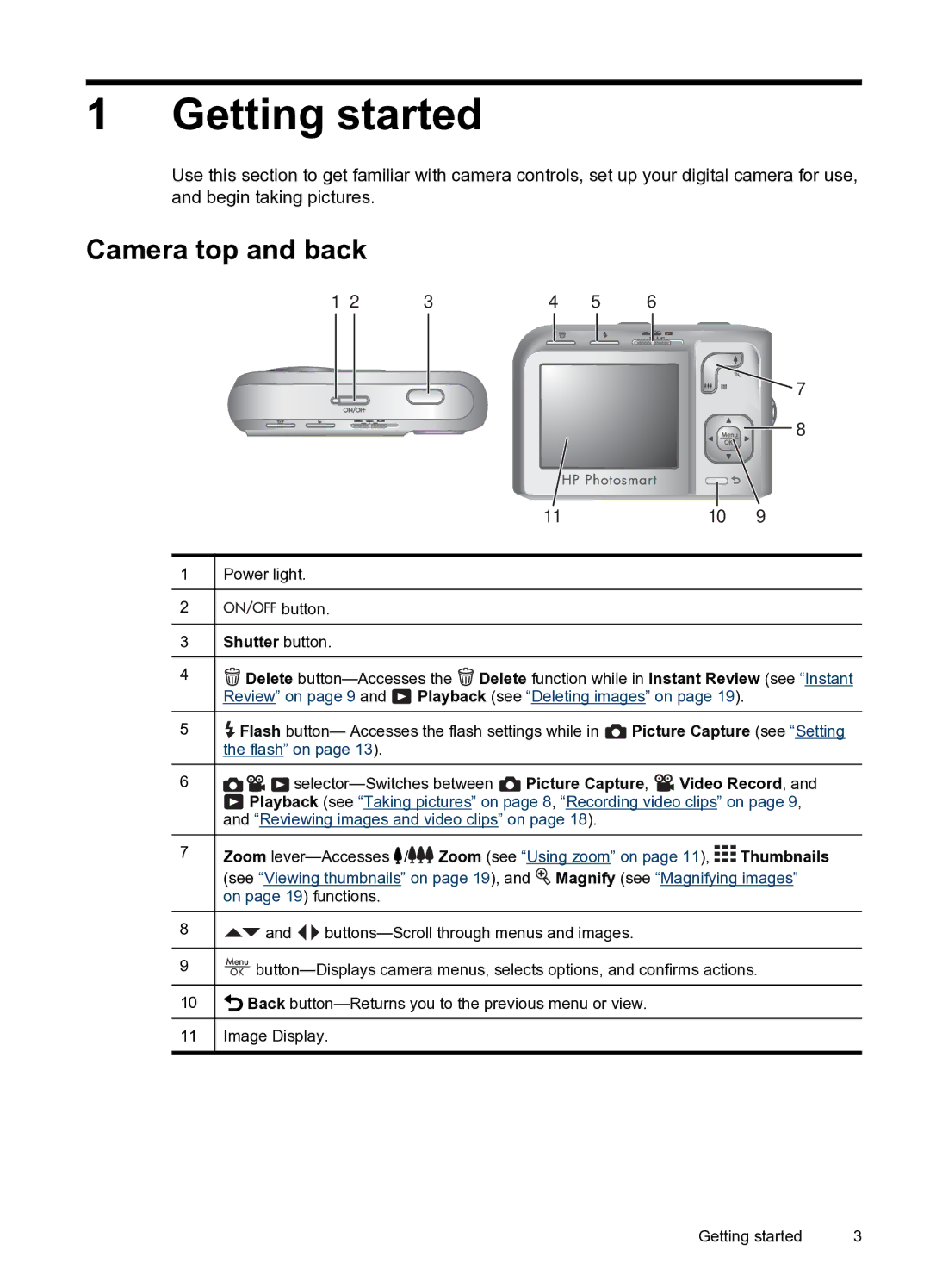
Camera top and back
1 2 | 3 | 4 | 5 | 6 |
 7
7 
 8
8
11 | 10 | 9 |
1Power light.
2

 button.
3Shutter button.
4 Delete
  Delete function while in Instant Review (see “Instant Review” on page 9 and
  Playback (see “Deleting images” on page 19).
5 Flash button— Accesses the flash settings while in
  Picture Capture (see “Setting the flash” on page 13).
6


 Picture Capture,
  Video Record, and
 Playback (see “Taking pictures” on page 8, “Recording video clips” on page 9, and “Reviewing images and video clips” on page 18).
7Zoom  /
/
 Zoom (see “Using zoom” on page 11),

 Thumbnails
(see “Viewing thumbnails” on page 19), and  Magnify (see “Magnifying images” on page 19) functions.
8 and
and 

9
10 Back
Back
11Image Display.
Getting started | 3 |