| Application Code |
|
JAXP |
|
|
DocumentBuilder | SAXParser | Transformer |
DOM API | SAX Parser | XSLT Processor |
Implementation | Implementation | Implementation |
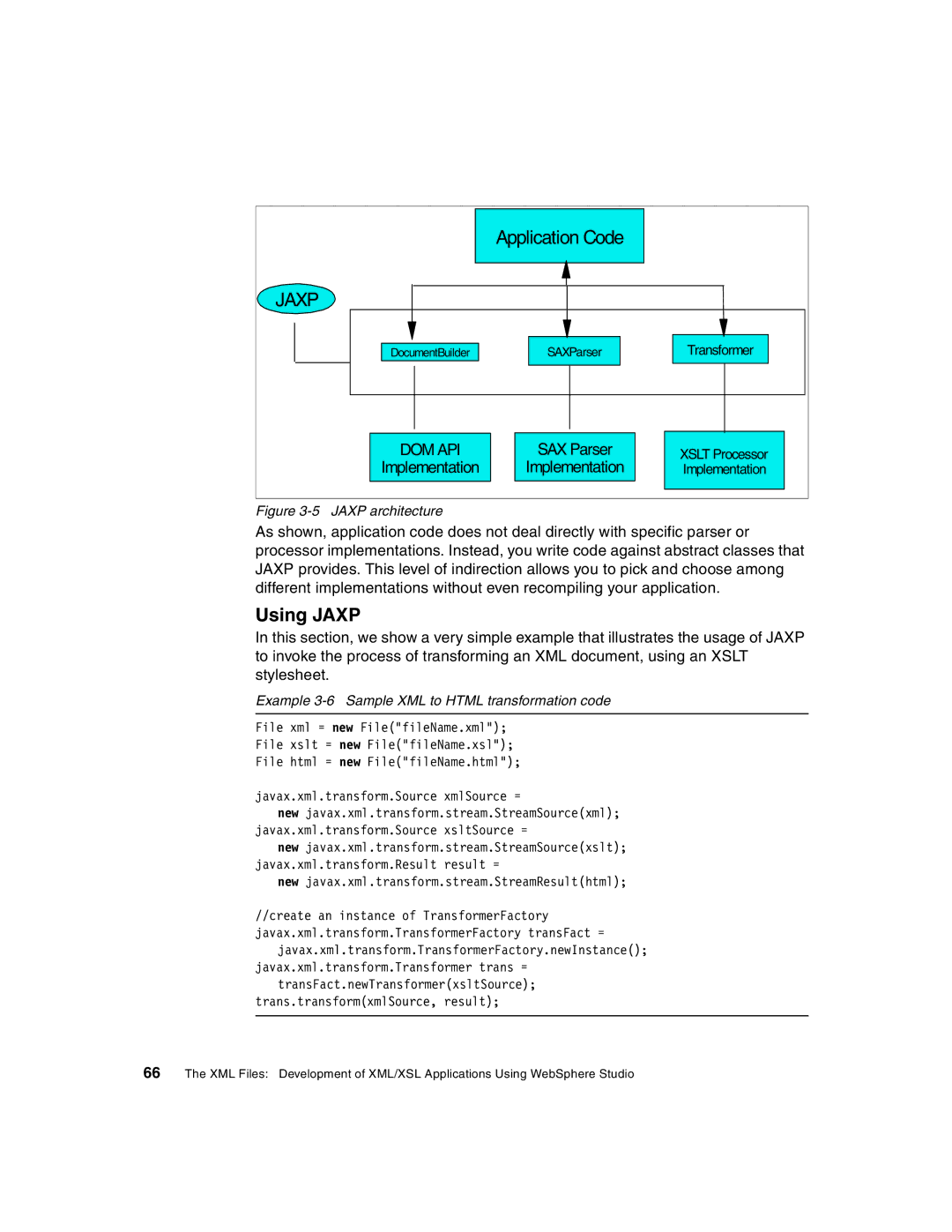
Figure 3-5 JAXP architecture
As shown, application code does not deal directly with specific parser or processor implementations. Instead, you write code against abstract classes that JAXP provides. This level of indirection allows you to pick and choose among different implementations without even recompiling your application.
Using JAXP
In this section, we show a very simple example that illustrates the usage of JAXP to invoke the process of transforming an XML document, using an XSLT stylesheet.
Example 3-6 Sample XML to HTML transformation code
File xml = new File("fileName.xml");
File xslt = new File("fileName.xsl");
File html = new File("fileName.html");
javax.xml.transform.Source xmlSource =
new javax.xml.transform.stream.StreamSource(xml); javax.xml.transform.Source xsltSource =
new javax.xml.transform.stream.StreamSource(xslt); javax.xml.transform.Result result =
new javax.xml.transform.stream.StreamResult(html);
//create an instance of TransformerFactory javax.xml.transform.TransformerFactory transFact =
javax.xml.transform.TransformerFactory.newInstance(); javax.xml.transform.Transformer trans =
transFact.newTransformer(xsltSource); trans.transform(xmlSource, result);
66 The XML Files: Development of XML/XSL Applications Using WebSphere Studio