How to
Inhalt
Índice PT Índice
Page
How to connect the External ReWriter to my computer?
Your computer Power HiSpeed USB Audio connector
Power outlet
On My Computer and choosing Properties
Controleer via stap 5 of u de juiste connector gebruikt
Lenta. Verificate nuovamente il punto
Questa procedura è valida solo per Windows XP
Dit geldt alleen voor Windows XP
Go to step
NL Alleen voor Windows 98 Tweede Edition
Wait until this screen pops up
US Windows 98 Second Edition only
Bottom of the device
Page
How to disconnect
US To disconnect the External ReWriter
Symbol
US Click on Safely remove USB…
Digital DV-camcorder?
Page
Next
US Choose Make DVD with captured video DVD-Video
Oder einer Disk befinden?
Choose Add Video files
Open
Effects, text effects and transitions
US After editing all files, choose Next
Disc menu
Pressing on the thumbnails. When done, choose Next
Tevreden bent
You can preview the finished movie by
US Choose Burn to, choose your recorder and choose Burn
Burning your disc
NeroVision Express transcodiert und brennt Ihre Disk
Successfully. Click OK. You may exit
Application now
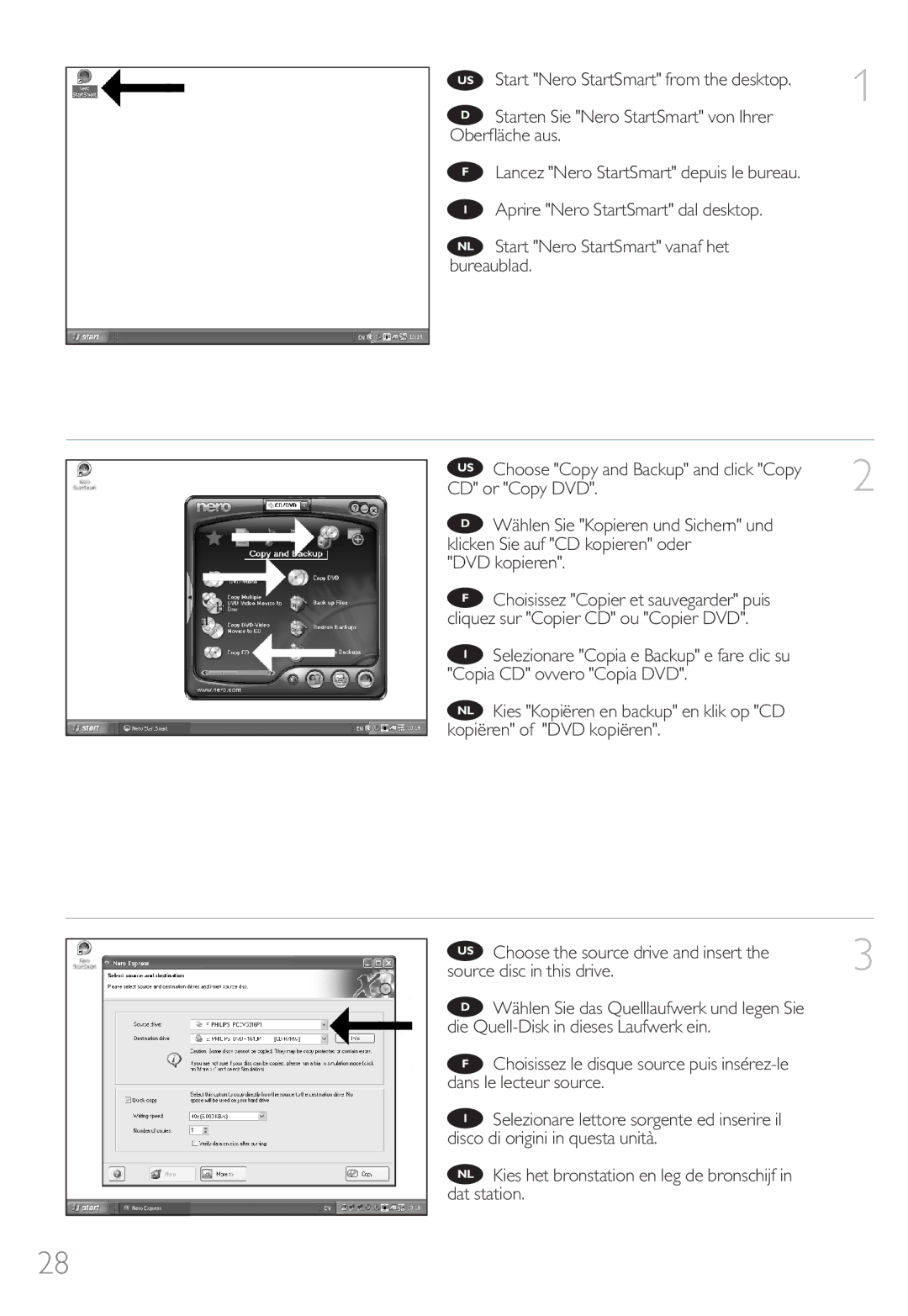
How to copy a disc?
CD or Copy DVD
DVD kopieren
Otherwise, unmark the checkbox. Click Burn
US Nero will now burn your disc
How to make a Data disc?
Or Make a data DVD
US Click Add
Click Next
Click Burn
Page
Page
How to make an Audio disc?
US Choose Audio and Make Audio CD
On your new audio disc and click Add
US Choose your recorder and click Burn
Nero will now burn your disc
Klik op OK. U kunt het programma nu afsluiten
How to find warranty information?
Weee mark Information to the Consumer
Frequently Asked Questions FAQ
Question 3 How do I keep my External ReWriter in good shape?
Question 10 How can I clean a dirty disc?
Question 11 May I use chemicals to clean a disc?
Question 6 I inserted a disc and it is not played
Question 9 I cannot read from a disc
Weee Kennzeichnung Kundeninformationen
Wie findet man Garantie-Informationen?
Achtung
Häufig gestellte Fragen FAQ
Frage 9 Ich kann nicht von einer CD lesen
Frage 10 Wie kann ich eine verschmutzte CD reinigen?
Marquage Weee « Informations pour le consommateur »
Comment trouver les informations relatives à la garantie?
Avertissement
Questions fréquentes FAQ
Question 9 Je ne parviens pas à lire un disque
Question 10 Comment nettoyer un disque encrassé ?
Inserire nuovamente il disco Nero e fare clic su Esci
Indicativo Weee Informazioni per il consumatore
Smaltimento di vecchi prodotti
Attenzione
Domande frequenti FAQ
Il Masterizzatore esterno ora funziona correttamente
Domanda 9 Non riesco a leggere il disco
Domanda 6 Ho inserito un disco, ma non viene riprodotto
Domanda 10 Come si pulisce un disco sporco?
WEEE-markering Informatie voor de consument
Waar vind ik informatie over de garantie?
PAS OP
Vaak gestelde vragen FAQ
Vraag 3 Hoe houd ik mijn Externe brander optimaal in vorm?
Vraag 10 Hoe kan een vuile disc schoonmaken?
Vraag 9 Een disc wordt niet gelezen
Vraag 11 Mag ik een disc met schoonmaakmiddelen reinigen?
Externa al ordenador?
En la parte posterior encontrará las
En la caja encontrará un dispositivo
Alimentação USB HiSpeed Conector de áudio
Eléctrica
Tomada eléctrica
Yazıcı ve bir güç prizine onları takınız
Połącz kable zasilające i podłącz je do
Logotipo del conector LowSpeed USB Alternativo
El botón derecho en Mi PC y seleccione
Propiedades
En caso contrario, vaya al paso
Kontrollera steg 5 igen Det gäller endast Windows XP
Esto puede tardar unos segundos
Gå till steg
Del ordenador, no en Grabadora externa
Espere a que aparezca esta pantalla
Endast Windows 98 Second Edition
Vänta tills den här skärmen visas
Conecte el cable USB al ordenador
¡Sólo para Windows 98 Second Edition
Na parte inferior do dispositivo
Del dispositivo Este número de modelo le permite buscar
Numarasını unutmayınız
Tebrikler. Philips aygıtınız artık kullanıma hazırdır
¿Cómo desconectar Grabadora externa sin apagar el ordenador?
Du koppla bort Extern DVD brännare
De una videocámara digital DV?
Trabalho
Seleccione Foto y vídeo y haga clic en Capturar vídeo
Vídeo
Video
Seleccione su videograbadora digital y utilice los
Botones para controlar su cámara digital. Pulse el
Botón Grabar para grabar vídeo
Escolha o seu DV Camcorder e use os botões
Seleccione Crear DVD con vídeo Capturado y DVD-Vídeo
Yöntemi…
¿Cómo crear un disco de vídeo a partir de
Trabalho
Uruchom program Nero StartSmart z Pulpitu
DVD de vídeo proprio
DVD de vídeo
Haga clic en Abrir
Clique em Abrir
Tıklatınız
Otwórz
Cuando termine, haga clic en Siguiente
Após editar todos os arquivos, escolha Avançar
Sonra, İleriyi seçiniz
El fondo del menú del disco
Aquí puede cambiar la presentación, el fondo
10 añadir títulos, etc. Cuando termine, haga clic en
Siguiente
Possível alterar o layout, o plano de fundo
Grabando el disco
Gravar o seu disco
Ve diskiniz yazıyor/kaydediyor
Nagrywa płytę
¿Cómo copiar un disco?
Uruchom program Nero StartSmart z
En Copiar CD o Copiar DVD
CD ou Copiar DVD Kopyala ve Yedekleyi seçiniz ve CD
Kopiuj CD lub Kopiuj DVD
Clique em Gravar
La casilla sin marcar. Haga clic en Copiar
Kopiera
Program Nero rozpocznie nagrywanie płyty
De datos?
De datos e Crear DVD de datos
Dados ou Criar DVD de Dados
DVD’si Yarat üzerine tıklatınız
Danymi lub Utwórz dysk DVD z danymi
Po dodaniu wszystkich plików kliknij
Zakończono
Clic en Grabar
Nero kommer nu att bränna din skiva
Grattis! din skiva har bränts utan fel
Cerrar la aplicación
Klicka på OK. Du kan avsluta programmet nu
Page
De audio?
Escolha Áudio e Criar CD de Áudio
Adicionar
En Añadir
Nya audioskiva och klicka på Lägg till
Nero kommer nu att bränna din skiva
Enhorabuena, su disco se ha grabado
Page
Indicativo Weee Información al consumidor
¿Cómo encontrar información sobre la garantía?
Advertencia
Preguntas frecuentes FAQ
Pregunta 9 No puedo leer un disco
Pregunta 6 He insertado un disco pero no se reproduce
Pregunta 10 ¿Cómo limpio un disco sucio?
Marca Weee Informações ao consumidor
Como encontrar informações sobre garantia?
Aviso
Perguntas mais frequentes FAQ
Não coloque nada em cima do Gravador Externo
Questão 9 Não consigo ler a partir de um disco
Questão 6 Introduzo um disco e este não é reproduzido
Questão 10 Como posso limpar um disco sujo?
Garanti bilgisi nasıl bulunur?
Nero diskini yeniden yerleştirip, çık üzerine tıklatınız
Weee İşareti Tüketicinin Bilgisine
Uyari
Sıkça Sorulan Sorular FAQ
Soru 3 Harici DVD Yazıcı’mi iyi durumda nasıl tutabilirim?
Soru 9 Bir diskten okuma yapamıyorum
Soru 6 Bir disk yerleştirdim ancak çalmıyor
Soru 10 Kirli bir diski nasıl temizleyebilirim?
Wyświetlanie informacji o gwarancji
Oznaczenie Weee Informacje dla użytkownika
Ostrzeżenie
Torby plastikowe mogą być niebezpieczne
Często zadawane pytania FAQ
105
Pytanie 9 Nie można odczytać płyty
Pytanie 10 Jak należy czyścić zabrudzone płyty?
WEEE-märkning Information till konsumenten
Visa garantiinformation
Varning
Vanliga frågor FAQ
Fråga 3 Hur håller jag Extern DVD brännare i gott skick?
Fråga 9 Jag kan inte läsa från en skiva
Fråga 6 Jag har satt i en skiva och den spelas inte upp
Fråga 10 Hur rengör jag en smutsig skiva?
Safety Precautions
111
Additional information available at our website