Troubleshooting
WARNING
Under no circumstances should you try to repair the system yourself, as this will invalidate the warranty. Do not open the system as there is a risk of electric shock.
If a fault occurs, first check the points listed below before taking the system for repair. If you are unable to remedy a problem by following these hints, consult your dealer or Philips for help.
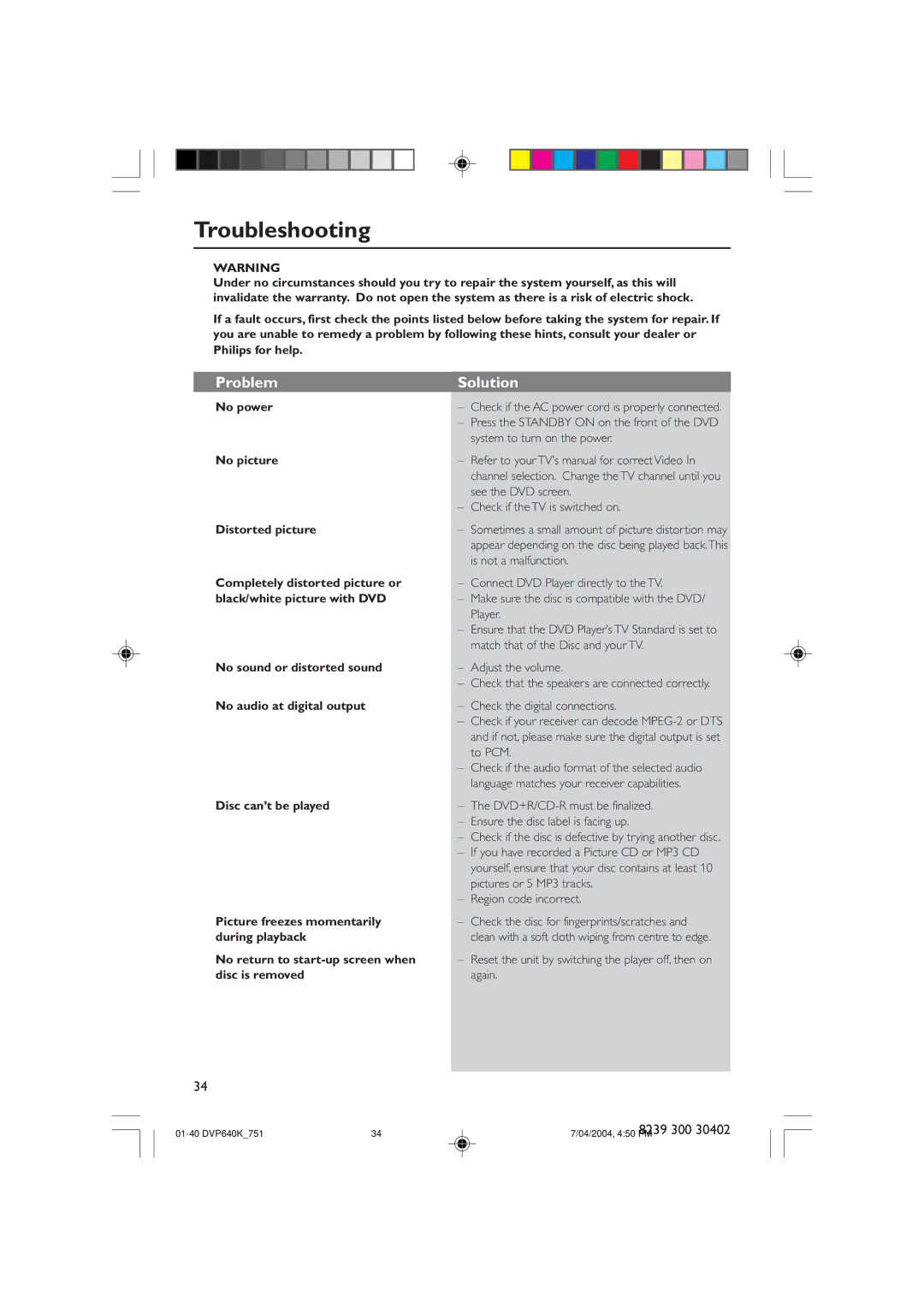
Problem | Solution | |
No power | – | Check if the AC power cord is properly connected. |
| – | Press the STANDBY ON on the front of the DVD |
|
| system to turn on the power. |
No picture | – | Refer to your TV’s manual for correct Video In |
|
| channel selection. Change the TV channel until you |
|
| see the DVD screen. |
| – Check if the TV is switched on. | |
Distorted picture | – | Sometimes a small amount of picture distortion may |
|
| appear depending on the disc being played back.This |
|
| is not a malfunction. |
Completely distorted picture or | – | Connect DVD Player directly to the TV. |
black/white picture with DVD | – | Make sure the disc is compatible with the DVD/ |
|
| Player. |
| – Ensure that the DVD Player’s TV Standard is set to | |
|
| match that of the Disc and your TV. |
No sound or distorted sound | – | Adjust the volume. |
| – | Check that the speakers are connected correctly. |
No audio at digital output | – | Check the digital connections. |
| – | Check if your receiver can decode |
|
| and if not, please make sure the digital output is set |
|
| to PCM. |
| – | Check if the audio format of the selected audio |
|
| language matches your receiver capabilities. |
Disc canÕt be played | – | The |
| – | Ensure the disc label is facing up. |
| – | Check if the disc is defective by trying another disc. |
| – | If you have recorded a Picture CD or MP3 CD |
|
| yourself, ensure that your disc contains at least 10 |
|
| pictures or 5 MP3 tracks. |
| – | Region code incorrect. |
Picture freezes momentarily | – | Check the disc for fingerprints/scratches and |
during playback |
| clean with a soft cloth wiping from centre to edge. |
No return to | – | Reset the unit by switching the player off, then on |
disc is removed |
| again. |
|
|
|
34
| 34 | 8239 300 30402 |
7/04/2004, 4:50 PM |