Connecting and Setting Up
20
2
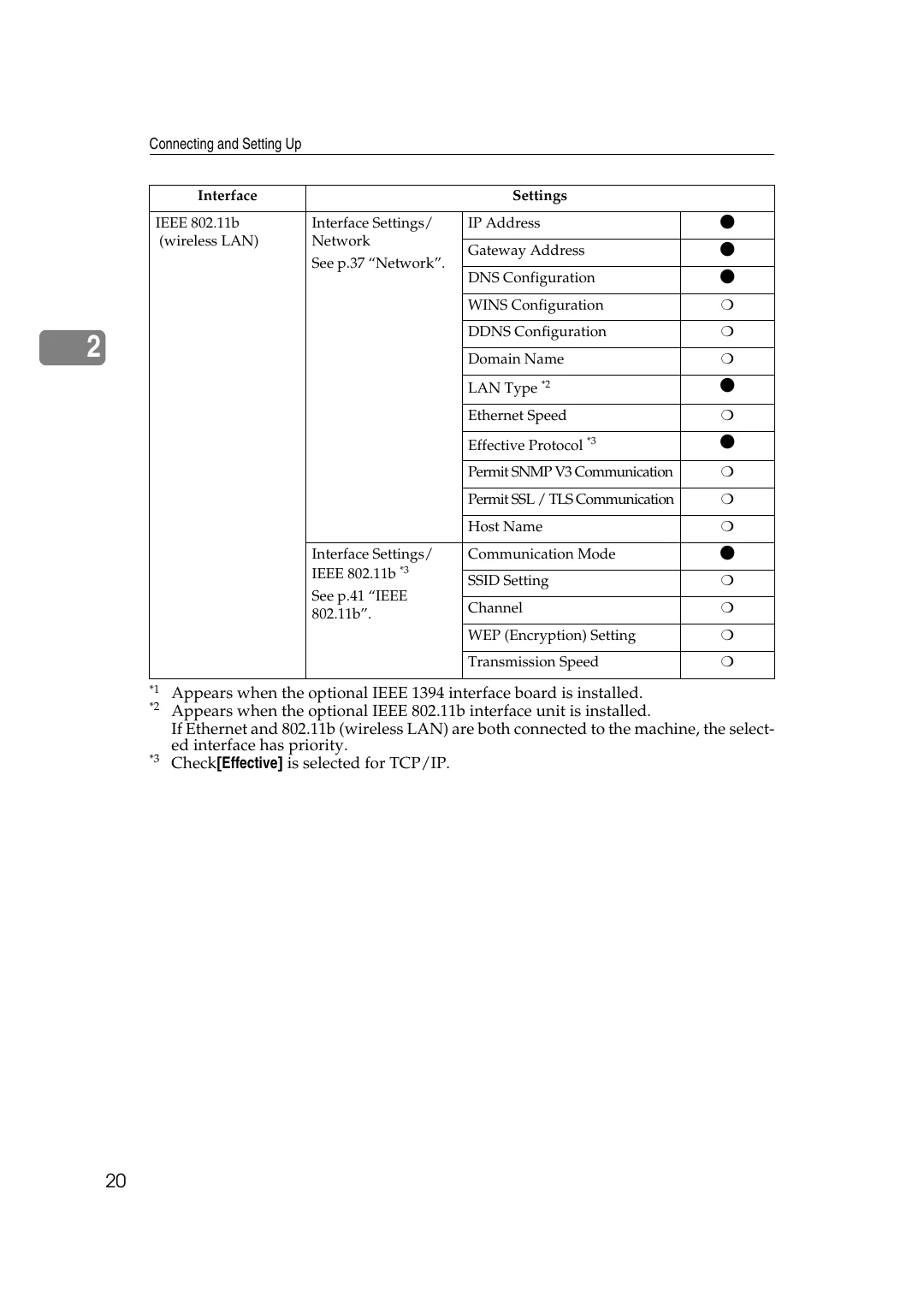
*1
Appears when the optional IEEE 1394 interface board is installed.
*2
Appears when the optional IEEE 802.11b interface unit is installed.
If Ethernet and 802.11b (wireless LAN) are both connected to the machine, the select-
ed interface has priority.
*3
Check
[
Effective
]
is selected for TCP/IP.
IEEE 802.11b
(wireless LAN)
Interface Settings/
Network
See p.37 “Network”.
IP Address
$
Gateway Address
$
DNS Configuration
$
WINS Configuration
❍
DDNS Configuration
❍
Domain Name
❍
LAN Type
*2
$
Ethernet Speed
❍
Effective Protocol
*3
$
Permit SNMP V3 Communication
❍
Permit SSL / TLS Communication
❍
Host Name
❍
Interface Settings/
IEEE 802.11b
*3
See p.41 “IEEE
802.11b”.
Communication Mode
$
SSID Setting
❍
Channel
❍
WEP (Encryption) Setting
❍
Transmission Speed
❍
Interface
Settings