Remote Control
Preparation for Use
– Remote Control –
■Battery installation
Use 2 “AA” size batteries
Batteries are not included.
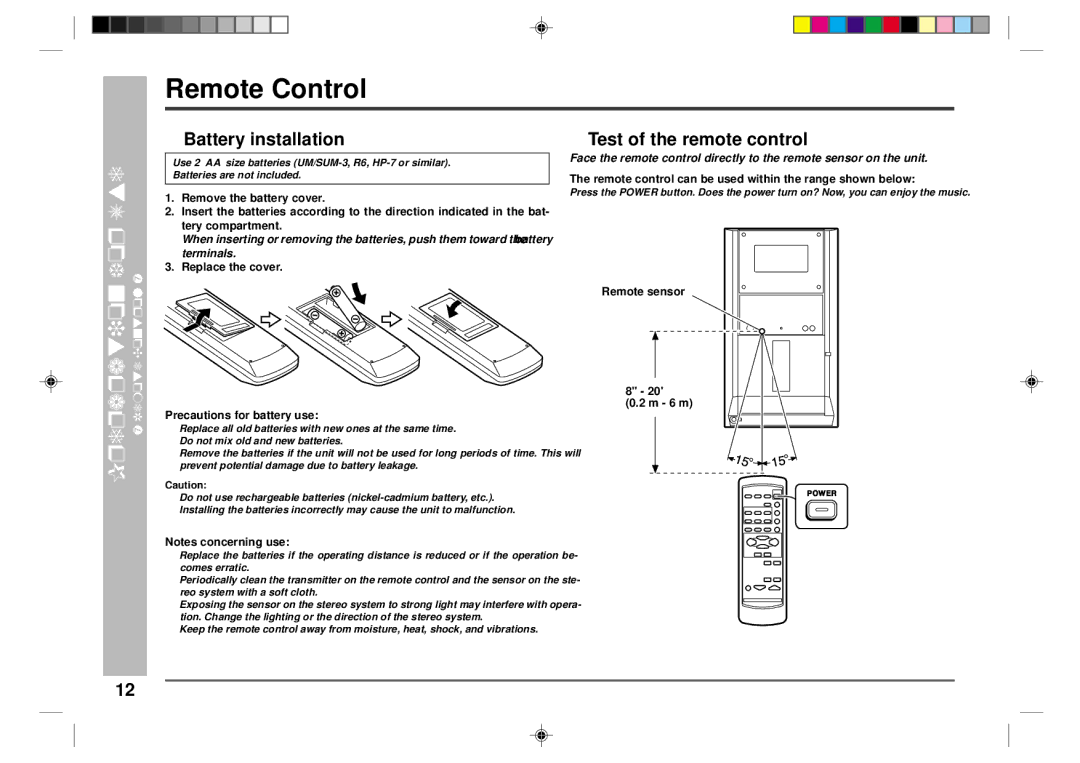
1.Remove the battery cover.
2.Insert the batteries according to the direction indicated in the bat- tery compartment.
When inserting or removing the batteries, push them toward the ë battery terminals.
3.Replace the cover.
Precautions for battery use:
●Replace all old batteries with new ones at the same time.
●Do not mix old and new batteries.
●Remove the batteries if the unit will not be used for long periods of time. This will prevent potential damage due to battery leakage.
Caution:
●Do not use rechargeable batteries
●Installing the batteries incorrectly may cause the unit to malfunction.
Notes concerning use:
●Replace the batteries if the operating distance is reduced or if the operation be- comes erratic.
●Periodically clean the transmitter on the remote control and the sensor on the ste- reo system with a soft cloth.
●Exposing the sensor on the stereo system to strong light may interfere with opera- tion. Change the lighting or the direction of the stereo system.
●Keep the remote control away from moisture, heat, shock, and vibrations.
■Test of the remote control
Face the remote control directly to the remote sensor on the unit.
The remote control can be used within the range shown below:
Press the POWER button. Does the power turn on? Now, you can enjoy the music.
Remote sensor
8" - 20'
(0.2 m - 6 m)
12