(Continued)
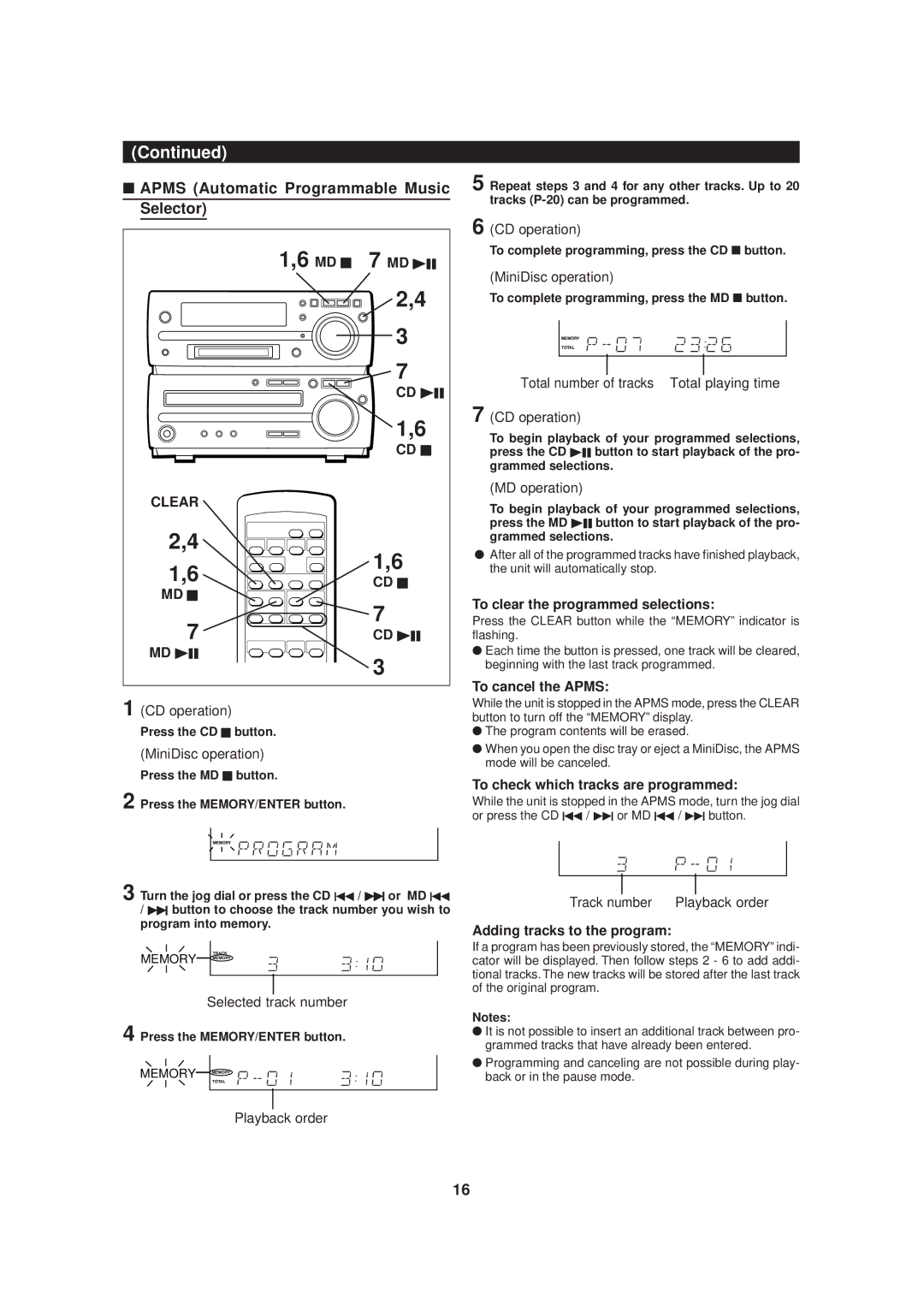
■APMS (Automatic Programmable Music Selector)
1,6 MD H | 7 MD 06 | |
| 2,4 | |
| 3 | |
| 7 | |
| CD 06 | |
| 1,6 | |
| CD H | |
CLEAR |
| |
2,4 | 1,6 | |
1,6 | ||
CD H | ||
MD H | ||
7 | ||
7 | ||
CD 06 | ||
MD 06 | 3 | |
|
1 (CD operation)
Press the CD H button.
(MiniDisc operation)
Press the MD H button.
2 Press the MEMORY/ENTER button.
3 Turn the jog dial or press the CD 5 / 4 or MD 5
/4 button to choose the track number you wish to program into memory.
MEMORY

Selected track number
4 Press the MEMORY/ENTER button.
MEMORY

Playback order
5 Repeat steps 3 and 4 for any other tracks. Up to 20 tracks
6 (CD operation)
To complete programming, press the CD ■ button.
(MiniDisc operation)
To complete programming, press the MD ■ button.
Total number of tracks Total playing time
7 (CD operation)
To begin playback of your programmed selections, press the CD 06 button to start playback of the pro- grammed selections.
(MD operation)
To begin playback of your programmed selections, press the MD 06 button to start playback of the pro- grammed selections.
●After all of the programmed tracks have finished playback, the unit will automatically stop.
To clear the programmed selections:
Press the CLEAR button while the “MEMORY” indicator is flashing.
●Each time the button is pressed, one track will be cleared, beginning with the last track programmed.
To cancel the APMS:
While the unit is stopped in the APMS mode, press the CLEAR button to turn off the “MEMORY” display.
●The program contents will be erased.
●When you open the disc tray or eject a MiniDisc, the APMS mode will be canceled.
To check which tracks are programmed:
While the unit is stopped in the APMS mode, turn the jog dial or press the CD 5 / 4 or MD 5 / 4 button.
Track number | Playback order |
Adding tracks to the program:
If a program has been previously stored, the “MEMORY” indi- cator will be displayed. Then follow steps 2 - 6 to add addi- tional tracks. The new tracks will be stored after the last track of the original program.
Notes:
●It is not possible to insert an additional track between pro- grammed tracks that have already been entered.
●Programming and canceling are not possible during play- back or in the pause mode.
16