Computer Compatibility Chart
Computer
•Multiple signal support
Horizontal Frequency:
•Compatible with sync on green and composite sync signals
•SXGA+ and SXGA compatible in intelligent compression
•Intelligent Compression and Expansion System resizing technology
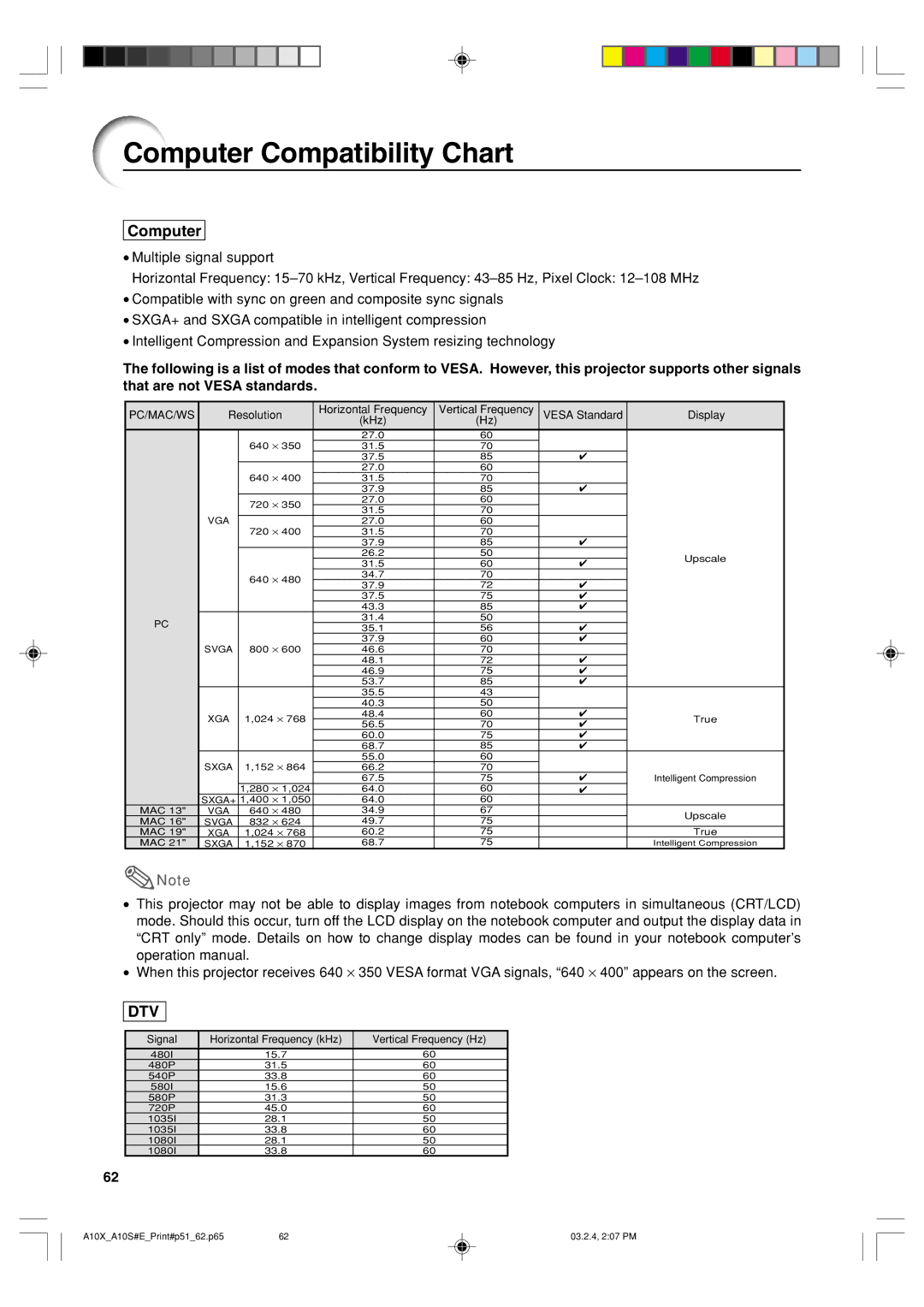
The following is a list of modes that conform to VESA. However, this projector supports other signals that are not VESA standards.
PC/MAC/WS | Resolution | Horizontal Frequency | Vertical Frequency | VESA Standard | Display | ||
|
|
|
| (kHz) | (Hz) |
|
|
|
|
| ⋅ 350 | 27.0 | 60 |
|
|
|
| 640 | 31.5 | 70 |
|
| |
|
|
|
| 37.5 | 85 | ✔ |
|
|
|
| ⋅ 400 | 27.0 | 60 |
|
|
|
| 640 | 31.5 | 70 |
|
| |
|
|
|
| 37.9 | 85 | ✔ |
|
|
| 720 | ⋅ 350 | 27.0 | 60 |
|
|
|
| 31.5 | 70 |
|
| ||
|
|
|
|
|
| ||
| VGA |
| ⋅ 400 | 27.0 | 60 |
|
|
|
| 720 | 31.5 | 70 |
|
| |
|
|
|
| 37.9 | 85 | ✔ |
|
|
|
|
| 26.2 | 50 |
| Upscale |
|
|
|
| 31.5 | 60 | ✔ | |
|
|
|
|
| |||
|
| 640 | ⋅ 480 | 34.7 | 70 |
|
|
|
| 37.9 | 72 | ✔ |
| ||
|
|
|
|
| |||
|
|
|
| 37.5 | 75 | ✔ |
|
|
|
|
| 43.3 | 85 | ✔ |
|
PC |
|
|
| 31.4 | 50 |
|
|
|
|
| 35.1 | 56 | ✔ |
| |
|
|
|
|
| |||
|
|
| ⋅ 600 | 37.9 | 60 | ✔ |
|
| SVGA | 800 | 46.6 | 70 |
|
| |
|
|
|
| 48.1 | 72 | ✔ |
|
|
|
|
| 46.9 | 75 | ✔ |
|
|
|
|
| 53.7 | 85 | ✔ |
|
|
|
|
| 35.5 | 43 |
|
|
|
|
|
| 40.3 | 50 |
|
|
| XGA | 1,024 ⋅ 768 | 48.4 | 60 | ✔ | True | |
| 56.5 | 70 | ✔ | ||||
|
|
|
|
| |||
|
|
|
| 60.0 | 75 | ✔ |
|
|
|
|
| 68.7 | 85 | ✔ |
|
|
| 1,152 ⋅ 864 | 55.0 | 60 |
|
| |
| SXGA | 66.2 | 70 |
|
| ||
|
|
|
| 67.5 | 75 | ✔ | Intelligent Compression |
|
| 1,280 | ⋅ 1,024 | 64.0 | 60 | ✔ |
|
| SXGA+ | 1,400 | ⋅ 1,050 | 64.0 | 60 |
|
|
MAC 13" | VGA | 640 | ⋅ 480 | 34.9 | 67 |
| Upscale |
MAC 16" | SVGA | 832 | ⋅ 624 | 49.7 | 75 |
| |
|
| ||||||
MAC 19" | XGA | 1,024 ⋅ 768 | 60.2 | 75 |
| True | |
MAC 21" | SXGA | 1,152 ⋅ 870 | 68.7 | 75 |
| Intelligent Compression | |
 Note
Note
•This projector may not be able to display images from notebook computers in simultaneous (CRT/LCD) mode. Should this occur, turn off the LCD display on the notebook computer and output the display data in “CRT only” mode. Details on how to change display modes can be found in your notebook computer’s operation manual.
•When this projector receives 640 ⋅ 350 VESA format VGA signals, “640 ⋅ 400” appears on the screen.
DTV
Signal | Horizontal Frequency (kHz) | Vertical Frequency (Hz) |
480I | 15.7 | 60 |
480P | 31.5 | 60 |
540P | 33.8 | 60 |
580I | 15.6 | 50 |
580P | 31.3 | 50 |
720P | 45.0 | 60 |
1035I | 28.1 | 50 |
1035I | 33.8 | 60 |
1080I | 28.1 | 50 |
1080I | 33.8 | 60 |
62
A10X_A10S#E_Print#p51_62.p65 | 62 | 03.2.4, 2:07 PM |