Toshiba Pocket PC e800/e805
Copyright Information
Introduction
Safety instructions
Safety precautions
Signal Word Meaning
First edition September
Page
Page
Page
Page
Page
Limitation of liability
Usage conditions for Bluetooth
Page
Working environment
FCC Notice Declaration of Conformity
CE compliance
Page
Bsmi Notice Taiwan Only
Canadian Regulatory Information Canada Only
Vcci Notice Japan Only Class Bite
Communication Commission Interference Statement
Declaration of Conformity Label & Marking Requirements
Table of Contents
Welcome
Getting Started
For information on See this source
Where to Find Information
Parts Names and Function
Program Button Initial Settings
Main unit front view
Program button 1 = Calendar Program button 2 = Tasks
Cradle
Main unit end view
Main unit back view
Power Button
To turn on the battery switch
Battery Switch
Battery/Alarm LED
Open Switch cover Slide the battery switch to the right
Wireless LED Descriptions
Wireless Communication Switch
Hold Switch
LED indicates the different status
About the Cursor Button
How to Use the Stylus
Assembling the Cradle
Battery Charging
About the Toshiba Scroller
You can use the following charging methods
How to Charge the Battery
Lamp color will change to green
When the battery is completely charged, the LED alarm
You can use the Toshiba Pocket PC e800/e805
Ble
How to Attach/Detach the Main Battery Pack
Battery pack without data loss because Toshiba Pocket
How to Use the Optional High Capacity Battery Pack
Ever, the capacity of the backup battery is limited, there
Fore when you change the main battery, attach the new
How to Prolong Battery Life
Battery Life
Parts and Functions of the Presentation Pack
How to Use the Optional Presentation Pack
Battery Charge Level and Stored Data Protection
Connecting the Presentation Pack to the Pocket PC
How to use the Optional USB Host Client Cable
To connect a USB keyboard to the Pocket PC
Releasing the Presentation Pack from the Pocket PC
Use only a Microsoft Pocket PC-compatible keyboard
Initial Setup
To remove a card
Inserting a CF II Card
Today Screen on
Pull the card straight up to remove
Inserting an SD Card
Connect the USB cradle to your computer as shown below
Connecting to a Computer
To Connect Using the Supplied Cradle
Insert the Pocket PC into the cradle
To connect directly using a connection cable
Today Screen
Program
Icon Program Description
Navigation Bar and Command Bar
Pop-up Menus
Enter Information on Your Toshiba Pocket
Entering Text Using the Input Panel
Notifications
To use Letter Recognizer
To type with the soft keyboard
To use Block Recognizer
Sonal tab, Input, and then the Word Completion tab
To select typed text
Writing on the Screen
To use Transcriber
To write on the screen
How to switch to writing mode
To select writing
To convert writing to text
Basic Skills
Tips for getting good recognition Write neatly
Drawing on the Screen
You may want to change the zoom level so that you can
To create a drawing
Then a zoom level
To select a drawing
Stand-alone recording if no note is open
Recording a Message
New recording is stored in the open note or as a
On your device, select Larger than 64 KB in Type
Using My Text
Find and Organize Information
Customize Your Toshiba Pocket PC
Adjusting Settings
Adding or Removing Programs
Next to a file name indicates the file is saved on a
To add programs using ActiveSync
To remove programs
To add a program directly from the Internet
To add a program to the Start menu
Setting the Screen Light
Setting a Password
Setting Power
Set the Power
Toshiba Pocket PC e800/e805 User’s Guide
To change Memory allocation
Setting Memory
To confirm usage status of a storage card
To release memory
Store attachments on storage card. This will store
Setting Advanced Sounds
Flash ROM Disk Nand Flash Memory
System Information
Setting Microphone
Identity Tab
Wireless Tab
Memory Tab
Drivers Tab
Tools Menu
Microsoft ActiveSync
To set the days and hours for peak times, tap Peak Times
Change the synchronization schedule
To create an appointment
Calendar Scheduling Appointments and Meetings
Ing the first day of the week, by tapping Options on
Tools menu
Creating Meeting Requests
Using the Summary Screen
Contacts Tracking Friends and Colleagues
To schedule a meeting
Finding a contact
To find a contact
To create a contact
To create a task
Tasks Keeping a To Do List
On the Tools menu. Then, tap Tap here to add a new
Task and enter your task information
To create a note
Synchronizing Email Messages
Inbox Sending and Receiving Email Mes- sages
To read your messages
Using the Message List
To respond to a received message
Bar to view the previous or next message
To compose a new message
Composing Messages
Managing Email Messages and Folders
Folder behavior with a direct connection to an email server
Pocket Word
Companion Programs
Typing Mode
Companion Programs
Ten words are converted to graphics metafiles when a
Writing Mode
Writing and selecting writing, see Chapter
Writing becomes a drawing, and can be edited
Pocket Excel
Drawing Mode
Recording Mode
To guess
One that is easy for you to remember but hard for others
Tips for Working in Pocket Excel
MSN Messenger
Tools menu, tap Options and then Accounts tab
Setting Up
To set up an account and sign
To see others online without being seen, in the Tools
Working with Contacts
Menu, tap My Status and select Appear Offline
If you block a contact, you will appear offline but will
Tap Contacts. To revert back to your chat window, tap
Chatting with Contacts
Chats and select the person with whom you were chat
Ting
View full chat View status of the chat
Windows Media Player
Getting Books on Your Device
Microsoft Reader
Using the Library
Reading a Book
Removing a Book
Using Reader Features
Edit Pictures
Pictures
Set Picture as Background
Send Pictures
View Slideshow of Pictures
Tap Tools and then Set as Today Wallpaper
Mobile Favorites
Mobile Favorites Folder
Favorite Links
To create a mobile favorite
To save device memory
Click Tools and then Create Mobile Favorite
Ize
Tap the AvantGo Channels link Tap Activate
Using AvantGo Channels
Synchronize an AvantGo channel
Using Pocket Internet Explorer
Tap Favorites to display your list of favorites
To view mobile favorites and channels
Favorites
To browse the Internet
To send information
Transfer Items Using Infrared
100
Connect to the Internet
To receive information
To create a modem connection to an ISP
To create an Ethernet connection to an ISP
101
To create a modem connection to a network
Connect to Work
102
To create an Ethernet connection to a network
103
Tap , Settings, Connections and then tab Connections
To set up a VPN server connection
104
Manage existing connections, VPN tab. Select
End a Connection
To edit proxy settings Tap , Settings, Connections tab
Connect Directly to an Email Server
105
106
Get Help on Connecting
To set up an email account
Overview
Configure Wireless LAN Network
Join an existing network
107
108
Launch a wireless LAN configuration
Turn Off/On Wireless LAN connection
IP Address
Power Off/On the wireless LAN modules
Selecting a preferred network
IP Address
Subnet mask
Default gateway
Name Servers
110
Alt Wins
Alt DNS
111
With your host computer
112
Wireless LAN Configuration
Set up a wireless network
113
Configure Wireless Network
114
Configure Network Authentication Screen
Wireless Communication power off
Icon Specification Wireless Communication switch off
Wireless power on
TMU Traffic Monitoring Utility
116
Wireless LAN Manager
Link Screen
117
Power Screen
118
Manager Screen
119
Info Screen
Toshiba Enroller
Certificate Import Wizard
120
Certificate from network
You double-tap Root Certificate
121
Certificate from file
Manage
122
Root
123
Advanced
124
Start Screen
Toshiba Certificate Import Wizard
125
Example Obtaining a TLS certificate from a CA server
126
127
After tapping, if there are any parameter problems,
Next
Import Wizard will alert you
Example Obtaining a Peap certificate from a file
128
Certificate file format, the Import Wizard will alert you
129
ConfigFree Launcher
Using ConfigFree
130
Example Obtaining a certificate from a file
Search for Wireless Devices
Profile Settings
Starting ConfigFree Launcher
Connectivity Doctor
132
Starting Profile Settings
Tap , Programs, and ConfigFree
Description of Main Dialog
Description of Command Bar
133
Adding a profile
134
Description of Start Dialog
Standard profile
Finish
135
Description of Finish Dialog
136
Starting Search for Wireless Devices
File Exit Exit can be selected from this issue View
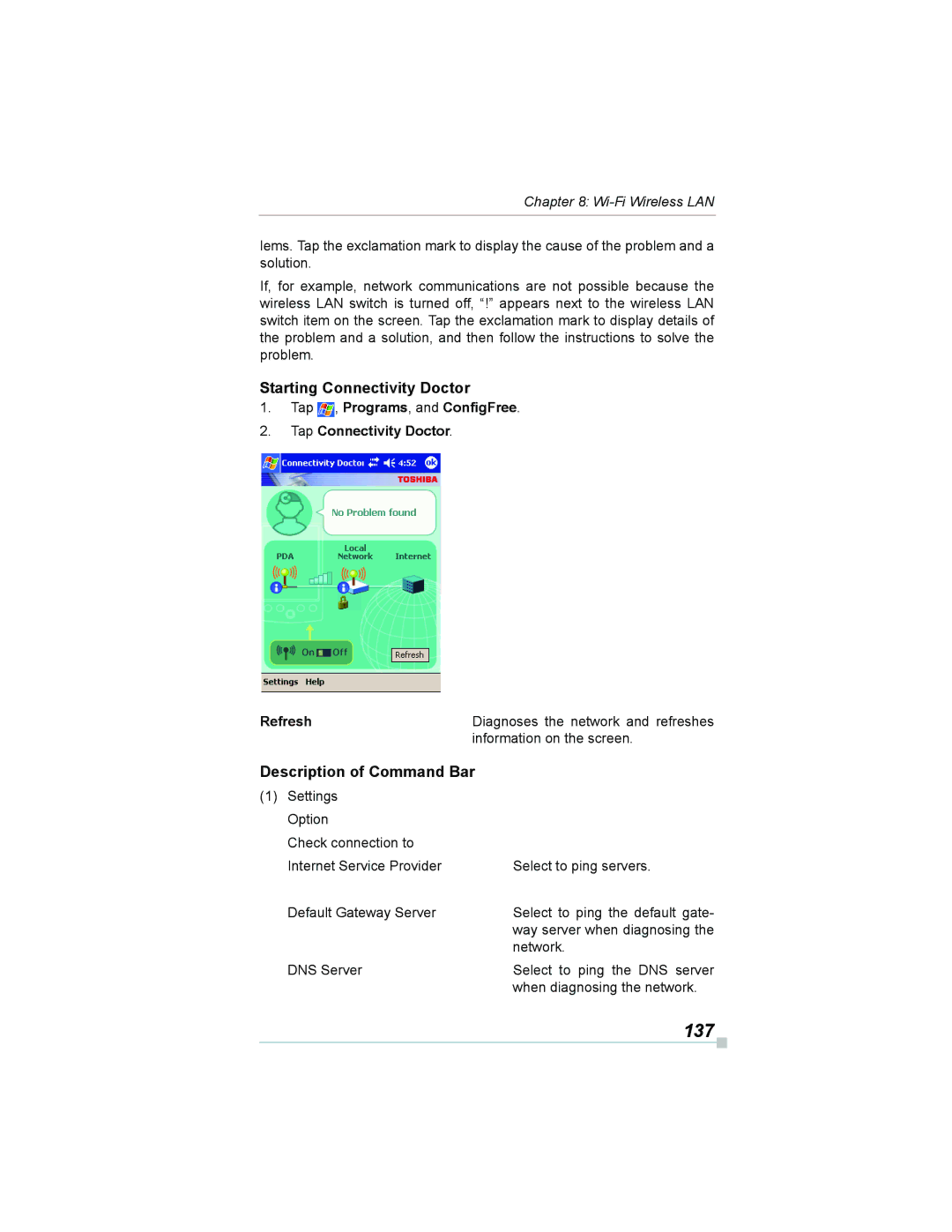
Starting Connectivity Doctor
137
Diagnoses the network and refreshes
Information on the screen
138
Sign-up
139
Launching an application
Details
About Bluetooth Software
Specifications
This chapter is valid for Bluetooth models only
140
141
Major specifications
142
Bluetooth Settings
Enabling Bluetooth on Your Toshiba Pocket PC e800/e805
143
Bluetooth Environmental Settings
Advanced Settings
Tap the Options menu and Local Device
144
145
Preparing to Connect with Bluetooth
146
147
Establishing an ActiveSync connection with a com- puter
Using COM Service
148
Preparations
Using PAN Service
Using DUN/LAP Service
Connecting to the Internet
149
Changing the network configuration for PAN service
Ending PAN service
Tap End Personal Area Networking on the Bluetooth menu
150
Sending a contact
Using OPP Service
151
Sending a task
152
Sending a schedule
Exchanging business cards
153
Receiving a business card
Tap Exchange by BT
154
Using FTP Service
Starting Bluetooth FTP
Receiving a file
155
Sending a file
FTP password is not registered in initial setting
FTP Authentication setting for Bluetooth FTP server
Before using it, we recommend you to set up the FTP
Password
Tap Tools on the command bar to display the Tools menu
Bluetooth Settings Screen
157
Tools menu
158
FTP Server Settings
View menu
Options menu
159
Default settings are as follows
Rity settings appears. Tap the desired security setting
Local Device
160
Launching an Application From the Home Screen
Home
161
162
About the Home Screen
About the Information Window
Display item Name Description
163
164
About Running
Application Activate/Stop
To display the Running tab pop-up menu, tap and hold
165
Display Icon List
166
Deleting an Icon
Renaming Icons
Adding an Icon
167
E800/e805
Tab Settings
Switching Icon Display
168
To add a tab
169
Tap Tools and then Tab Settings
To change the name of a tab
To sort icons
Background Color and Text Color Setting
Toshiba Screen Resolution
170
To apply Background Color and Text Color
ClearVue
On the Home screen, tap Screen Resolution
171
To change screen display modes
172
173
How to Make a Backup
Making a Backup
174
175
Carrying Out the Restore Operation
176
Making an Auto Backup
Deleting a Backup File
To delete the backup data
177
178
To make a backup automatically
179
Setting the World Clock
180
Toshiba Voice Recorder TVR
To select the city from a zoomed map
Tap Start, Programs, and then World Clock
To use TVR to record
181
To play a file from the TVR
Tap Start, Programs, and then Voice Recorder
To set the TVR options
182
To setup Text to Speech from Companion CD
Using Toshiba Text to Speech for Pocket
183
Mail Speech To start Mail Speech
184
Text Speech
185
To read out a text file
Tap Start, Programs, then Text Speech
Select any of the following Play Starts reading the text
186
To read the text copied on the clipboard
Speech Settings
187
Reading Tab
188
Installing the Voice Command
Using Voice Command
189
Mail Tab
Global Command
Setting Up Voice Command
Settings, and then Buttons
190
To use the commands to insert texts
User Command
To use the commands to launch applications
Using Voice Command for Each Application
192
Voice Command Settings
193
Checking the Command List
Arrange the Recognition Level of Voice Command
To define text for the command
To define the action for a User Command
To assign a program to the command
194
IA Presenter
ATI Presentation Pack
IA Presenter
IA Screen Mirror
Using IA Presenter’s Desktop Converter
Installing the ATI Presentation Pack
Sary for using IA Presenter’s Desktop Converter
196
Choosing Dimensions for the Converted .IAP File
Opening a Presentation and Using View Modes
197
Normal View
Slide Sorter
198
Quick Notes
199
200
Pop-Up Menu for Slide Show Mode
Trigger
201
Pen
Pen Color
VGA Zoom Ratio
202
Erases all the pen strokes on the current slide
203
VGA Slide Show
204
205
Controlling Transition Effects
Merging Presentations
206
IA Screen Mirror
Online Help
207
208
Troubleshooting
Symptom Cause Correction
209
SymptomCauseCorrection
210
Not Enough Battery Power
211
Resetting
212
Clear Memory
Problems Solutions
Troubleshooting for Wi-Fi
213
Range of 1 to
Wireless LAN Connectivity
FAQ for Wi-Fi
B1 How do I form a wireless network?
Compatibility
215
More Information
216
217
Application
218
C2 How do I wirelessly browse the Internet?
219
Settings
D1 What is SSID? What should I set in the Ssid field?
E3 How do I set the WEP security service?
E1 What is WEP?
Security
220
221
F3 How does the data transmission rate work?
Performance
222
Error messages during COM/DUN service
Error Messages for Bluetooth
223
Unable to retrieve Local Device information
224
Solution Register the connection and try connecting again
Unable to update service information
225
Unable to successfully disconnect. Check the status
226
Error messages during Object Push Profile OPP service
227
228
Error messages during File Transfer Protocol FTP service
229
230
231
Troubleshooting for Toshiba IP Phone for Pocket PC
General Bluetooth terms
Glossary for Bluetooth
Graphical User Interface GUI Bluetooth terms
232
233
234
Operating conditions
235
Audio
236

 , Programs, and ConfigFree.