Toshiba Pocket PC e800/e805
Introduction
Copyright Information
Signal Word Meaning
Safety precautions
Safety instructions
First edition September
Page
Page
Page
Page
Page
Usage conditions for Bluetooth
Limitation of liability
Page
Working environment
CE compliance
FCC Notice Declaration of Conformity
Page
Bsmi Notice Taiwan Only
Canadian Regulatory Information Canada Only
Vcci Notice Japan Only Class Bite
Declaration of Conformity Label & Marking Requirements
Communication Commission Interference Statement
Table of Contents
Getting Started
Welcome
Where to Find Information
For information on See this source
Main unit front view
Program Button Initial Settings
Parts Names and Function
Program button 1 = Calendar Program button 2 = Tasks
Main unit end view
Cradle
Power Button
Main unit back view
Battery/Alarm LED
Battery Switch
To turn on the battery switch
Open Switch cover Slide the battery switch to the right
Hold Switch
Wireless Communication Switch
Wireless LED Descriptions
LED indicates the different status
How to Use the Stylus
About the Cursor Button
Assembling the Cradle
Battery Charging
About the Toshiba Scroller
How to Charge the Battery
You can use the following charging methods
Lamp color will change to green
When the battery is completely charged, the LED alarm
You can use the Toshiba Pocket PC e800/e805
How to Attach/Detach the Main Battery Pack
Ble
Ever, the capacity of the backup battery is limited, there
How to Use the Optional High Capacity Battery Pack
Battery pack without data loss because Toshiba Pocket
Fore when you change the main battery, attach the new
Battery Life
How to Prolong Battery Life
Parts and Functions of the Presentation Pack
How to Use the Optional Presentation Pack
Battery Charge Level and Stored Data Protection
To connect a USB keyboard to the Pocket PC
How to use the Optional USB Host Client Cable
Connecting the Presentation Pack to the Pocket PC
Releasing the Presentation Pack from the Pocket PC
Initial Setup
Use only a Microsoft Pocket PC-compatible keyboard
To remove a card
Inserting a CF II Card
Today Screen on
Inserting an SD Card
Pull the card straight up to remove
Connect the USB cradle to your computer as shown below
Connecting to a Computer
To Connect Using the Supplied Cradle
To connect directly using a connection cable
Insert the Pocket PC into the cradle
Today Screen
Program
Icon Program Description
Navigation Bar and Command Bar
Pop-up Menus
Enter Information on Your Toshiba Pocket
Entering Text Using the Input Panel
Notifications
To use Block Recognizer
To type with the soft keyboard
To use Letter Recognizer
Sonal tab, Input, and then the Word Completion tab
To select typed text
Writing on the Screen
To use Transcriber
To select writing
How to switch to writing mode
To write on the screen
To convert writing to text
Basic Skills
Drawing on the Screen
Tips for getting good recognition Write neatly
Then a zoom level
To create a drawing
You may want to change the zoom level so that you can
To select a drawing
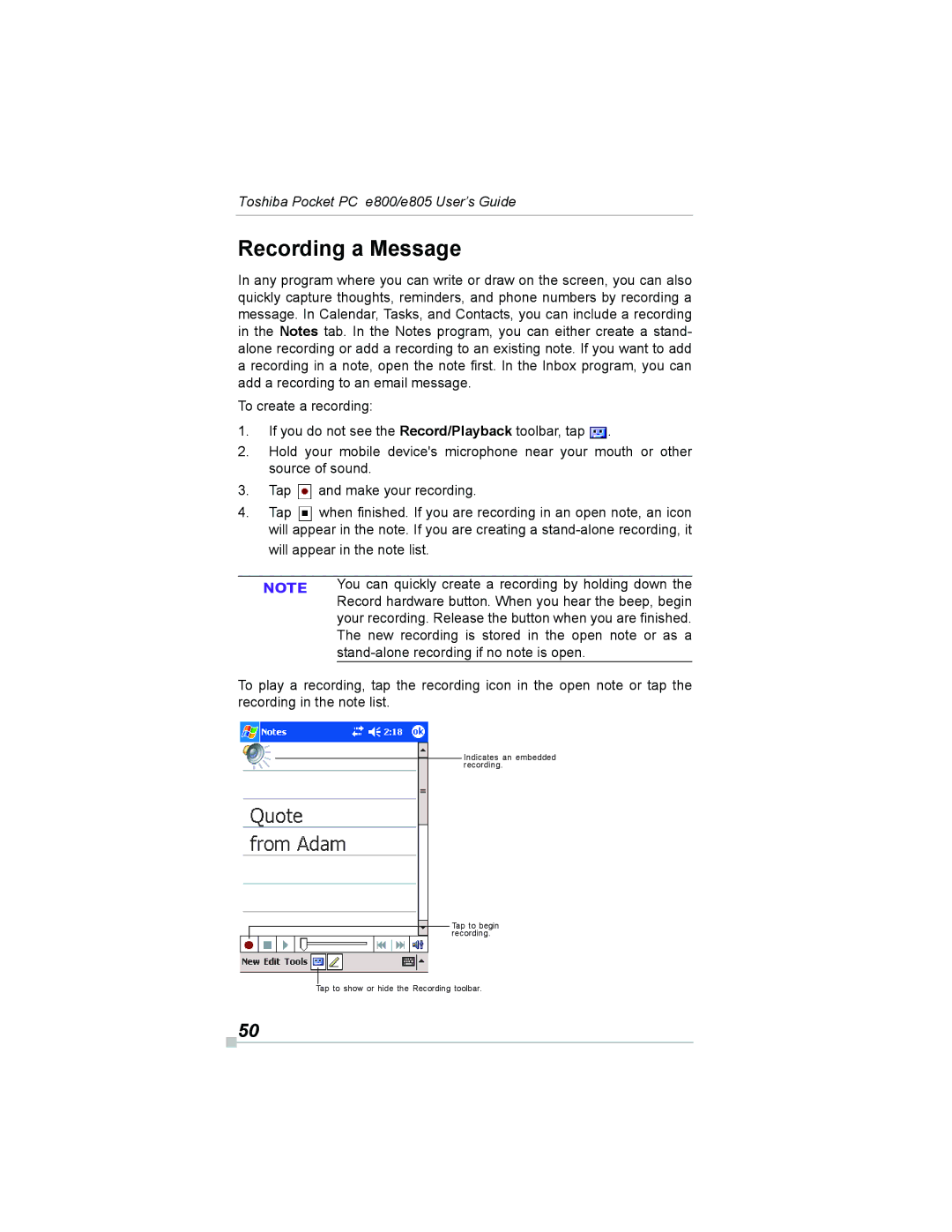
Stand-alone recording if no note is open
Recording a Message
New recording is stored in the open note or as a
On your device, select Larger than 64 KB in Type
Using My Text
Find and Organize Information
Adding or Removing Programs
Adjusting Settings
Customize Your Toshiba Pocket PC
Next to a file name indicates the file is saved on a
To add programs using ActiveSync
To remove programs
To add a program directly from the Internet
To add a program to the Start menu
Setting a Password
Setting the Screen Light
Setting Power
Set the Power
Toshiba Pocket PC e800/e805 User’s Guide
To confirm usage status of a storage card
Setting Memory
To change Memory allocation
To release memory
Store attachments on storage card. This will store
Setting Advanced Sounds
Flash ROM Disk Nand Flash Memory
Setting Microphone
System Information
Memory Tab
Wireless Tab
Identity Tab
Drivers Tab
Tools Menu
Microsoft ActiveSync
Change the synchronization schedule
To set the days and hours for peak times, tap Peak Times
Ing the first day of the week, by tapping Options on
Calendar Scheduling Appointments and Meetings
To create an appointment
Tools menu
Contacts Tracking Friends and Colleagues
Using the Summary Screen
Creating Meeting Requests
To schedule a meeting
Finding a contact
To find a contact
To create a contact
On the Tools menu. Then, tap Tap here to add a new
Tasks Keeping a To Do List
To create a task
Task and enter your task information
To create a note
Inbox Sending and Receiving Email Mes- sages
Synchronizing Email Messages
To respond to a received message
Using the Message List
To read your messages
Bar to view the previous or next message
To compose a new message
Composing Messages
Managing Email Messages and Folders
Folder behavior with a direct connection to an email server
Companion Programs
Pocket Word
Typing Mode
Companion Programs
Writing and selecting writing, see Chapter
Writing Mode
Ten words are converted to graphics metafiles when a
Writing becomes a drawing, and can be edited
Pocket Excel
Drawing Mode
Recording Mode
One that is easy for you to remember but hard for others
To guess
MSN Messenger
Tips for Working in Pocket Excel
Tools menu, tap Options and then Accounts tab
Setting Up
To set up an account and sign
Menu, tap My Status and select Appear Offline
Working with Contacts
To see others online without being seen, in the Tools
If you block a contact, you will appear offline but will
Chats and select the person with whom you were chat
Chatting with Contacts
Tap Contacts. To revert back to your chat window, tap
Ting
View full chat View status of the chat
Windows Media Player
Microsoft Reader
Getting Books on Your Device
Using the Library
Reading a Book
Using Reader Features
Removing a Book
Pictures
Edit Pictures
View Slideshow of Pictures
Send Pictures
Set Picture as Background
Tap Tools and then Set as Today Wallpaper
Mobile Favorites
Mobile Favorites Folder
Favorite Links
Click Tools and then Create Mobile Favorite
To save device memory
To create a mobile favorite
Ize
Tap the AvantGo Channels link Tap Activate
Using AvantGo Channels
Synchronize an AvantGo channel
Using Pocket Internet Explorer
To view mobile favorites and channels
Tap Favorites to display your list of favorites
To browse the Internet
Favorites
Transfer Items Using Infrared
To send information
To receive information
Connect to the Internet
100
To create a modem connection to an ISP
101
To create an Ethernet connection to an ISP
To create a modem connection to a network
Connect to Work
102
103
To create an Ethernet connection to a network
104
To set up a VPN server connection
Tap , Settings, Connections and then tab Connections
Manage existing connections, VPN tab. Select
Connect Directly to an Email Server
To edit proxy settings Tap , Settings, Connections tab
End a Connection
105
106
Get Help on Connecting
To set up an email account
Join an existing network
Configure Wireless LAN Network
Overview
107
108
Launch a wireless LAN configuration
Turn Off/On Wireless LAN connection
Selecting a preferred network
Power Off/On the wireless LAN modules
IP Address
IP Address
Name Servers
Default gateway
Subnet mask
110
111
Alt DNS
Alt Wins
With your host computer
112
Wireless LAN Configuration
Set up a wireless network
Configure Wireless Network
113
Configure Network Authentication Screen
114
Wireless power on
Icon Specification Wireless Communication switch off
Wireless Communication power off
TMU Traffic Monitoring Utility
116
Wireless LAN Manager
Link Screen
Power Screen
117
Manager Screen
118
119
Info Screen
Toshiba Enroller
Certificate Import Wizard
120
Certificate from network
You double-tap Root Certificate
121
Certificate from file
122
Manage
123
Root
124
Advanced
Start Screen
Toshiba Certificate Import Wizard
125
126
Example Obtaining a TLS certificate from a CA server
Next
After tapping, if there are any parameter problems,
127
Import Wizard will alert you
128
Example Obtaining a Peap certificate from a file
129
Certificate file format, the Import Wizard will alert you
130
Using ConfigFree
ConfigFree Launcher
Example Obtaining a certificate from a file
Starting ConfigFree Launcher
Profile Settings
Search for Wireless Devices
Connectivity Doctor
132
Starting Profile Settings
Tap , Programs, and ConfigFree
Description of Main Dialog
Description of Command Bar
133
Description of Start Dialog
134
Adding a profile
Standard profile
Finish
135
Description of Finish Dialog
136
Starting Search for Wireless Devices
File Exit Exit can be selected from this issue View
Diagnoses the network and refreshes
137
Starting Connectivity Doctor
Information on the screen
138
Launching an application
139
Sign-up
Details
This chapter is valid for Bluetooth models only
Specifications
About Bluetooth Software
140
Major specifications
141
142
Bluetooth Settings
Enabling Bluetooth on Your Toshiba Pocket PC e800/e805
143
Bluetooth Environmental Settings
Advanced Settings
144
Tap the Options menu and Local Device
Preparing to Connect with Bluetooth
145
146
147
148
Using COM Service
Establishing an ActiveSync connection with a com- puter
Preparations
Connecting to the Internet
Using DUN/LAP Service
Using PAN Service
149
Tap End Personal Area Networking on the Bluetooth menu
Ending PAN service
Changing the network configuration for PAN service
150
Sending a contact
Using OPP Service
151
Sending a task
152
Sending a schedule
Receiving a business card
153
Exchanging business cards
Tap Exchange by BT
154
Using FTP Service
Starting Bluetooth FTP
Receiving a file
155
Sending a file
Before using it, we recommend you to set up the FTP
FTP Authentication setting for Bluetooth FTP server
FTP password is not registered in initial setting
Password
157
Bluetooth Settings Screen
Tap Tools on the command bar to display the Tools menu
Tools menu
View menu
FTP Server Settings
158
Options menu
159
Default settings are as follows
Rity settings appears. Tap the desired security setting
160
Local Device
Launching an Application From the Home Screen
Home
161
162
About the Home Screen
About the Information Window
163
Display item Name Description
Application Activate/Stop
About Running
164
To display the Running tab pop-up menu, tap and hold
Display Icon List
165
Deleting an Icon
166
167
Adding an Icon
Renaming Icons
E800/e805
168
Switching Icon Display
Tab Settings
To add a tab
To change the name of a tab
Tap Tools and then Tab Settings
169
To sort icons
170
Toshiba Screen Resolution
Background Color and Text Color Setting
To apply Background Color and Text Color
171
On the Home screen, tap Screen Resolution
ClearVue
To change screen display modes
172
173
How to Make a Backup
Making a Backup
174
Carrying Out the Restore Operation
175
176
To delete the backup data
Deleting a Backup File
Making an Auto Backup
177
To make a backup automatically
178
Setting the World Clock
179
To select the city from a zoomed map
Toshiba Voice Recorder TVR
180
Tap Start, Programs, and then World Clock
To play a file from the TVR
181
To use TVR to record
Tap Start, Programs, and then Voice Recorder
182
To set the TVR options
183
Using Toshiba Text to Speech for Pocket
To setup Text to Speech from Companion CD
Mail Speech To start Mail Speech
184
To read out a text file
185
Text Speech
Tap Start, Programs, then Text Speech
186
Select any of the following Play Starts reading the text
To read the text copied on the clipboard
Speech Settings
187
188
Reading Tab
189
Using Voice Command
Installing the Voice Command
Mail Tab
Settings, and then Buttons
Setting Up Voice Command
Global Command
190
To use the commands to launch applications
User Command
To use the commands to insert texts
Using Voice Command for Each Application
Voice Command Settings
192
193
Checking the Command List
Arrange the Recognition Level of Voice Command
To assign a program to the command
To define the action for a User Command
To define text for the command
194
IA Presenter
ATI Presentation Pack
IA Presenter
IA Screen Mirror
Sary for using IA Presenter’s Desktop Converter
Installing the ATI Presentation Pack
Using IA Presenter’s Desktop Converter
196
197
Opening a Presentation and Using View Modes
Choosing Dimensions for the Converted .IAP File
Normal View
198
Slide Sorter
199
Quick Notes
Pop-Up Menu for Slide Show Mode
200
Pen
201
Trigger
Pen Color
202
VGA Zoom Ratio
203
Erases all the pen strokes on the current slide
204
VGA Slide Show
205
Controlling Transition Effects
Merging Presentations
IA Screen Mirror
206
207
Online Help
208
Troubleshooting
Symptom Cause Correction
SymptomCauseCorrection
209
Not Enough Battery Power
210
Resetting
211
Clear Memory
212
213
Troubleshooting for Wi-Fi
Problems Solutions
Range of 1 to
B1 How do I form a wireless network?
FAQ for Wi-Fi
Wireless LAN Connectivity
Compatibility
More Information
215
216
Application
217
C2 How do I wirelessly browse the Internet?
218
219
Settings
D1 What is SSID? What should I set in the Ssid field?
Security
E1 What is WEP?
E3 How do I set the WEP security service?
220
221
F3 How does the data transmission rate work?
Performance
222
223
Error Messages for Bluetooth
Error messages during COM/DUN service
Unable to retrieve Local Device information
224
225
Unable to update service information
Solution Register the connection and try connecting again
Unable to successfully disconnect. Check the status
Error messages during Object Push Profile OPP service
226
227
Error messages during File Transfer Protocol FTP service
228
229
230
Troubleshooting for Toshiba IP Phone for Pocket PC
231
Graphical User Interface GUI Bluetooth terms
Glossary for Bluetooth
General Bluetooth terms
232
233
234
235
Operating conditions
236
Audio

 .
. and make your recording.
 when finished. If you are recording in an open note, an icon will appear in the note. If you are creating a